> ## Documentation Index
> Fetch the complete documentation index at: https://docs.cloudify.biz/llms.txt
> Use this file to discover all available pages before exploring further.
# Flows Requests
> A full log of every webhook request received by Lighthouse Flows — filter by time, method, path, and trigger type.
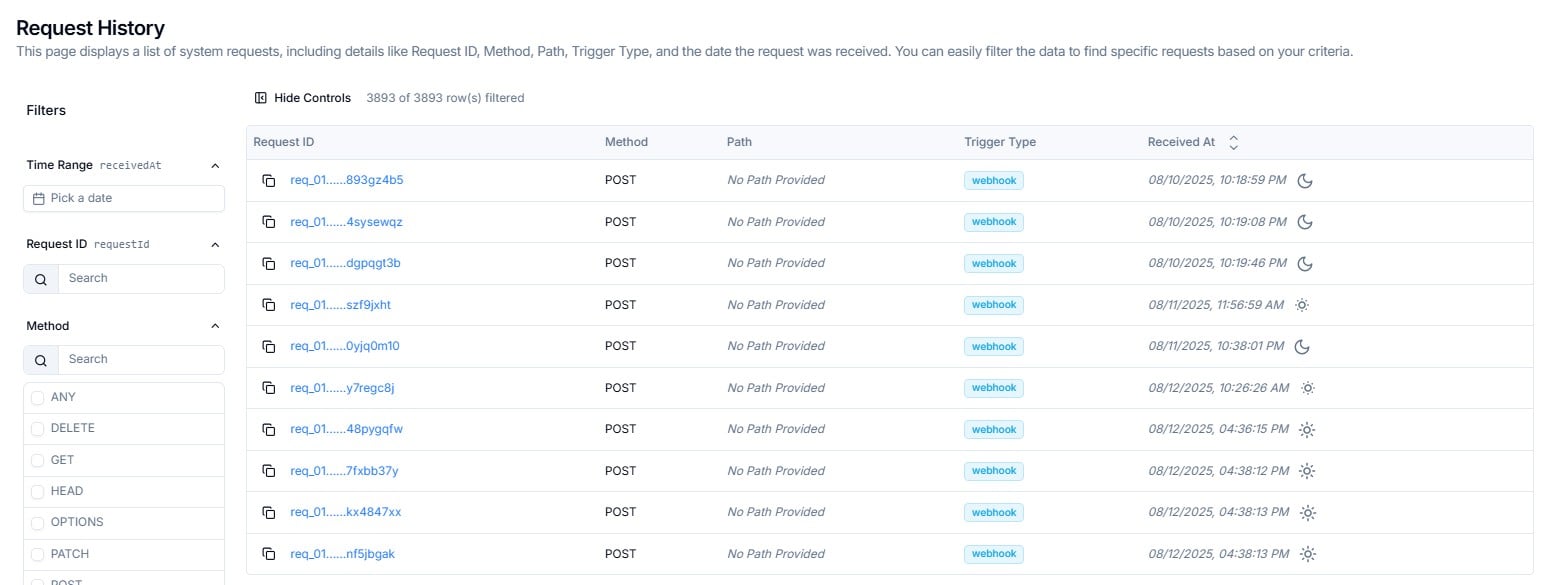
The **Request History** page shows every inbound request received by Lighthouse Flows. Each row is a single HTTP request — capturing its ID, method, path, trigger type, and the exact time it arrived.
 Use this page to:
* Confirm that a specific webhook reached Lighthouse Flows
* Investigate missing or unexpected requests by time range or trigger type
* Copy a Request ID to share with Cloudify for troubleshooting
***
## Reading the Requests Table
Each row represents one inbound request.
| Column | What It Shows |
| ---------------- | -------------------------------------------------------------------------------------------------------------------------------------------- |
| **Request ID** | Unique identifier — e.g. `req_01......rycf6c4n`. Click the copy icon on the left to copy the full ID. Click the ID link to view full details |
| **Method** | The HTTP method used — typically `POST` for webhook payloads |
| **Path** | The URL path the request was sent to. Shows `No Path Provided` when no path was included |
| **Trigger Type** | How the request was initiated — shown as a colour-coded badge |
| **Received At** | The exact date and time the request arrived — format `MM/DD/YYYY, HH:MM:SS AM/PM` |
### Trigger Type Badges
| Badge | What It Means |
| ------------ | -------------------------------------------- |
| **webhook** | Request received via a webhook trigger |
| **schedule** | Request initiated by a scheduled trigger |
| **polling** | Request received via a polling-based trigger |
***
## Filtering Requests
The left-hand **Filters** panel lets you narrow the list across five dimensions.
Use this page to:
* Confirm that a specific webhook reached Lighthouse Flows
* Investigate missing or unexpected requests by time range or trigger type
* Copy a Request ID to share with Cloudify for troubleshooting
***
## Reading the Requests Table
Each row represents one inbound request.
| Column | What It Shows |
| ---------------- | -------------------------------------------------------------------------------------------------------------------------------------------- |
| **Request ID** | Unique identifier — e.g. `req_01......rycf6c4n`. Click the copy icon on the left to copy the full ID. Click the ID link to view full details |
| **Method** | The HTTP method used — typically `POST` for webhook payloads |
| **Path** | The URL path the request was sent to. Shows `No Path Provided` when no path was included |
| **Trigger Type** | How the request was initiated — shown as a colour-coded badge |
| **Received At** | The exact date and time the request arrived — format `MM/DD/YYYY, HH:MM:SS AM/PM` |
### Trigger Type Badges
| Badge | What It Means |
| ------------ | -------------------------------------------- |
| **webhook** | Request received via a webhook trigger |
| **schedule** | Request initiated by a scheduled trigger |
| **polling** | Request received via a polling-based trigger |
***
## Filtering Requests
The left-hand **Filters** panel lets you narrow the list across five dimensions.
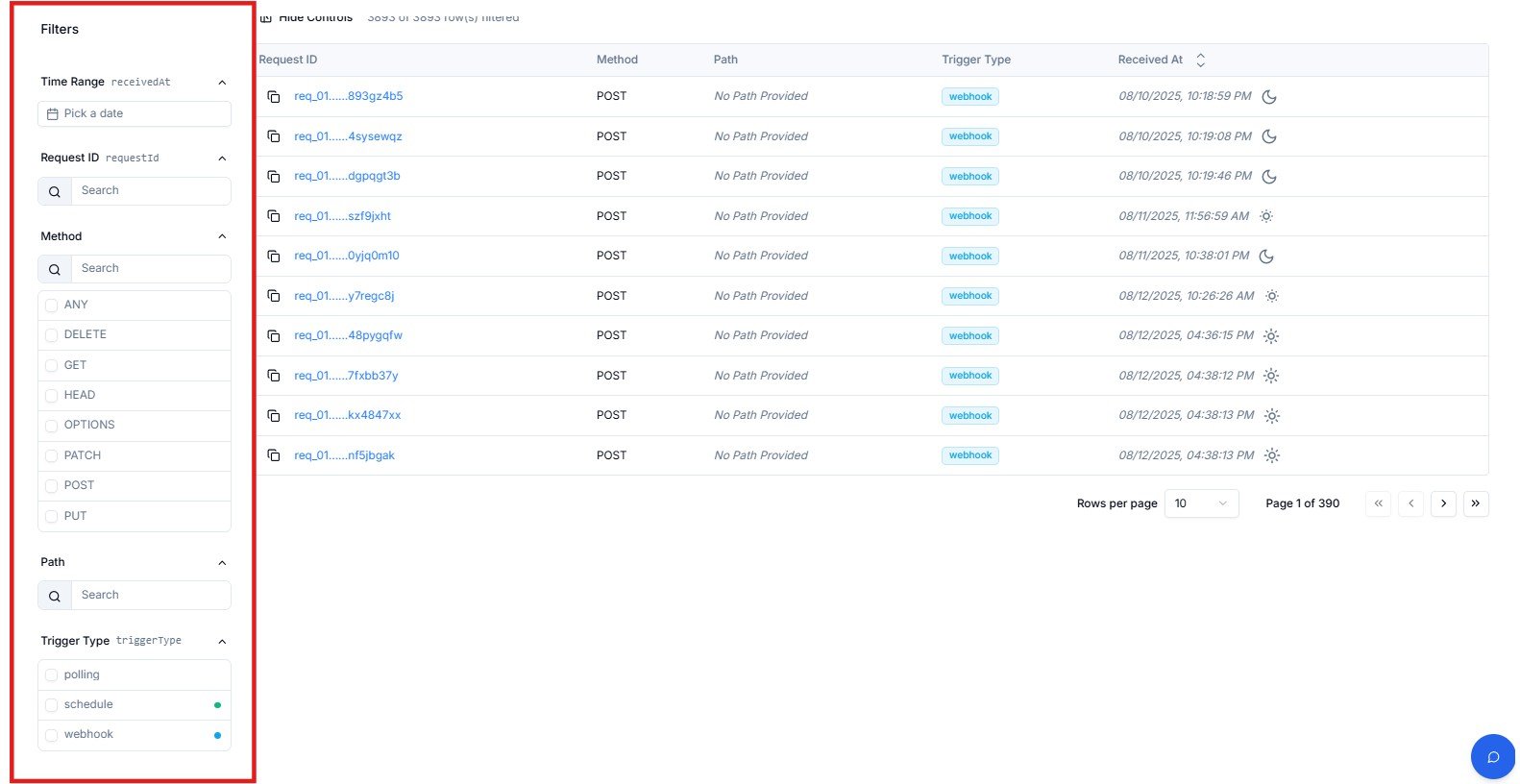 | Filter | How to Use |
| ---------------- | ------------------------------------------------------------------------------------------------- |
| **Time Range** | Click **Pick a date** to select a date or range — filters by `receivedAt` |
| **Request ID** | Paste or type a Request ID to find a specific request |
| **Method** | Check one or more HTTP methods: `ANY`, `DELETE`, `GET`, `HEAD`, `OPTIONS`, `PATCH`, `POST`, `PUT` |
| **Path** | Search for requests sent to a specific URL path |
| **Trigger Type** | Check one or more: `polling`, `schedule`, `webhook` |
To investigate a specific webhook delivery issue, start by setting **Time Range** to the relevant window and **Trigger Type** to `webhook`. This immediately narrows the list to the relevant requests.
***
## Table Controls
| Control | What It Does |
| -------------------------- | --------------------------------------------------------------------------------- |
| **Hide Controls** | Collapses the left filter panel to give the table more horizontal space |
| **X of Y row(s) filtered** | Live count of rows matching current filters — e.g. `1142 of 1142 row(s) filtered` |
| **Rows per page** | Dropdown to set how many rows display per page — default is **10** |
| **Page navigation** | `<<` first · `<` previous · `>` next · `>>` last — shows current page and total |
***
## Frequently Asked Questions
Set the **Time Range** filter to the window when the webhook was sent, then filter **Trigger Type** to `webhook`. If the request still doesn't appear, it may not have reached Lighthouse — check the webhook URL is correct and the request was not blocked at the network level. Raise a support ticket if the issue persists.
This means the webhook request did not include a URL path beyond the base trigger endpoint. This is normal for webhooks that send payloads directly to the root trigger URL without a path suffix.
Click the **copy icon** on the left of the row. The full Request ID is copied to your clipboard. Include it in your support ticket so Cloudify can locate the exact request immediately.
**Webhook** — an external system pushed data to your Flow trigger URL in real time. **Schedule** — the trigger fired automatically at a configured time. **Polling** — Lighthouse checked a source system at regular intervals for new data.
Export is not available directly from this page. Contact Cloudify support if you need request history records for audit or analysis purposes.
***
| Filter | How to Use |
| ---------------- | ------------------------------------------------------------------------------------------------- |
| **Time Range** | Click **Pick a date** to select a date or range — filters by `receivedAt` |
| **Request ID** | Paste or type a Request ID to find a specific request |
| **Method** | Check one or more HTTP methods: `ANY`, `DELETE`, `GET`, `HEAD`, `OPTIONS`, `PATCH`, `POST`, `PUT` |
| **Path** | Search for requests sent to a specific URL path |
| **Trigger Type** | Check one or more: `polling`, `schedule`, `webhook` |
To investigate a specific webhook delivery issue, start by setting **Time Range** to the relevant window and **Trigger Type** to `webhook`. This immediately narrows the list to the relevant requests.
***
## Table Controls
| Control | What It Does |
| -------------------------- | --------------------------------------------------------------------------------- |
| **Hide Controls** | Collapses the left filter panel to give the table more horizontal space |
| **X of Y row(s) filtered** | Live count of rows matching current filters — e.g. `1142 of 1142 row(s) filtered` |
| **Rows per page** | Dropdown to set how many rows display per page — default is **10** |
| **Page navigation** | `<<` first · `<` previous · `>` next · `>>` last — shows current page and total |
***
## Frequently Asked Questions
Set the **Time Range** filter to the window when the webhook was sent, then filter **Trigger Type** to `webhook`. If the request still doesn't appear, it may not have reached Lighthouse — check the webhook URL is correct and the request was not blocked at the network level. Raise a support ticket if the issue persists.
This means the webhook request did not include a URL path beyond the base trigger endpoint. This is normal for webhooks that send payloads directly to the root trigger URL without a path suffix.
Click the **copy icon** on the left of the row. The full Request ID is copied to your clipboard. Include it in your support ticket so Cloudify can locate the exact request immediately.
**Webhook** — an external system pushed data to your Flow trigger URL in real time. **Schedule** — the trigger fired automatically at a configured time. **Polling** — Lighthouse checked a source system at regular intervals for new data.
Export is not available directly from this page. Contact Cloudify support if you need request history records for audit or analysis purposes.
***