> ## Documentation Index
> Fetch the complete documentation index at: https://docs.cloudify.biz/llms.txt
> Use this file to discover all available pages before exploring further.
# Flows Events
> A full log of all events processed through your Flows — including delivery status, attempt tracking, and filtering outcomes.
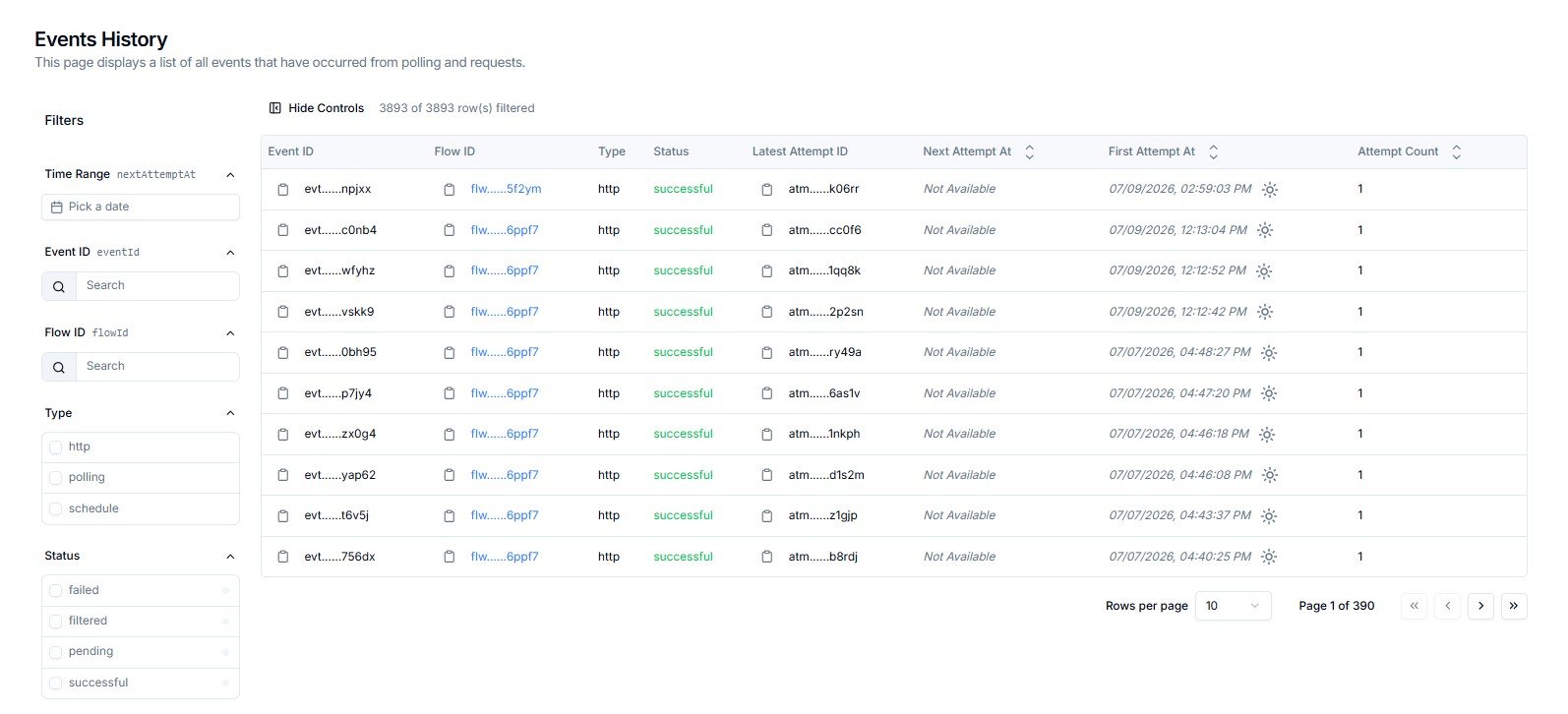
The Flow Events page shows every event processed by Lighthouse Flows — from the moment a request entered a Flow through to its final delivery outcome.
 **Events History vs Request History**
**Request History** records every raw inbound HTTP request received at your trigger endpoints.
**Events History** records what happened to each request *after* it entered a Flow — whether it was delivered, filtered, retried, or failed. Use this page to understand the outcome of each event.
***
## Reading the Events Table
Each row represents a single event processed through a Flow. Scroll horizontally to see all columns.
| Column | What It Shows |
| --------------------- | ------------------------------------------------------------------------------------------------- |
| **Event ID** | Unique identifier for this event — e.g. `evt......9pcxb`. Click the copy icon to copy the full ID |
| **Flow ID** | The Flow that processed this event — e.g. `flw......pyybp`. Click the link to open the Flow |
| **Type** | How the event was initiated — `http`, `polling`, or `schedule` |
| **Status** | The current outcome — see status reference below |
| **Latest Attempt ID** | The ID of the most recent delivery attempt — e.g. `atm......s1rwb` |
| **Next Attempt At** | When the next retry is scheduled. Shows `Not Available` when no further retries are planned |
| **First Attempt At** | Timestamp of the first delivery attempt |
| **Attempt Count** | How many delivery attempts have been made for this event |
***
## Event Status Reference
| Status | Meaning | What To Do |
| -------------- | ------------------------------------------------------------------------------------ | -------------------------------------------------------- |
| **successful** | The event was delivered to all targets without error | No action needed |
| **failed** | All delivery attempts were exhausted — the event could not be delivered | Contact Cloudify with the Event ID and Latest Attempt ID |
| **filtered** | A CEL filter rule in the Flow blocked this event from delivery — this is intentional | Review your Flow's filter rules if this was unexpected |
| **pending** | The event is queued and waiting for its next delivery attempt | No action needed — it will process automatically |
Filter by **Status → failed** to immediately surface all events that exhausted retries and need attention.
A **filtered** status is not an error. It means an event was intentionally stopped by a rule configured in the Flow. Contact Cloudify if you are seeing unexpected `filtered` results.
***
## Filtering Events
The left-hand **Filters** panel lets you narrow results across four dimensions.
**Events History vs Request History**
**Request History** records every raw inbound HTTP request received at your trigger endpoints.
**Events History** records what happened to each request *after* it entered a Flow — whether it was delivered, filtered, retried, or failed. Use this page to understand the outcome of each event.
***
## Reading the Events Table
Each row represents a single event processed through a Flow. Scroll horizontally to see all columns.
| Column | What It Shows |
| --------------------- | ------------------------------------------------------------------------------------------------- |
| **Event ID** | Unique identifier for this event — e.g. `evt......9pcxb`. Click the copy icon to copy the full ID |
| **Flow ID** | The Flow that processed this event — e.g. `flw......pyybp`. Click the link to open the Flow |
| **Type** | How the event was initiated — `http`, `polling`, or `schedule` |
| **Status** | The current outcome — see status reference below |
| **Latest Attempt ID** | The ID of the most recent delivery attempt — e.g. `atm......s1rwb` |
| **Next Attempt At** | When the next retry is scheduled. Shows `Not Available` when no further retries are planned |
| **First Attempt At** | Timestamp of the first delivery attempt |
| **Attempt Count** | How many delivery attempts have been made for this event |
***
## Event Status Reference
| Status | Meaning | What To Do |
| -------------- | ------------------------------------------------------------------------------------ | -------------------------------------------------------- |
| **successful** | The event was delivered to all targets without error | No action needed |
| **failed** | All delivery attempts were exhausted — the event could not be delivered | Contact Cloudify with the Event ID and Latest Attempt ID |
| **filtered** | A CEL filter rule in the Flow blocked this event from delivery — this is intentional | Review your Flow's filter rules if this was unexpected |
| **pending** | The event is queued and waiting for its next delivery attempt | No action needed — it will process automatically |
Filter by **Status → failed** to immediately surface all events that exhausted retries and need attention.
A **filtered** status is not an error. It means an event was intentionally stopped by a rule configured in the Flow. Contact Cloudify if you are seeing unexpected `filtered` results.
***
## Filtering Events
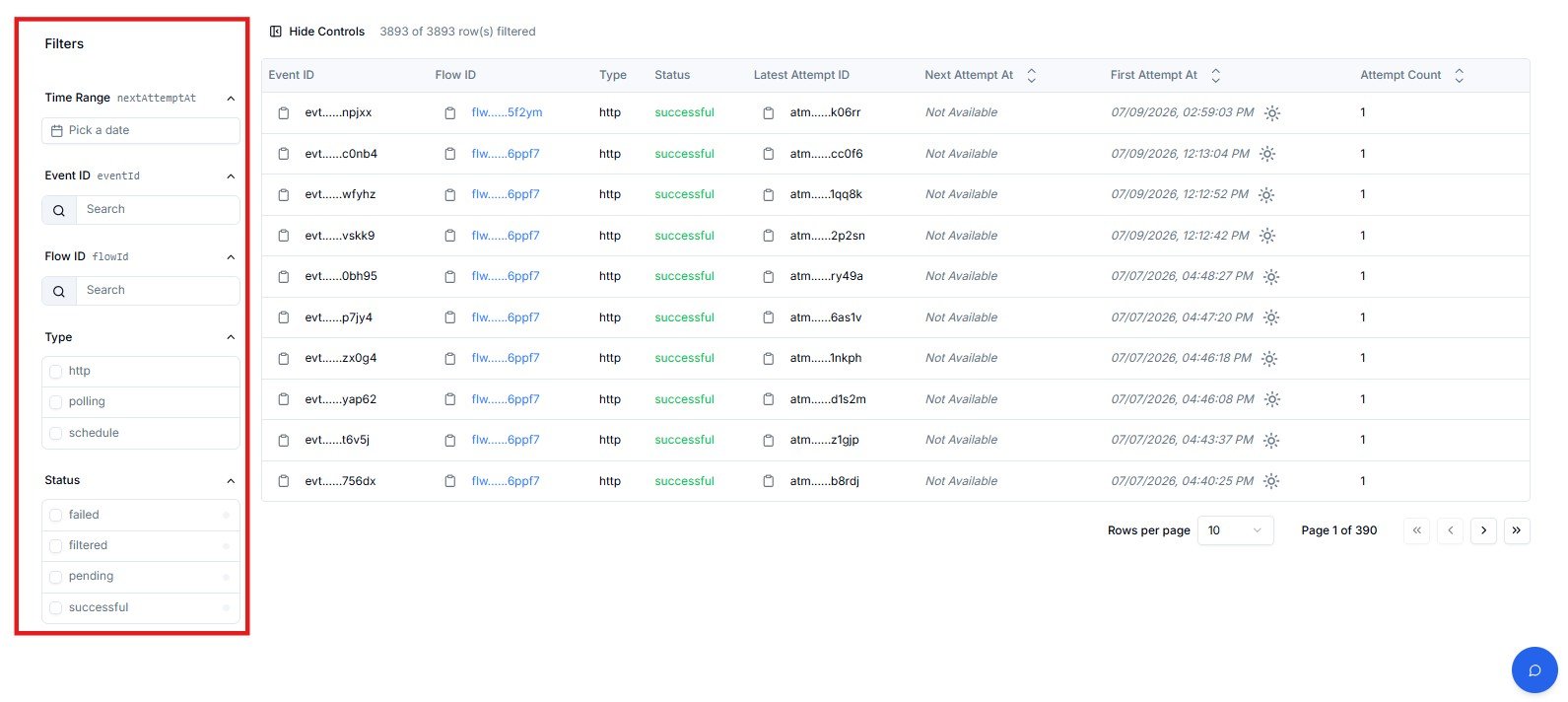
The left-hand **Filters** panel lets you narrow results across four dimensions.
 | Filter | How to Use |
| -------------- | --------------------------------------------------------------------------------------- |
| **Time Range** | Click **Pick a date** to filter by when the next delivery attempt is (or was) scheduled |
| **Event ID** | Paste or type an Event ID to locate a specific event |
| **Flow ID** | Search by Flow ID to show only events processed by a specific Flow |
| **Type** | Check one or more: `http`, `polling`, `schedule` |
| **Status** | Check one or more: `failed`, `filtered`, `pending`, `successful` |
The **Time Range** filter is based on `nextAttemptAt` — the scheduled time of the next retry. To investigate by when an event first arrived, use the **First Attempt At** column as your reference point in the table.
***
## Table Controls
| Control | What It Does |
| -------------------------- | ------------------------------------------------------------------------------- |
| **Hide Controls** | Collapses the left filter panel to give the table more horizontal space |
| **X of Y row(s) filtered** | Live count of rows matching current filters vs total — e.g. `1142 of 1142` |
| **Rows per page** | Dropdown to set how many rows display per page — default is **10** |
| **Page navigation** | `<<` first · `<` previous · `>` next · `>>` last — shows current page and total |
***
## Frequently Asked Questions
A **request** is the raw inbound HTTP call received at your trigger endpoint — logged in Request History. An **event** is created when a Flow processes that request and attempts delivery. If a request was received but no event was created, the Flow may have rejected it before processing (e.g. failed signature validation).
No. `filtered` means a CEL filter rule in the Flow determined this event should not be delivered. This is working as designed. If events are being filtered that you expected to go through, review the filter conditions in that Flow with Cloudify.
Check the **Attempt Count** to see how many retries were made, then note the **Latest Attempt ID**. Raise a support ticket with Cloudify including both the **Event ID** and **Latest Attempt ID**.
Yes. For `successful` events this is expected — delivery succeeded so no retry is needed. For `failed` events, it means all configured retry attempts have been exhausted.
Use the **Flow ID** filter. Copy the Flow ID from the Flows page and paste it into the search field. The table will show only events processed by that Flow.
***
| Filter | How to Use |
| -------------- | --------------------------------------------------------------------------------------- |
| **Time Range** | Click **Pick a date** to filter by when the next delivery attempt is (or was) scheduled |
| **Event ID** | Paste or type an Event ID to locate a specific event |
| **Flow ID** | Search by Flow ID to show only events processed by a specific Flow |
| **Type** | Check one or more: `http`, `polling`, `schedule` |
| **Status** | Check one or more: `failed`, `filtered`, `pending`, `successful` |
The **Time Range** filter is based on `nextAttemptAt` — the scheduled time of the next retry. To investigate by when an event first arrived, use the **First Attempt At** column as your reference point in the table.
***
## Table Controls
| Control | What It Does |
| -------------------------- | ------------------------------------------------------------------------------- |
| **Hide Controls** | Collapses the left filter panel to give the table more horizontal space |
| **X of Y row(s) filtered** | Live count of rows matching current filters vs total — e.g. `1142 of 1142` |
| **Rows per page** | Dropdown to set how many rows display per page — default is **10** |
| **Page navigation** | `<<` first · `<` previous · `>` next · `>>` last — shows current page and total |
***
## Frequently Asked Questions
A **request** is the raw inbound HTTP call received at your trigger endpoint — logged in Request History. An **event** is created when a Flow processes that request and attempts delivery. If a request was received but no event was created, the Flow may have rejected it before processing (e.g. failed signature validation).
No. `filtered` means a CEL filter rule in the Flow determined this event should not be delivered. This is working as designed. If events are being filtered that you expected to go through, review the filter conditions in that Flow with Cloudify.
Check the **Attempt Count** to see how many retries were made, then note the **Latest Attempt ID**. Raise a support ticket with Cloudify including both the **Event ID** and **Latest Attempt ID**.
Yes. For `successful` events this is expected — delivery succeeded so no retry is needed. For `failed` events, it means all configured retry attempts have been exhausted.
Use the **Flow ID** filter. Copy the Flow ID from the Flows page and paste it into the search field. The table will show only events processed by that Flow.
***