> ## Documentation Index
> Fetch the complete documentation index at: https://docs.cloudify.biz/llms.txt
> Use this file to discover all available pages before exploring further.

# Cloudify Dashboard

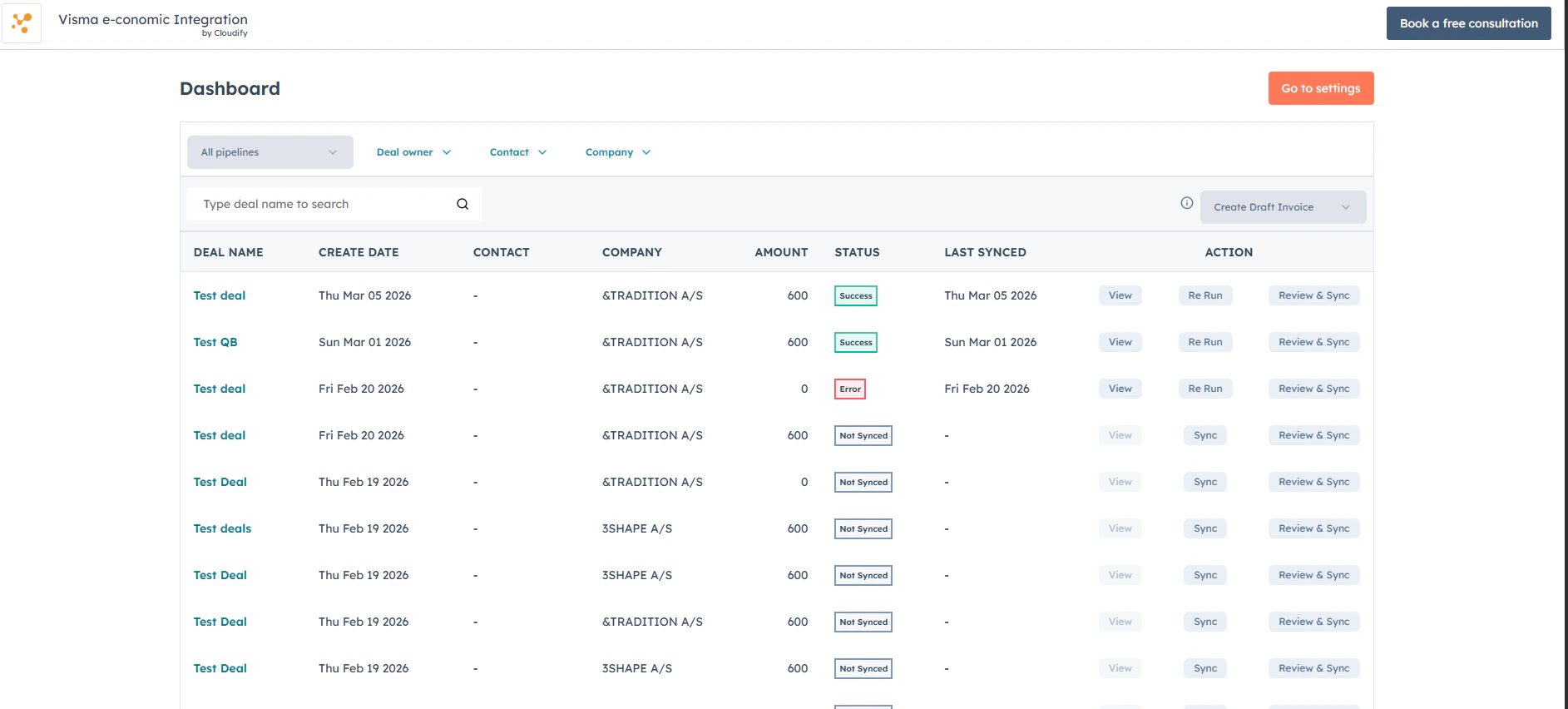
> The Cloudify Dashboard brings you complete visibility and control over your HubSpot–e-conomic integration all in one place.

***

## How to Access the Integration Dashboard

<Steps>
  <Step title="Navigate to Visma e-conomic Settings">
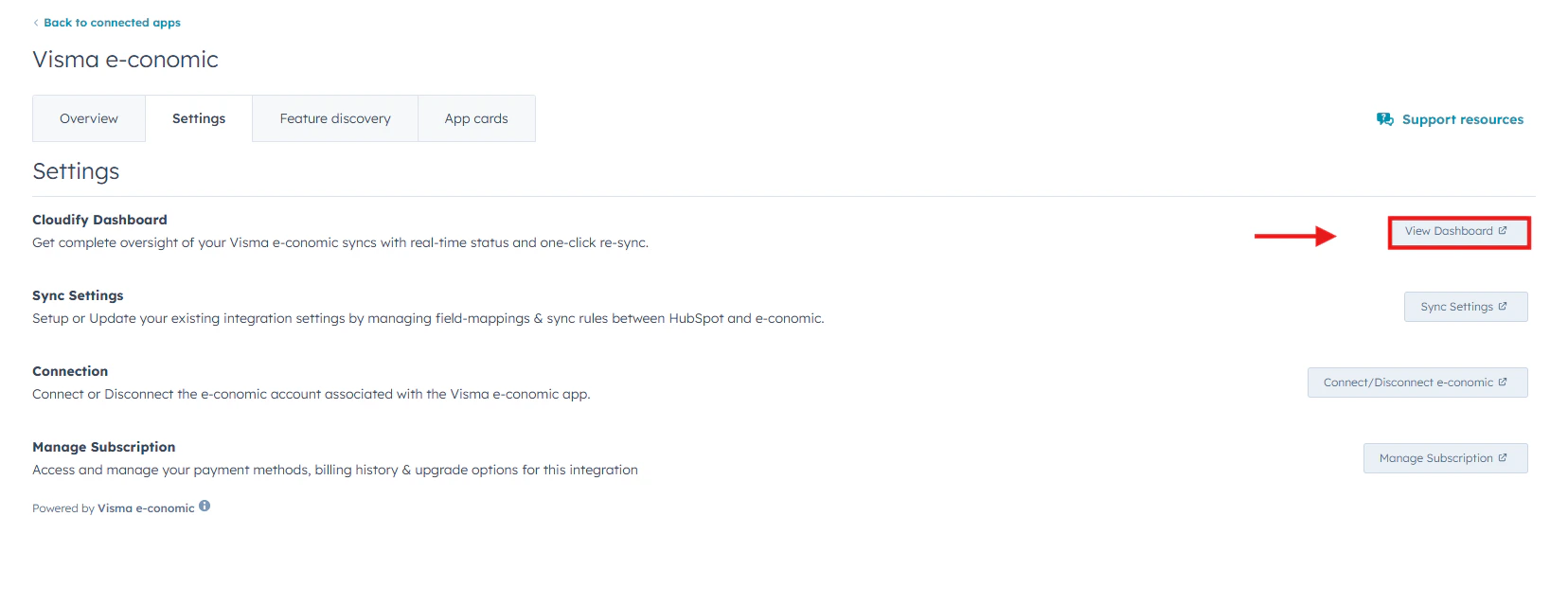
    Click **Connected Apps** → **Visma e-conomic**→ **Settings**.
    <Frame>
      <img alt="Click Connected Apps, then Xero, then Settings in HubSpot" lightAlt="Click Connected Apps, then Xero, then Settings in HubSpot" darkAlt="Click Connected Apps, then Xero, then Settings in HubSpot" src="https://mintcdn.com/cloudify-c7720744/vbRT_M1td7Th601K/images/Screenshot-2026-04-11-171825.png?fit=max&auto=format&n=vbRT_M1td7Th601K&q=85&s=fb005407936013839b52c0e8d94941f1" className="dark:hidden" width="1656" height="639" data-path="images/Screenshot-2026-04-11-171825.png" />

      <img alt="Click Connected Apps, then Xero, then Settings in HubSpot" lightAlt="Click Connected Apps, then Xero, then Settings in HubSpot" darkAlt="Click Connected Apps, then Xero, then Settings in HubSpot" src="https://mintcdn.com/cloudify-c7720744/0Gt4M9yvYE0e6OYk/images/image.png" className="hidden dark:block" />
    </Frame>
  </Step>

  <Step title="Open the Cloudify Dashboard">
    Under the **Settings** tab, go to **Cloudify Dashboard** and click the **View Dashboard** button on the right side.

    This will open the full Cloudify HubSpot–e-conomic dashboard, where you can monitor sync statuses, manage invoices, and take action on your deals in real time.
    <Frame>
      <img src="https://mintcdn.com/cloudify-c7720744/vbRT_M1td7Th601K/images/Screenshot-2026-04-11-171932.png?fit=max&auto=format&n=vbRT_M1td7Th601K&q=85&s=4bd1cdf50234c4032ebaa90043465474" alt="Screenshot 2026 04 11 171932" width="1885" height="852" data-path="images/Screenshot-2026-04-11-171932.png" />
    </Frame>
  </Step>
</Steps>

***

## Benefits

<CardGroup cols={2}>
  <Card title="Filter by Pipeline, Owner, Contact, or Company" icon="filter">
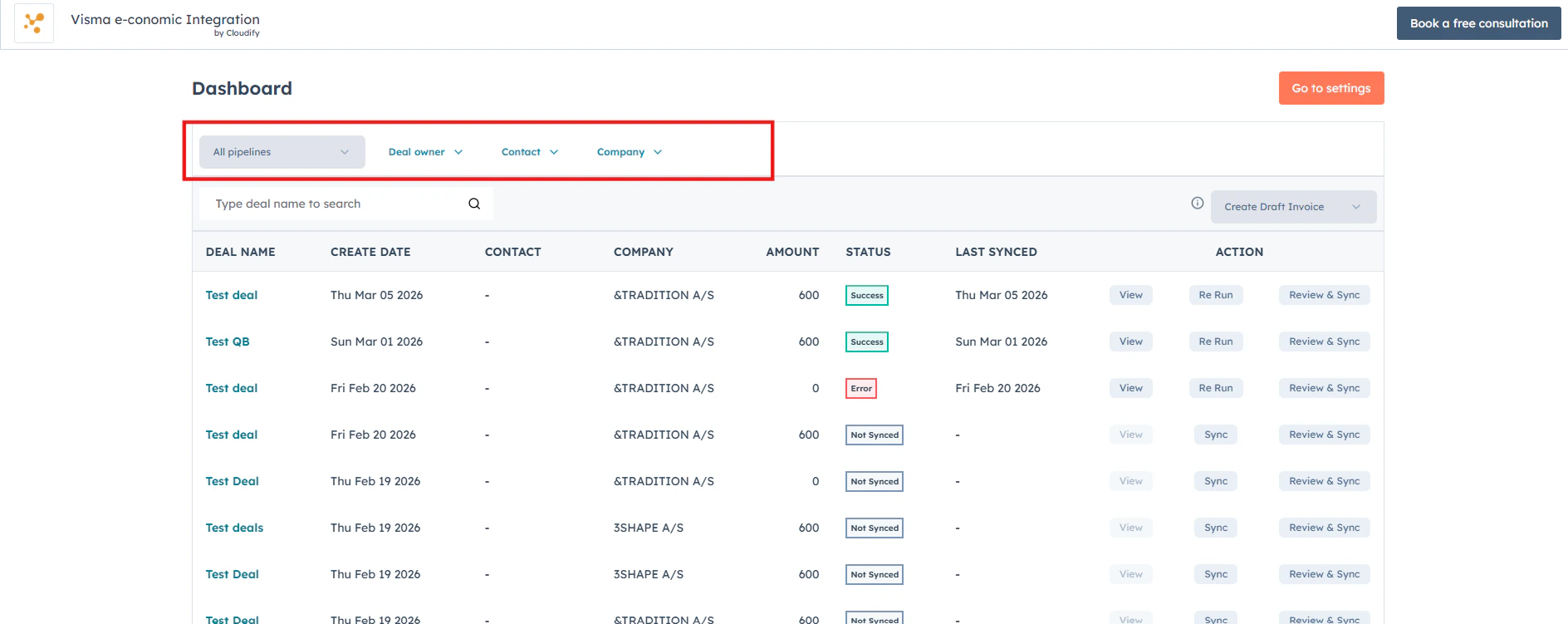
    Effortlessly refine your view by filtering deals based on Pipeline, Deal Owner, Contact, or Company — helping you find exactly what you need in seconds.
  </Card>

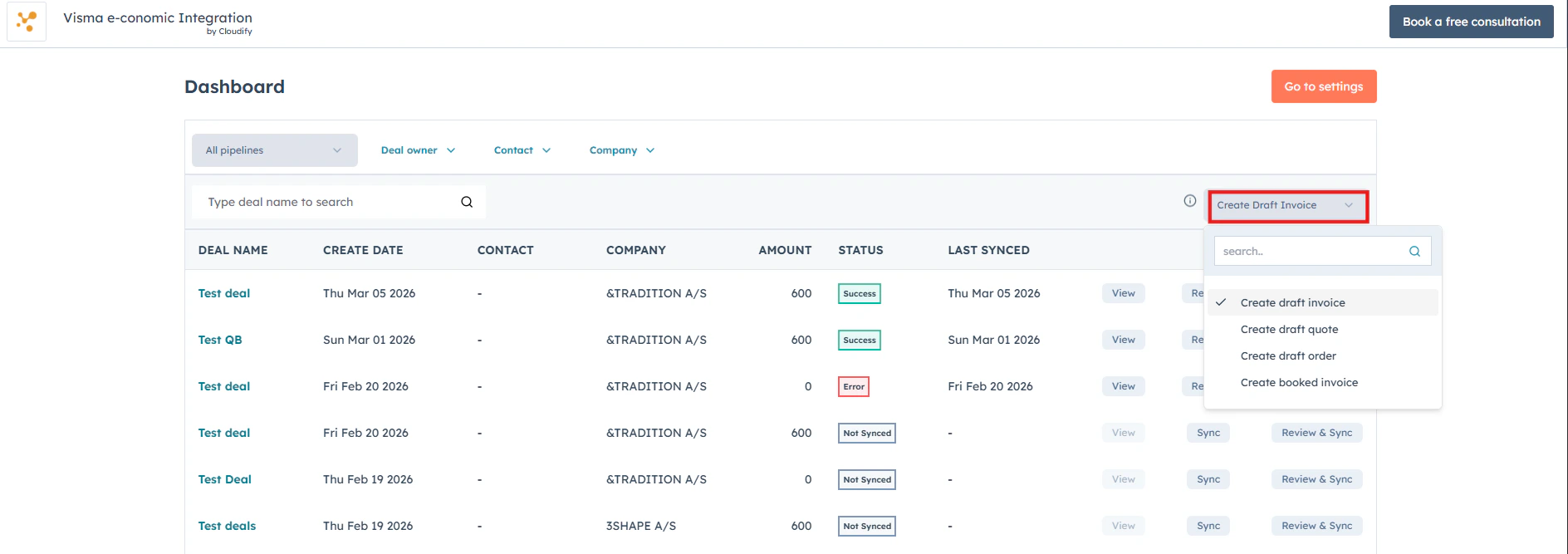
  <Card title="Choose invoice or quote type" icon="file-invoice">
    Select the invoice or quote type you'd like to create in e-conomic directly from the dashboard, saving time without switching screens.
  </Card>

  <Card title="Real-time deal and sync status" icon="circle-check">
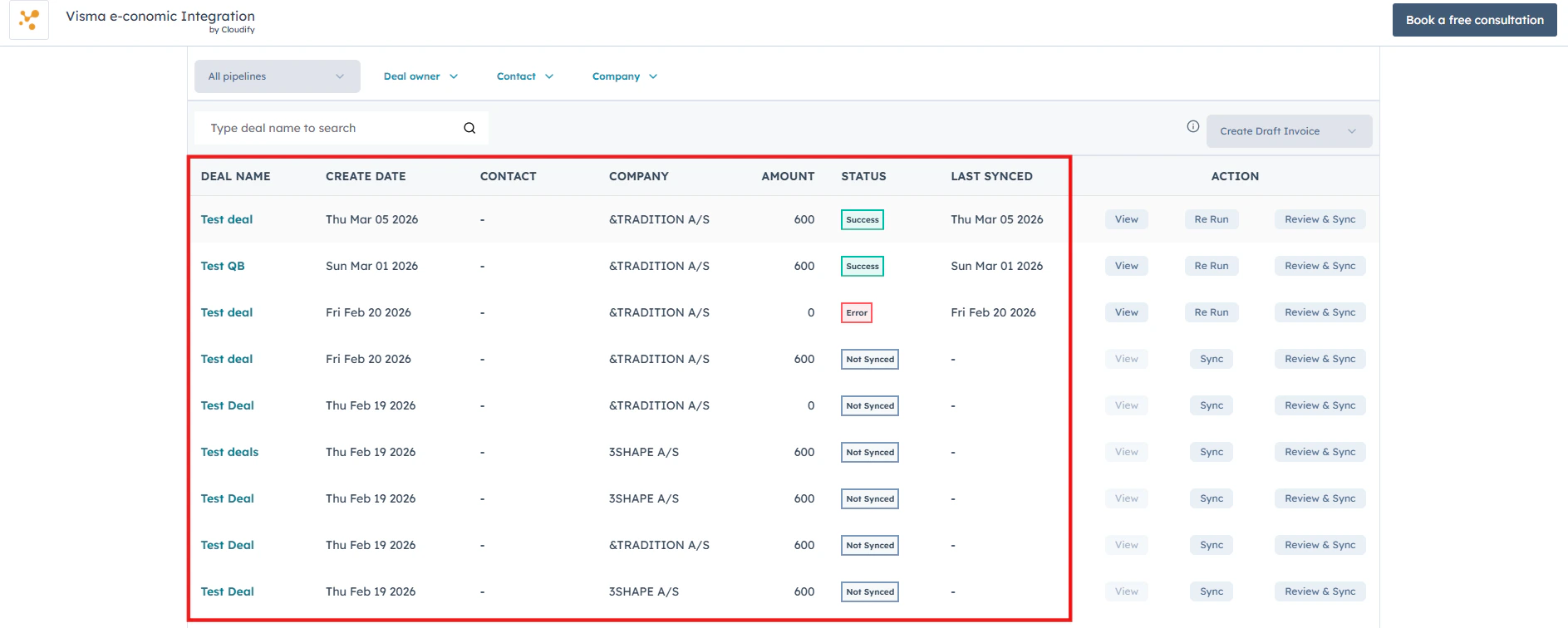
    View all your HubSpot deals along with their create date, contact, company, amount, and real-time sync status so you can instantly see what's synced, pending, or needs attention.
  </Card>

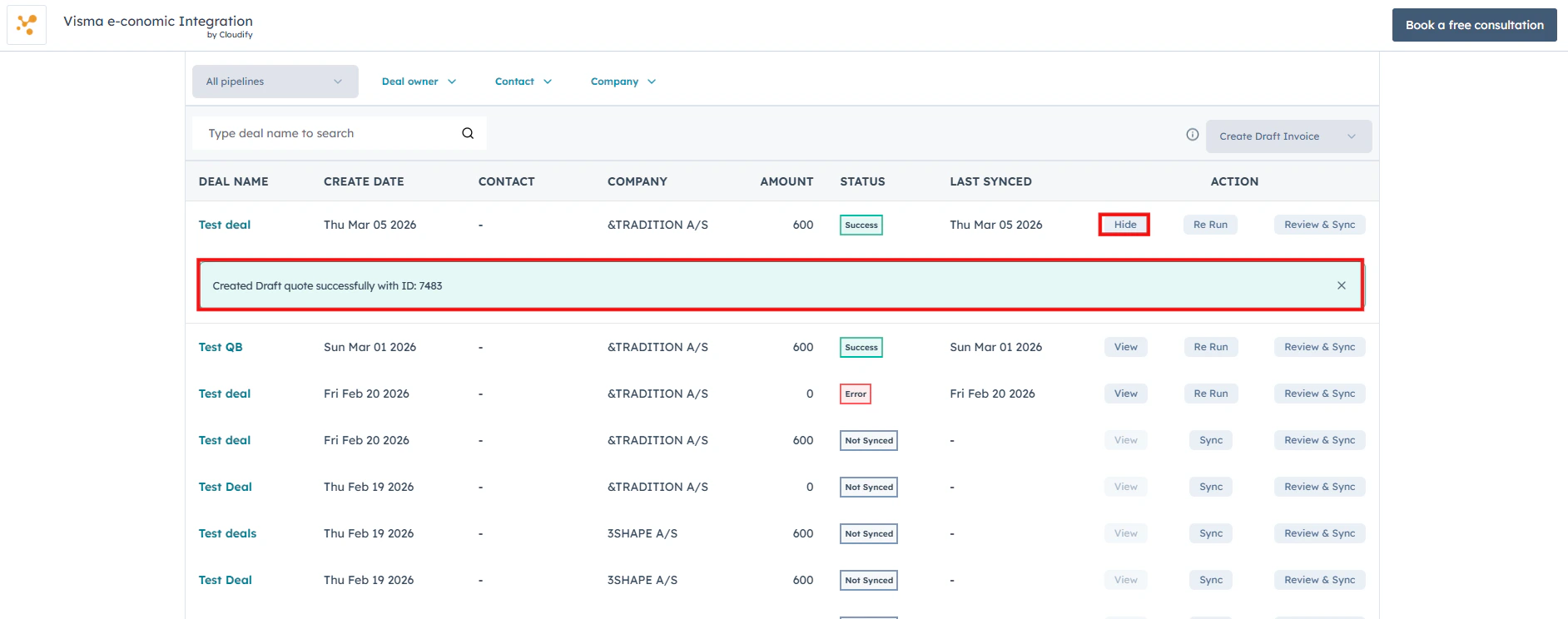
  <Card title="View deal details" icon="eye">
    Use the **View** button to quickly open and review the associated HubSpot deal, along with its sync details and invoice information.
  </Card>
</CardGroup>

* **Filtering Deals**

<Frame>
  <img alt="Filter deals by Pipeline, Deal Owner, Contact, or Company" lightAlt="Filter deals by Pipeline, Deal Owner, Contact, or Company" darkAlt="Filter deals by Pipeline, Deal Owner, Contact, or Company" src="https://mintcdn.com/cloudify-c7720744/vbRT_M1td7Th601K/images/Screenshot-2026-04-11-172116.png?fit=max&auto=format&n=vbRT_M1td7Th601K&q=85&s=89aa81df27b58bae9ce59be37ed93bde" className="dark:hidden" width="1888" height="751" data-path="images/Screenshot-2026-04-11-172116.png" />

  <img alt="Filter deals by Pipeline, Deal Owner, Contact, or Company" lightAlt="Filter deals by Pipeline, Deal Owner, Contact, or Company" darkAlt="Filter deals by Pipeline, Deal Owner, Contact, or Company" src="https://mintcdn.com/cloudify-c7720744/e7dP5dXgL5eHHGxk/images/image-4.png" className="hidden dark:block" />
</Frame>

* **Selecting Invoice, Quote, Order Type**
<Frame>
  <img alt="Choose the invoice or quote type to create in Xero" lightAlt="Choose the invoice or quote type to create in Xero" darkAlt="Choose the invoice or quote type to create in Xero" src="https://mintcdn.com/cloudify-c7720744/vbRT_M1td7Th601K/images/Screenshot-2026-04-11-172219.png?fit=max&auto=format&n=vbRT_M1td7Th601K&q=85&s=7b545a237257fd85060a39b83b047870" className="dark:hidden" width="1888" height="667" data-path="images/Screenshot-2026-04-11-172219.png" />

  <img alt="Choose the invoice or quote type to create in Xero" lightAlt="Choose the invoice or quote type to create in Xero" darkAlt="Choose the invoice or quote type to create in Xero" src="https://mintcdn.com/cloudify-c7720744/e7dP5dXgL5eHHGxk/images/image-5.png" className="hidden dark:block" />
</Frame>

* **Deal List with Sync Status**

<Frame>
  <img alt="View all HubSpot deals with their sync status, contact, company, and amount" lightAlt="View all HubSpot deals with their sync status, contact, company, and amount" darkAlt="View all HubSpot deals with their sync status, contact, company, and amount" src="https://mintcdn.com/cloudify-c7720744/vbRT_M1td7Th601K/images/Screenshot-2026-04-11-172309.png?fit=max&auto=format&n=vbRT_M1td7Th601K&q=85&s=66eebf5fb013a0a115759163687175fb" className="dark:hidden" width="1887" height="756" data-path="images/Screenshot-2026-04-11-172309.png" />

  <img alt="View all HubSpot deals with their sync status, contact, company, and amount" lightAlt="View all HubSpot deals with their sync status, contact, company, and amount" darkAlt="View all HubSpot deals with their sync status, contact, company, and amount" src="https://mintcdn.com/cloudify-c7720744/e7dP5dXgL5eHHGxk/images/image-7.png" className="hidden dark:block" />
</Frame>

* **Viewing Deal and Invoice Details**
<Frame>
  <img alt="Use the View button to open a HubSpot deal and review its sync and invoice details" lightAlt="Use the View button to open a HubSpot deal and review its sync and invoice details" darkAlt="Use the View button to open a HubSpot deal and review its sync and invoice details" src="https://mintcdn.com/cloudify-c7720744/vbRT_M1td7Th601K/images/Screenshot-2026-04-11-172358.png?fit=max&auto=format&n=vbRT_M1td7Th601K&q=85&s=cc751d58e56b412bc6cf48e2addebc43" className="dark:hidden" width="1884" height="744" data-path="images/Screenshot-2026-04-11-172358.png" />

  <img alt="Use the View button to open a HubSpot deal and review its sync and invoice details" lightAlt="Use the View button to open a HubSpot deal and review its sync and invoice details" darkAlt="Use the View button to open a HubSpot deal and review its sync and invoice details" src="https://mintcdn.com/cloudify-c7720744/e7dP5dXgL5eHHGxk/images/image-8.png" className="hidden dark:block" />
</Frame>

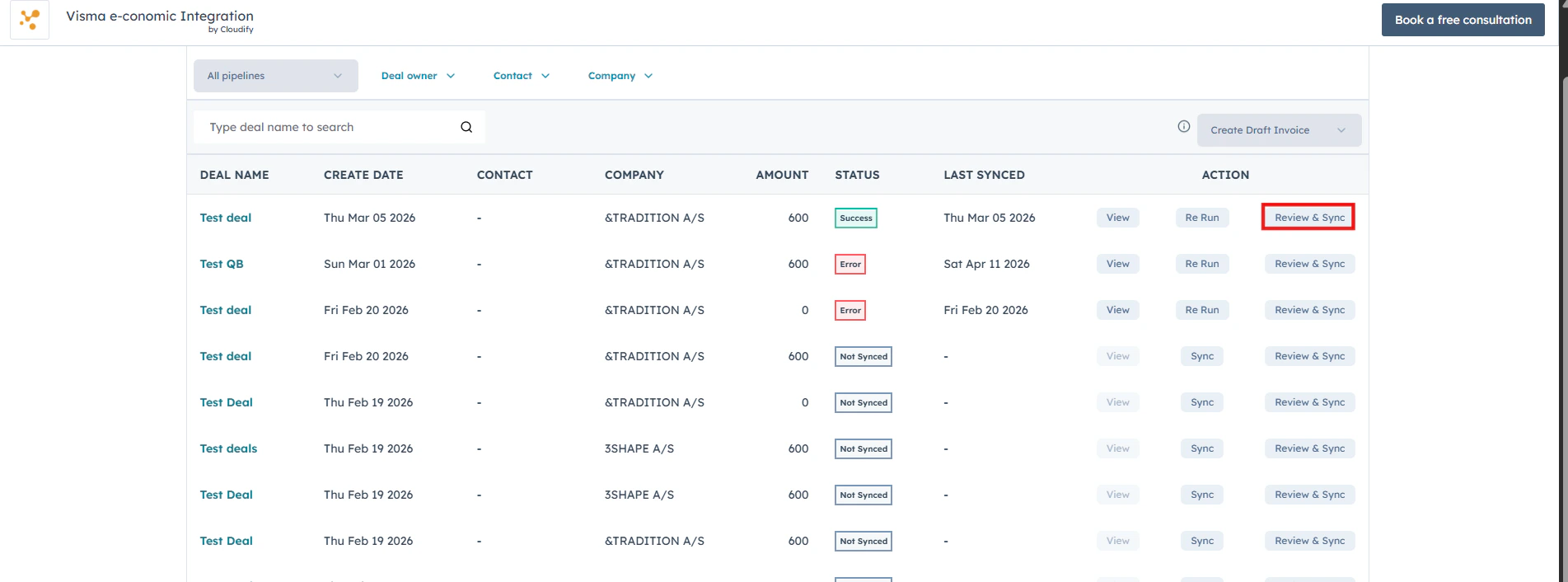
* **Syncing and Managing Invoices**

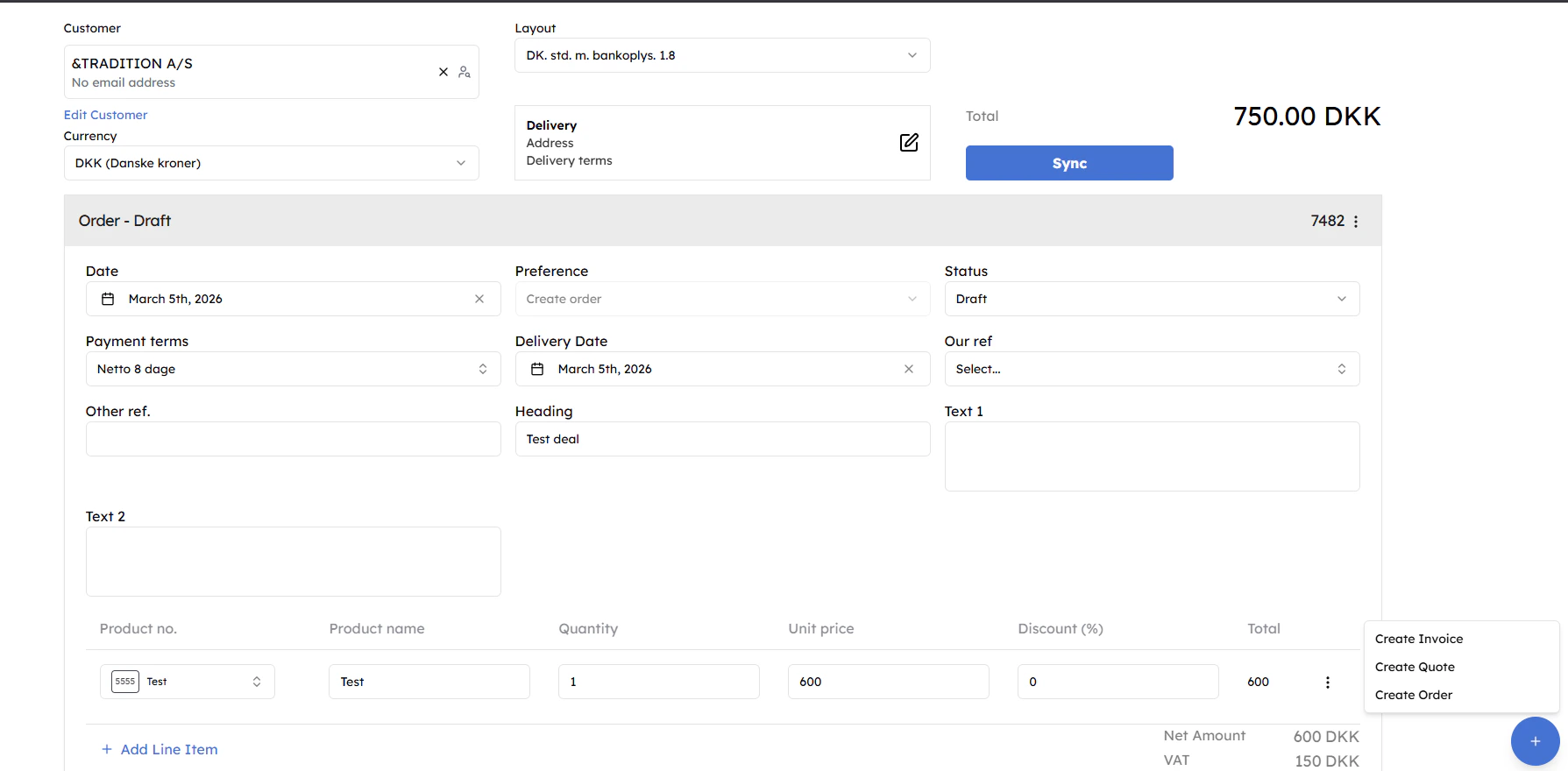
Use the **Sync** and **Re Run** buttons to instantly trigger or retry invoice syncing. Use **Review & Sync** to inspect and edit invoice, quote or order details before sending them to e-conomic.
<img alt="Use Sync, Re Run, and Review & Sync buttons to manage invoice syncing" lightAlt="Use Sync, Re Run, and Review & Sync buttons to manage invoice syncing" darkAlt="Use Sync, Re Run, and Review & Sync buttons to manage invoice syncing" src="https://mintcdn.com/cloudify-c7720744/vbRT_M1td7Th601K/images/Screenshot-2026-04-11-172539.png?fit=max&auto=format&n=vbRT_M1td7Th601K&q=85&s=b7fc565cfa97fd2705644d135c8092d1" className="dark:hidden" width="1903" height="706" data-path="images/Screenshot-2026-04-11-172539.png" />

<img alt="Use Sync, Re Run, and Review & Sync buttons to manage invoice syncing" lightAlt="Use Sync, Re Run, and Review & Sync buttons to manage invoice syncing" darkAlt="Use Sync, Re Run, and Review & Sync buttons to manage invoice syncing" src="https://mintcdn.com/cloudify-c7720744/e7dP5dXgL5eHHGxk/images/image-9.png" className="hidden dark:block" />

<Frame>
  <img src="https://mintcdn.com/cloudify-c7720744/vbRT_M1td7Th601K/images/Screenshot-2026-04-11-172623.png?fit=max&auto=format&n=vbRT_M1td7Th601K&q=85&s=cab48ffb5bfa88fad5afde53d378db44" alt="Screenshot 2026 04 11 172623" width="1789" height="880" data-path="images/Screenshot-2026-04-11-172623.png" />
</Frame>

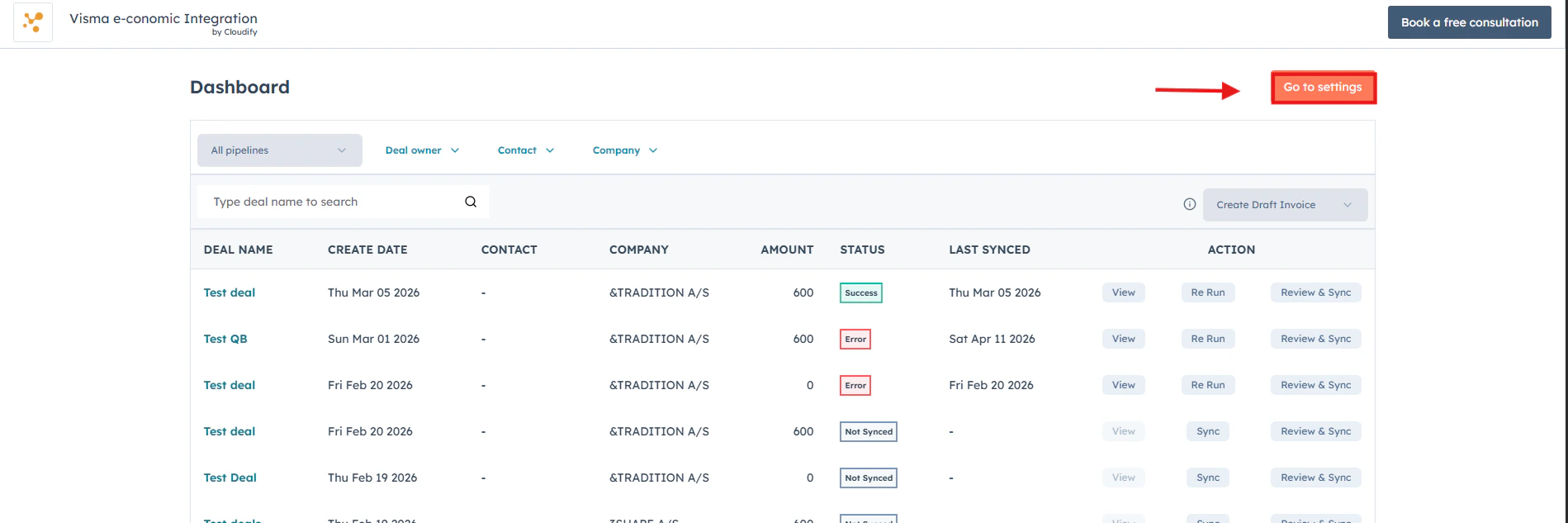
* **Updating Settings**

Click **Settings** at any time to update your preferences or adjust integration options. The Cloudify Dashboard is your unified place to manage everything.
<Frame>
  <img src="https://mintcdn.com/cloudify-c7720744/vbRT_M1td7Th601K/images/Screenshot-2026-04-11-172705.png?fit=max&auto=format&n=vbRT_M1td7Th601K&q=85&s=1f63aa7da2f1d9b5a10c860dbadf7323" alt="Screenshot 2026 04 11 172705" width="1899" height="633" data-path="images/Screenshot-2026-04-11-172705.png" />
</Frame>

***