> ## Documentation Index
> Fetch the complete documentation index at: https://docs.cloudify.biz/llms.txt
> Use this file to discover all available pages before exploring further.

# One-click Invoice/Quote/Order  

The Visma e-conomic integration by Cloudify facilitates one-click creation of invoices, quotes or orders directly from HubSpot deals, irrespective of the deal stage.

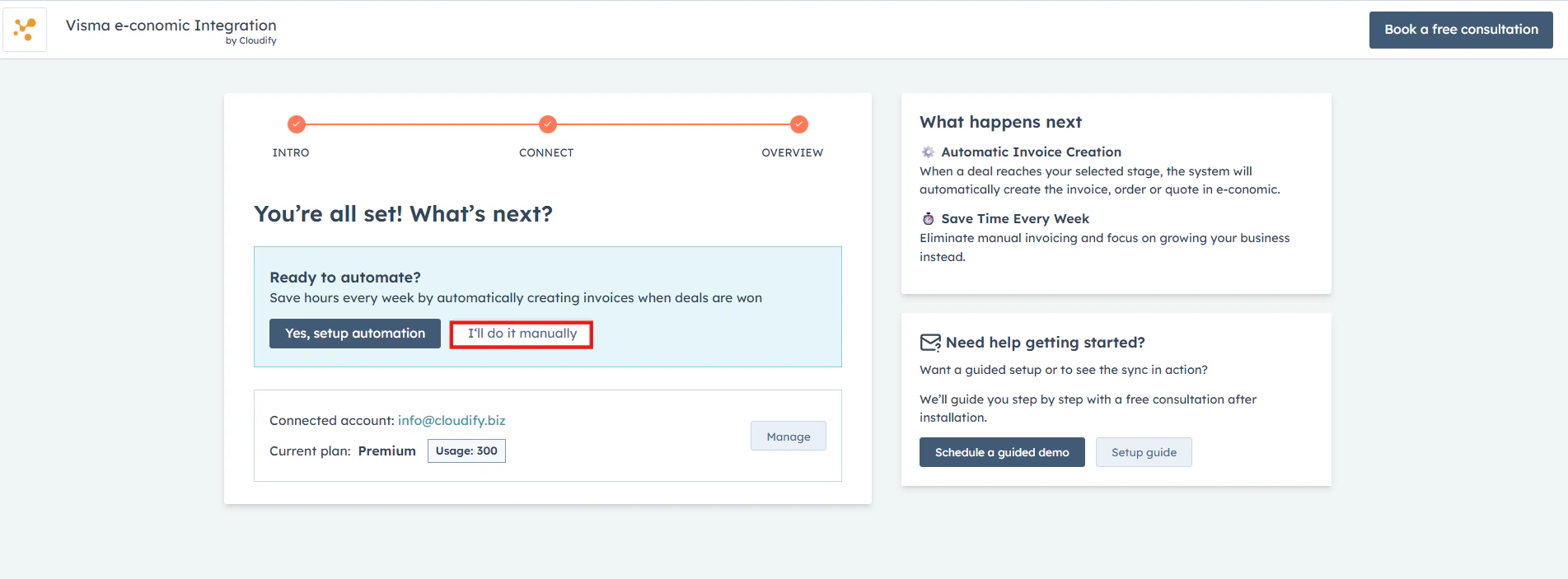
Selecting **I'll do it manually** skips automation and takes you to the **Cloudify Dashboard**, allowing you to update invoices from any HubSpot deal stage.
<Frame>
  <img alt="Select I'll do it manually to skip automation and go to the Cloudify Dashboard" lightAlt="Select I'll do it manually to skip automation and go to the Cloudify Dashboard" darkAlt="Select I'll do it manually to skip automation and go to the Cloudify Dashboard" src="https://mintcdn.com/cloudify-c7720744/vbRT_M1td7Th601K/images/Screenshot-2026-04-11-130514.png?fit=max&auto=format&n=vbRT_M1td7Th601K&q=85&s=f1829eea54cc253f2b7ce147ff3c4c82" className="dark:hidden" width="1903" height="703" data-path="images/Screenshot-2026-04-11-130514.png" />

  <img alt="Select I'll do it manually to skip automation and go to the Cloudify Dashboard" lightAlt="Select I'll do it manually to skip automation and go to the Cloudify Dashboard" darkAlt="Select I'll do it manually to skip automation and go to the Cloudify Dashboard" src="https://mintcdn.com/cloudify-c7720744/A6A_8yNHChdsPV-l/images/Screenshot2026-03-18022421.png" className="hidden dark:block" />
</Frame>

***

## Manual Sync via the Dashboard

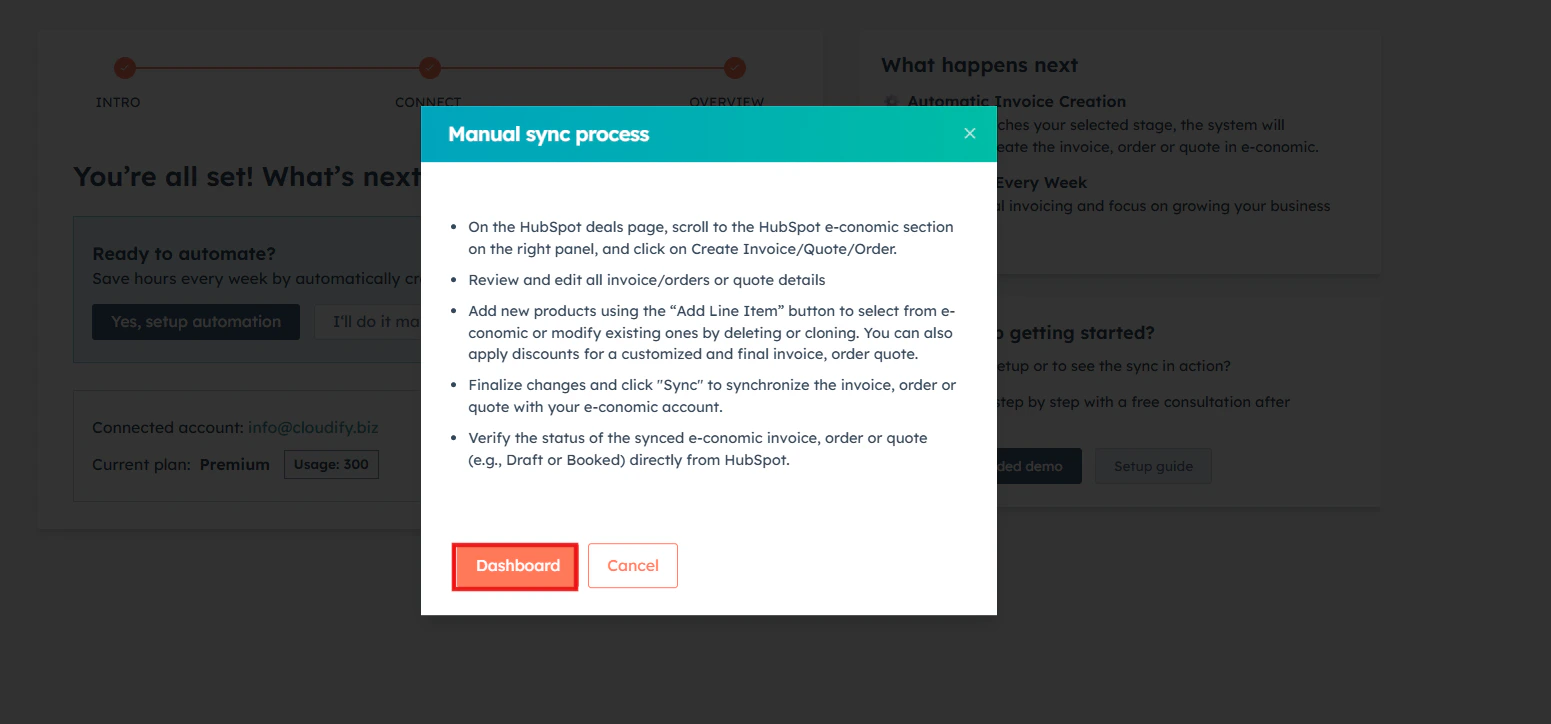
Once you click **Dashboard**, follow these steps to complete a manual sync:
<Frame>
  <img alt="Cloudify Dashboard showing deals available for manual sync" lightAlt="Cloudify Dashboard showing deals available for manual sync" darkAlt="Cloudify Dashboard showing deals available for manual sync" src="https://mintcdn.com/cloudify-c7720744/vbRT_M1td7Th601K/images/Screenshot-2026-04-11-132313.png?fit=max&auto=format&n=vbRT_M1td7Th601K&q=85&s=f71fcea66f0ee0108d3f11b41f4ca467" className="dark:hidden" width="1551" height="724" data-path="images/Screenshot-2026-04-11-132313.png" />

  <img alt="Cloudify Dashboard showing deals available for manual sync" lightAlt="Cloudify Dashboard showing deals available for manual sync" darkAlt="Cloudify Dashboard showing deals available for manual sync" src="https://mintcdn.com/cloudify-c7720744/EIGlfGBzTycal6nZ/images/Screenshot2026-03-18023554.png" className="hidden dark:block" />
</Frame>

<Steps>
  <Step title="Access the invoice">
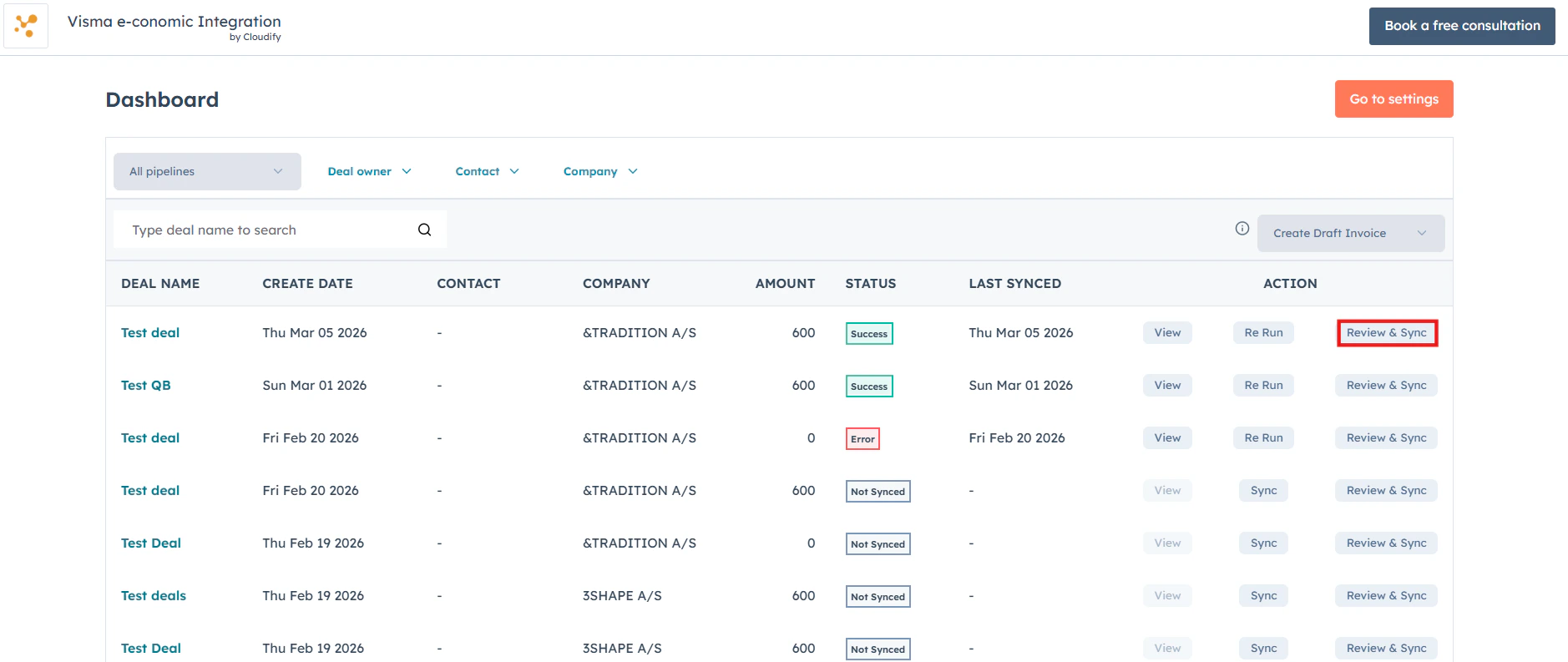
    Go to any invoice on the dashboard you wish to update and click **Review and Sync**. The manual sync window will immediately appear on your screen.
    <Frame>
      <img alt="Click Review and Sync on any invoice to open the manual sync window" lightAlt="Click Review and Sync on any invoice to open the manual sync window" darkAlt="Click Review and Sync on any invoice to open the manual sync window" src="https://mintcdn.com/cloudify-c7720744/vbRT_M1td7Th601K/images/Screenshot-2026-04-11-132541.png?fit=max&auto=format&n=vbRT_M1td7Th601K&q=85&s=73adedae96f8802d535348df6e5159dc" className="dark:hidden" width="1878" height="793" data-path="images/Screenshot-2026-04-11-132541.png" />

      <img alt="Click Review and Sync on any invoice to open the manual sync window" lightAlt="Click Review and Sync on any invoice to open the manual sync window" darkAlt="Click Review and Sync on any invoice to open the manual sync window" src="https://mintcdn.com/cloudify-c7720744/EIGlfGBzTycal6nZ/images/Screenshot2026-03-18022757.png" className="hidden dark:block" />
    </Frame>
  </Step>

  <Step title="Enter basic details">
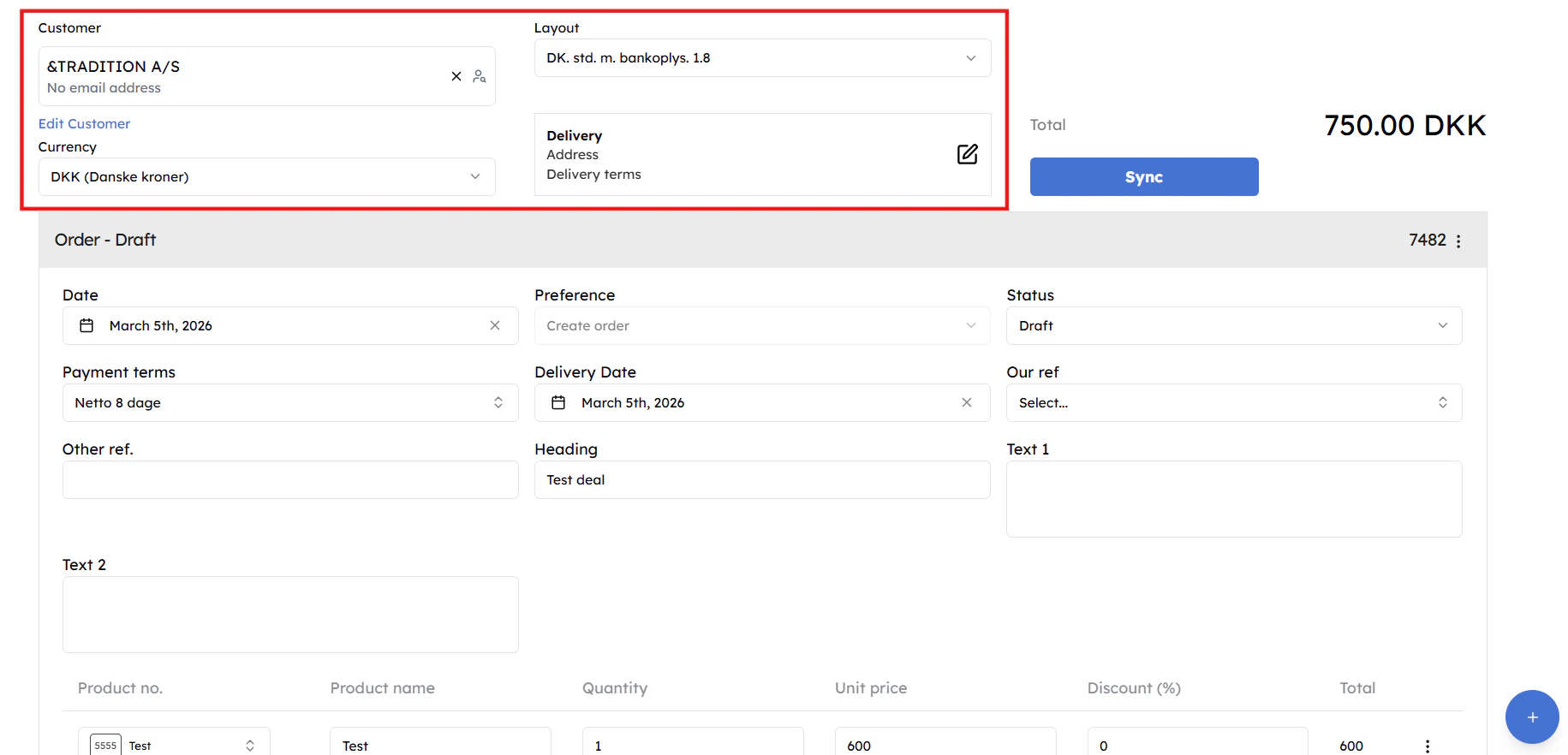
    Ensure customer, currency, layout, and delivery details are correctly selected
    <Frame>
      <img alt="Select contact, currency, tax, and account details" lightAlt="Select contact, currency, tax, and account details" darkAlt="Select contact, currency, tax, and account details" src="https://mintcdn.com/cloudify-c7720744/vbRT_M1td7Th601K/images/Screenshot-2026-04-11-135814.png?fit=max&auto=format&n=vbRT_M1td7Th601K&q=85&s=c4d9cc08d6c5bc0148e0e30738bd89d0" className="dark:hidden" width="1831" height="882" data-path="images/Screenshot-2026-04-11-135814.png" />

      <img alt="Select contact, currency, tax, and account details" lightAlt="Select contact, currency, tax, and account details" darkAlt="Select contact, currency, tax, and account details" src="https://mintcdn.com/cloudify-c7720744/EIGlfGBzTycal6nZ/images/Screenshot2026-03-18022929.png" className="hidden dark:block" />
    </Frame>
  </Step>

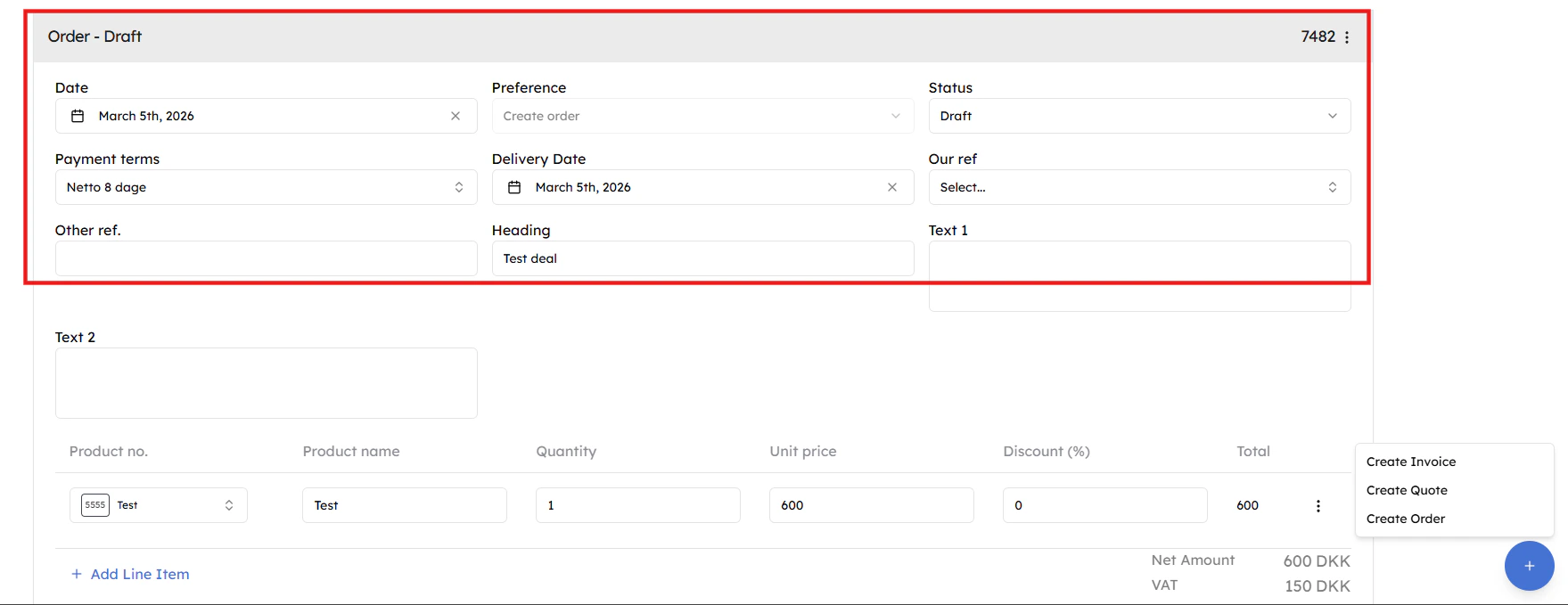
  <Step title="Complete Details">
    Review and update date, payment terms, delivery info, references, and line items, then choose the appropriate action (Invoice, Quote, or Order) to proceed
    <Frame>
      <img src="https://mintcdn.com/cloudify-c7720744/vbRT_M1td7Th601K/images/Screenshot-2026-04-12-000003.png?fit=max&auto=format&n=vbRT_M1td7Th601K&q=85&s=c41c7bbaa01b5c00c9bd4dabf072e7eb" alt="Screenshot 2026 04 12 000003" width="1759" height="679" data-path="images/Screenshot-2026-04-12-000003.png" />
    </Frame>
  </Step>

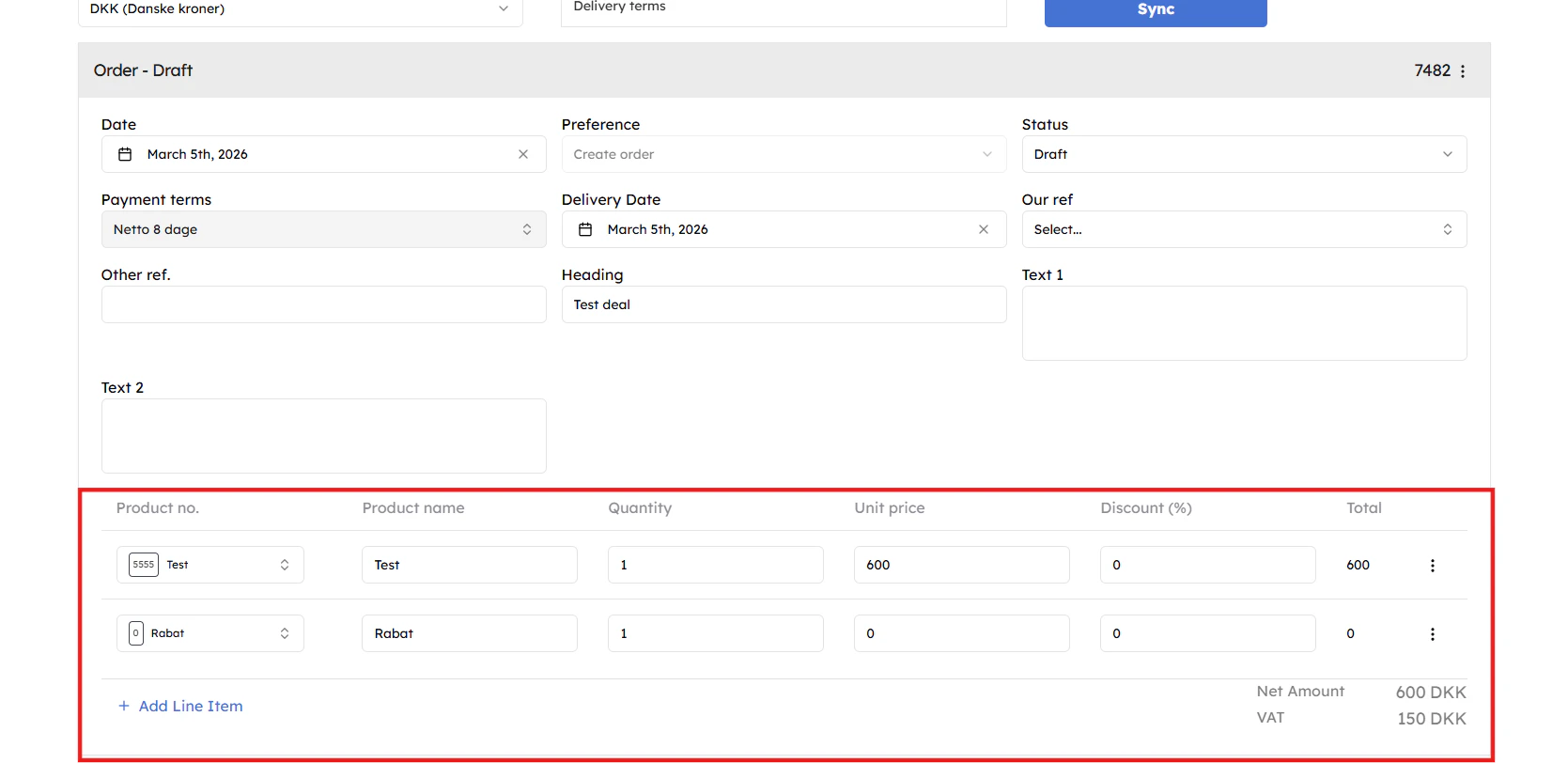
  <Step title="Add products">
    Add new products using the “**Add Line Item**” button to select from e-conomic or modify existing ones by deleting or cloning. You can also apply discounts for a customized and final invoice, order quote.
    <Frame>
      <img alt="Click + Add Line Item to add products, or Customize Accounts, Taxes and Amounts for item-level adjustments" lightAlt="Click + Add Line Item to add products, or Customize Accounts, Taxes and Amounts for item-level adjustments" darkAlt="Click + Add Line Item to add products, or Customize Accounts, Taxes and Amounts for item-level adjustments" src="https://mintcdn.com/cloudify-c7720744/vbRT_M1td7Th601K/images/Screenshot-2026-04-11-140124.png?fit=max&auto=format&n=vbRT_M1td7Th601K&q=85&s=1d580e294d1cac7ac38fd1b121a2654d" className="dark:hidden" width="1669" height="812" data-path="images/Screenshot-2026-04-11-140124.png" />

      <img alt="Click + Add Line Item to add products, or Customize Accounts, Taxes and Amounts for item-level adjustments" lightAlt="Click + Add Line Item to add products, or Customize Accounts, Taxes and Amounts for item-level adjustments" darkAlt="Click + Add Line Item to add products, or Customize Accounts, Taxes and Amounts for item-level adjustments" src="https://mintcdn.com/cloudify-c7720744/EIGlfGBzTycal6nZ/images/Screenshot2026-03-18023145.png" className="hidden dark:block" />
    </Frame>
  </Step>

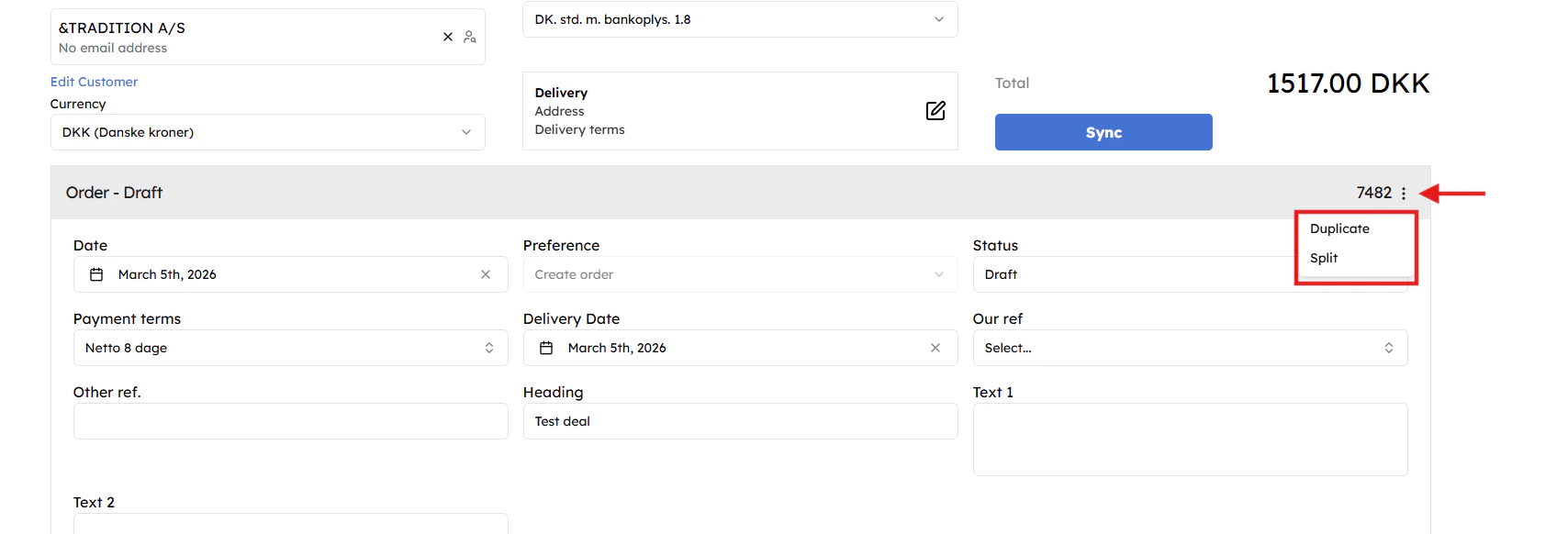
  <Step title="Adjust the invoice (Optional)">
    Click the **three-dots menu** to **Split** your invoice by percentage or **Duplicate** it.
    <Frame>
      <img alt="Use the three-dots menu to Split or Duplicate the invoice" lightAlt="Use the three-dots menu to Split or Duplicate the invoice" darkAlt="Use the three-dots menu to Split or Duplicate the invoice" src="https://mintcdn.com/cloudify-c7720744/vbRT_M1td7Th601K/images/Screenshot-2026-04-11-140219.png?fit=max&auto=format&n=vbRT_M1td7Th601K&q=85&s=a7e688d3146a4041cd0e6620c978260e" className="dark:hidden" width="1708" height="582" data-path="images/Screenshot-2026-04-11-140219.png" />

      <img alt="Use the three-dots menu to Split or Duplicate the invoice" lightAlt="Use the three-dots menu to Split or Duplicate the invoice" darkAlt="Use the three-dots menu to Split or Duplicate the invoice" src="https://mintcdn.com/cloudify-c7720744/EIGlfGBzTycal6nZ/images/Screenshot2026-03-18023403.png" className="hidden dark:block" />
    </Frame>
  </Step>

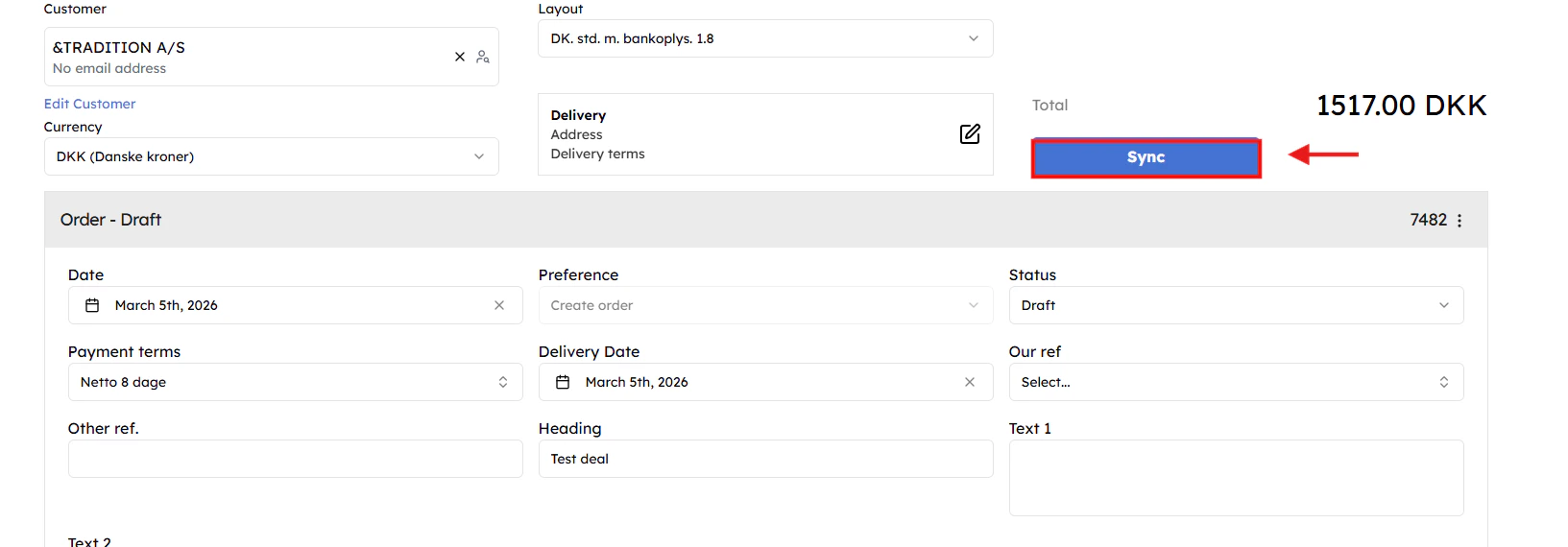
  <Step title="Finish and sync">
    Click **Sync** to push the draft to e-conomic. You can view the final invoice in the deal's attachments or notes.
    <Frame>
      <img alt="Click Save Progress to save for later, or Sync to Xero to push the invoice" lightAlt="Click Save Progress to save for later, or Sync to Xero to push the invoice" darkAlt="Click Save Progress to save for later, or Sync to Xero to push the invoice" src="https://mintcdn.com/cloudify-c7720744/vbRT_M1td7Th601K/images/Screenshot-2026-04-11-140311.png?fit=max&auto=format&n=vbRT_M1td7Th601K&q=85&s=3d6435e3a792019fc8932bab4f3b4770" className="dark:hidden" width="1633" height="570" data-path="images/Screenshot-2026-04-11-140311.png" />

      <img alt="Click Save Progress to save for later, or Sync to Xero to push the invoice" lightAlt="Click Save Progress to save for later, or Sync to Xero to push the invoice" darkAlt="Click Save Progress to save for later, or Sync to Xero to push the invoice" src="https://mintcdn.com/cloudify-c7720744/EIGlfGBzTycal6nZ/images/Screenshot2026-03-18023506.png" className="hidden dark:block" />
    </Frame>
  </Step>
</Steps>

***

<CardGroup cols={2} />
