> ## Documentation Index
> Fetch the complete documentation index at: https://docs.cloudify.biz/llms.txt
> Use this file to discover all available pages before exploring further.
# Overview
> Welcome to the HubSpot-QuickBooks Online Integration Setup Guide. This comprehensive resource will guide you through the process of connecting your HubSpot and QuickBooks accounts, enabling seamless data synchronization and workflow automation between these powerful platforms.
**Integration Benefits**
By integrating HubSpot with QuickBooks Online, your organization can:
1. Automate invoice generation based on HubSpot deal stages
2. Ensure real-time synchronization of customer data across both platforms
3. Access up-to-date financial insights directly within HubSpot
4. Significantly reduce time spent on manual data entry and reconciliation
5. Enhance financial reporting with integrated sales and accounting data
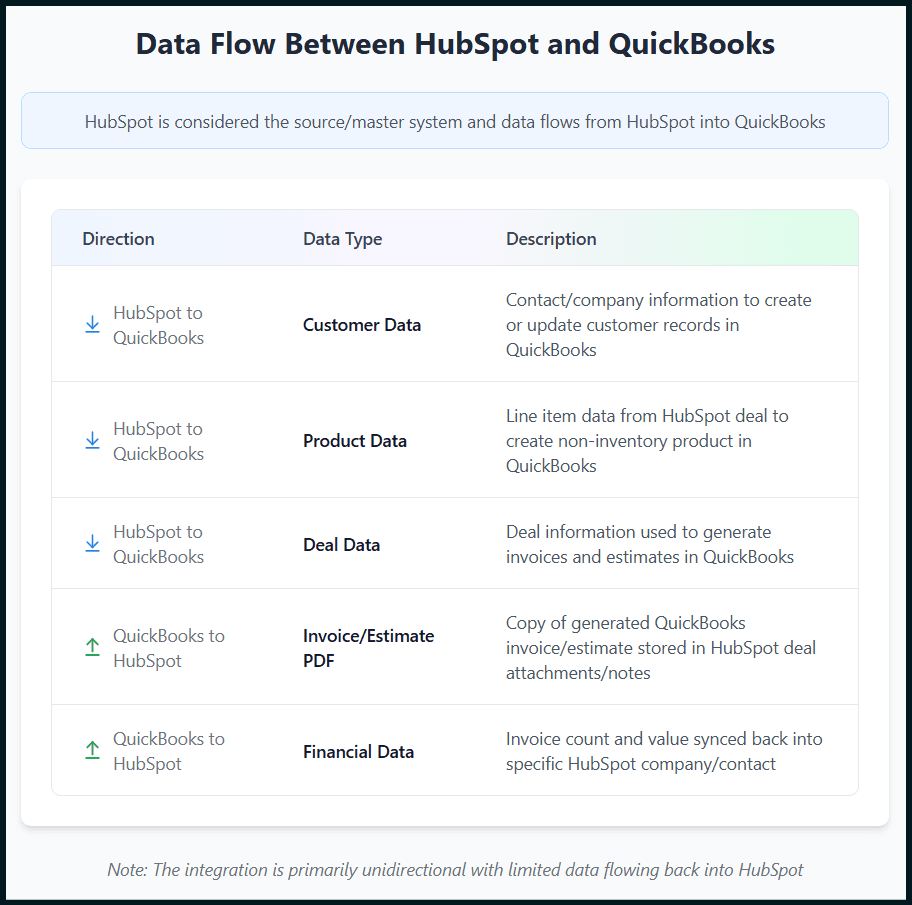
**Data Flow Between HubSpot and QuickBooks**
The table below shows what data is synced between HubSpot and QuickBooks. The data flow is largely unidirectional from HubSpot to QuickBooks, except for the invoice/estimate PDF copy imported back into HubSpot as well as paid/unpaid invoice data synced into HubSpot company/contact.
Always check the **Notes** section in your HubSpot deal to view the status of your integration run.
**Got unique integration needs?**\
Our custom team can build tailored integrations, specialized data mappings, and workflow automations to perfectly match your specific business processes.
[Advanced integration settings](https://custom.cloudify.biz/)