> ## Documentation Index
> Fetch the complete documentation index at: https://docs.cloudify.biz/llms.txt
> Use this file to discover all available pages before exploring further.
# Cancel your subscription
> How to cancel your HubSpot–Xero integration plan.
Cancelling stops all active syncs immediately. If you're on a paid plan, you won't be charged again but **no refunds** are issued for the current billing period.
## Steps to cancel
In HubSpot, click the **gear icon** in the top navigation bar to open **Settings**.
 Then navigate to **Integrations → Connected Apps**.
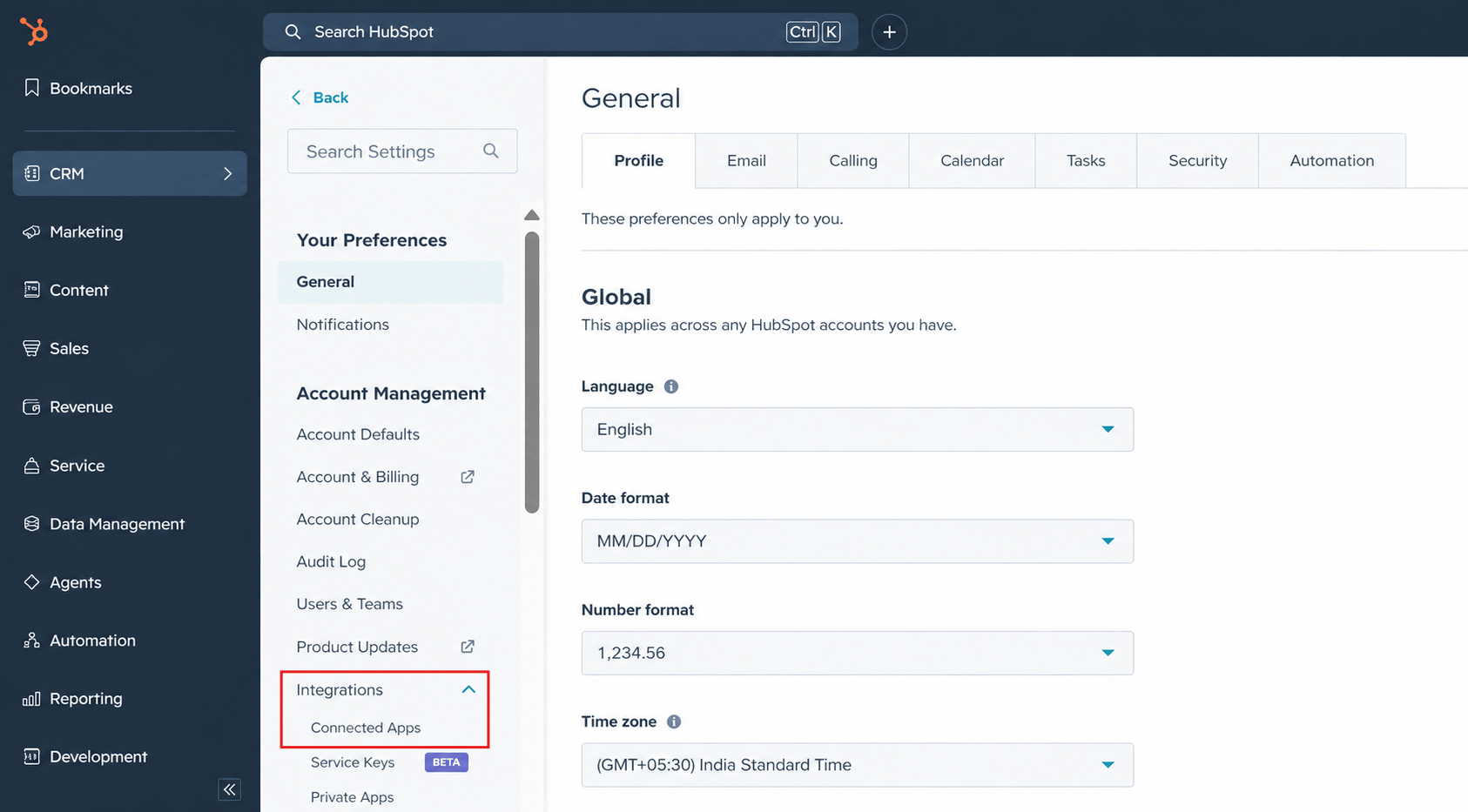 In the Connected Apps list, search for **Xero Integration by Cloudify** and click the app to open its detail page.
Inside the Cloudify app detail page, click **Actions → Go to settings**.
This opens the Cloudify subscription management page.
In the Connected Apps list, search for **Xero Integration by Cloudify** and click the app to open its detail page.
Inside the Cloudify app detail page, click **Actions → Go to settings**.
This opens the Cloudify subscription management page.
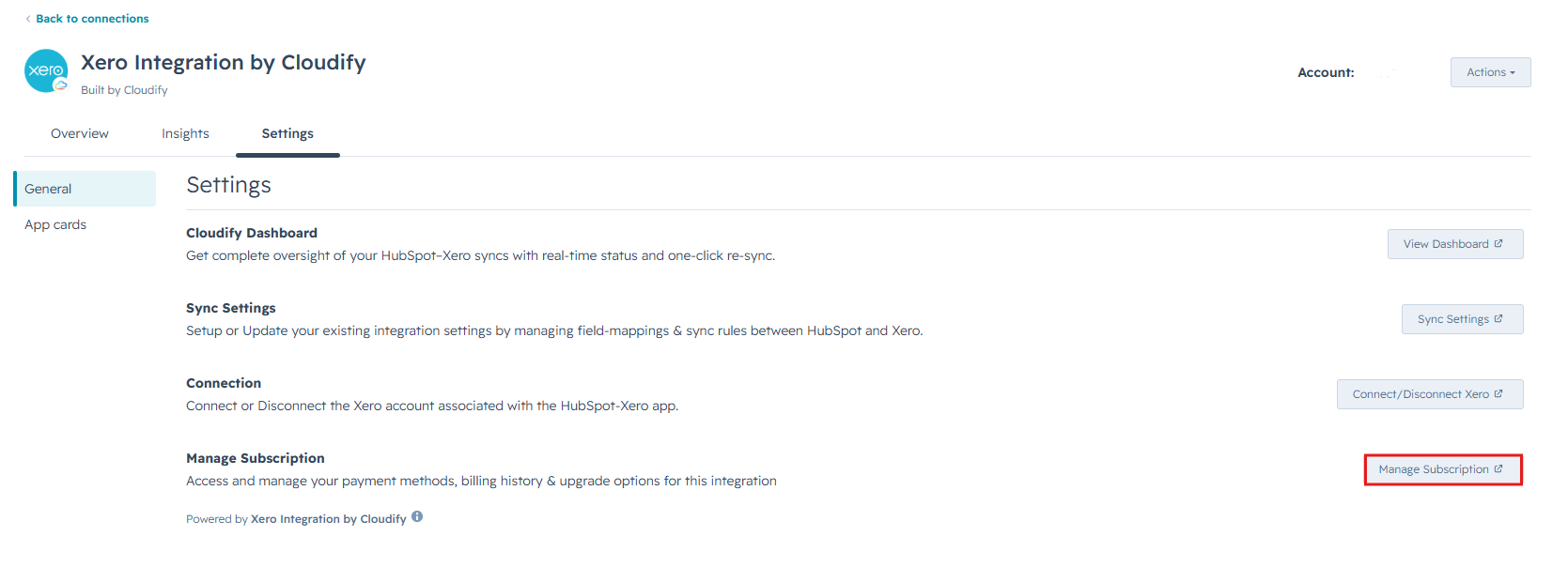 Click **Manage subscription**. You'll see your current plan details, billing cycle, and usage.
Click **Cancel subscription**. A confirmation prompt will appear — confirm to complete cancellation.
You'll receive an email receipt at your billing address.
Click **Manage subscription**. You'll see your current plan details, billing cycle, and usage.
Click **Cancel subscription**. A confirmation prompt will appear — confirm to complete cancellation.
You'll receive an email receipt at your billing address.
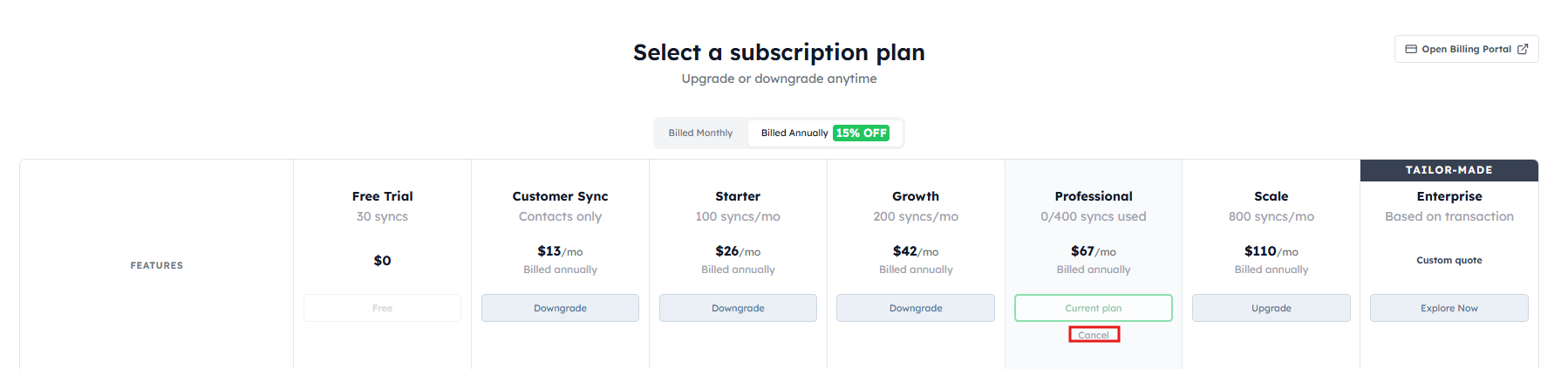 This action is immediate and cannot be undone. Your syncs will stop as soon as you confirm.
***
## What happens after cancellation
All syncs stop immediately upon cancellation.
Retained for 30 days. Reactivate within this window to restore everything.
No further charges. Your plan runs to the end of the current billing period.
You can reactivate your plan at any time within 30 days of cancellation.
***
## Custom solutions
Not finding a plan that fits your sync volume, workflow, or team structure? We build tailored integrations for companies with specific requirements — custom field mapping, enterprise data volumes, dedicated support, or bespoke automation logic.
[Get a custom quote for your business](https://meetings.hubspot.com/steveklein/custom-integration). We'll scope out exactly what you need.
***
## Help us improve
Before you go, we'd love to hear what we could have done better. Your feedback directly shapes what we build next — it takes about 2 minutes.
[Open the feedback form →](https://share.hsforms.com/1pVUfBFBqSri1CBahsbRUIA348k8)
This action is immediate and cannot be undone. Your syncs will stop as soon as you confirm.
***
## What happens after cancellation
All syncs stop immediately upon cancellation.
Retained for 30 days. Reactivate within this window to restore everything.
No further charges. Your plan runs to the end of the current billing period.
You can reactivate your plan at any time within 30 days of cancellation.
***
## Custom solutions
Not finding a plan that fits your sync volume, workflow, or team structure? We build tailored integrations for companies with specific requirements — custom field mapping, enterprise data volumes, dedicated support, or bespoke automation logic.
[Get a custom quote for your business](https://meetings.hubspot.com/steveklein/custom-integration). We'll scope out exactly what you need.
***
## Help us improve
Before you go, we'd love to hear what we could have done better. Your feedback directly shapes what we build next — it takes about 2 minutes.
[Open the feedback form →](https://share.hsforms.com/1pVUfBFBqSri1CBahsbRUIA348k8)