> ## Documentation Index
> Fetch the complete documentation index at: https://docs.cloudify.biz/llms.txt
> Use this file to discover all available pages before exploring further.
# FAQs - Frequently Asked Questions
**IMPORTANT**: Always check the **"All"** subsection under the **History** section of your Pipedrive deals to view the status of your integration run.
This integration helps you:
Turn your Pipedrive deals into Fortnox invoices or orders
Keep your Pipedrive and Fortnox product and customer data in sync
View financial information within Pipedrive contacts
Track sync-status in your deal notes
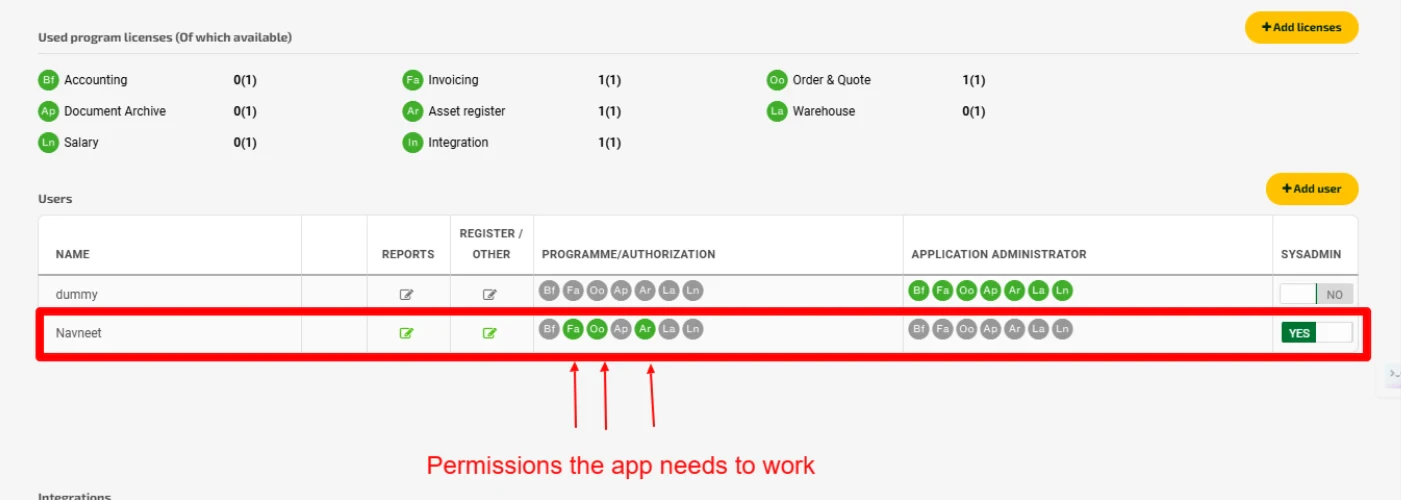
Fortnox requires a few scopes enabled before you can create an invoice or order:Fa: InvoiceOo: Order & QuoteAr: Asset register
If you are looking to create an invoice, then please ensure that Fa and Ar are enabledIf you are creating an order, then you would need Oo and ArRequired scopes are shown in the image below:
 Expand the "History" section in your Pipedrive deal to view the integration updates. You will find the PDF copy of the successful invoice/order attached. If the integration ran into any errors, error logs will be shown as well. You can make necessary changes and then click on the 'Replay' button in the notes to re-run the integration.
Set up triggers for specific deal stages in My apps > Fortnox Integration > Settings > Invoice/Order
No. The integration only creates a draft invoice/order in Fortnox. It won't be automatically sent to your customers. You'll need to send it to your customer manually for now.
No. You can only connect one Fortnox account to one Pipedrive account at a time. However, you can connect a new Fortnox account if needed, by disconnecting the existing Fortnox connection.
The integration syncs customer and product data from Pipedrive to Fortnox only, not the other way around.
To resolve this issue, you need to enable Products in your Pipedrive account:
* Click on your profile icon in the top-right corner of Pipedrive
* Select "Tools and apps" from the dropdown menu
* Click on "Products"
* Click the button to enable products for your company
In that case, user will have to go with automatic deal to invoice flow where they can select draft document creation (will have to delete it later from their accounting system if they don't want it). This will ensure that customers and products gets updated in accounting system.
Yes. The integration will create a new customer record in Fortnox using the information from your Pipedrive person/organization added in the deal.
The app provides you three options to choose from if a product from Pipedrive is not found in Fortnox:
* Take no action by skipping invoice/order generation
* Choose from a default product that serves as a placeholder
* Create a new product in Fortnox
Check:
* Your Pipedrive deal notes for any sync errors
* Your Fortnox connection status
* If needed, try the "Replay" option in deal notes
Contact [support@cloudify.biz](mailto:support@cloudify.biz) if issues persist
Use the "**Replay**" option in your deal's history notes. This allows you to retry any failed sy
No. Failed integration attempts are not counted towards your usage. You will only be charged for successful invoice/order creations.
* Go to **Organizations** or **Persons** in Pipedrive.
* In the left-hand panel, locate the **Fortnox Sync** card.
* Select any timeline and click **Update**.
The integration will then search for the corresponding customer in Fortnox. If the customer is found, it will retrieve and display the latest financial data. If no matching customer exists, the integration will automatically create a new customer in Fortnox based on your customer sync settings
**Got unique integration needs?**
Expand the "History" section in your Pipedrive deal to view the integration updates. You will find the PDF copy of the successful invoice/order attached. If the integration ran into any errors, error logs will be shown as well. You can make necessary changes and then click on the 'Replay' button in the notes to re-run the integration.
Set up triggers for specific deal stages in My apps > Fortnox Integration > Settings > Invoice/Order
No. The integration only creates a draft invoice/order in Fortnox. It won't be automatically sent to your customers. You'll need to send it to your customer manually for now.
No. You can only connect one Fortnox account to one Pipedrive account at a time. However, you can connect a new Fortnox account if needed, by disconnecting the existing Fortnox connection.
The integration syncs customer and product data from Pipedrive to Fortnox only, not the other way around.
To resolve this issue, you need to enable Products in your Pipedrive account:
* Click on your profile icon in the top-right corner of Pipedrive
* Select "Tools and apps" from the dropdown menu
* Click on "Products"
* Click the button to enable products for your company
In that case, user will have to go with automatic deal to invoice flow where they can select draft document creation (will have to delete it later from their accounting system if they don't want it). This will ensure that customers and products gets updated in accounting system.
Yes. The integration will create a new customer record in Fortnox using the information from your Pipedrive person/organization added in the deal.
The app provides you three options to choose from if a product from Pipedrive is not found in Fortnox:
* Take no action by skipping invoice/order generation
* Choose from a default product that serves as a placeholder
* Create a new product in Fortnox
Check:
* Your Pipedrive deal notes for any sync errors
* Your Fortnox connection status
* If needed, try the "Replay" option in deal notes
Contact [support@cloudify.biz](mailto:support@cloudify.biz) if issues persist
Use the "**Replay**" option in your deal's history notes. This allows you to retry any failed sy
No. Failed integration attempts are not counted towards your usage. You will only be charged for successful invoice/order creations.
* Go to **Organizations** or **Persons** in Pipedrive.
* In the left-hand panel, locate the **Fortnox Sync** card.
* Select any timeline and click **Update**.
The integration will then search for the corresponding customer in Fortnox. If the customer is found, it will retrieve and display the latest financial data. If no matching customer exists, the integration will automatically create a new customer in Fortnox based on your customer sync settings
**Got unique integration needs?**
Our custom team can build tailored integrations, specialized data mappings, and workflow automations to perfectly match your specific business processes.
[Advanced integration settings](https://custom.cloudify.biz/)