> ## Documentation Index
> Fetch the complete documentation index at: https://docs.cloudify.biz/llms.txt
> Use this file to discover all available pages before exploring further.
# Invoice Sync Settings
This page controls when invoices are created in Exact Online, what type they are, what extra details get included, and how invoice data fields are mapped from your Shopify orders.
***
## Sync Rules
### Automatically create Exact Online invoices
When this toggle is **on**, the integration creates invoices in Exact Online automatically — no manual action needed on your end.
Turn it **off** if you prefer to create invoices manually from the dashboard. This gives you full control over which orders get invoiced and when.
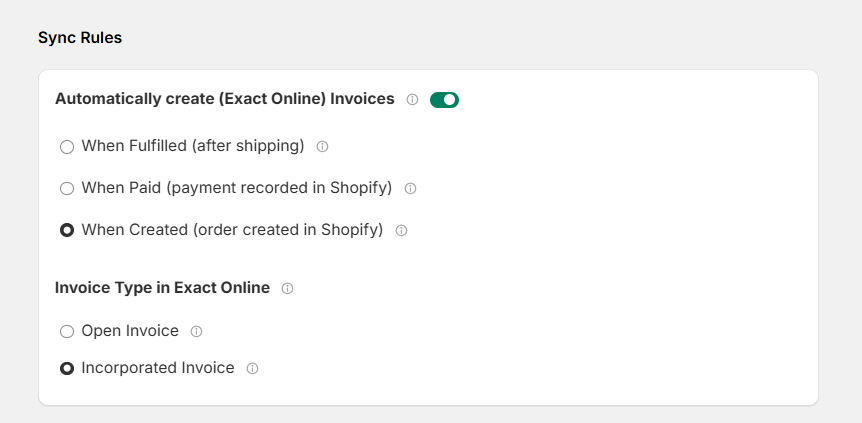 #### When should the invoice be created?
Choose the Shopify order status that triggers invoice creation:
| Option | When it triggers |
| ---------------------------- | ----------------------------------------- |
| **When Fulfilled** | After the order has been shipped |
| **When Paid** | As soon as payment is recorded in Shopify |
| **When Created** *(default)* | The moment the order is placed in Shopify |
Pick the trigger that matches your business flow. If you invoice before shipping, use **When Created**. If you only invoice after goods are dispatched, use **When Fulfilled**.
### Invoice type in Exact Online
Choose how the invoice is created in Exact Online:
#### When should the invoice be created?
Choose the Shopify order status that triggers invoice creation:
| Option | When it triggers |
| ---------------------------- | ----------------------------------------- |
| **When Fulfilled** | After the order has been shipped |
| **When Paid** | As soon as payment is recorded in Shopify |
| **When Created** *(default)* | The moment the order is placed in Shopify |
Pick the trigger that matches your business flow. If you invoice before shipping, use **When Created**. If you only invoice after goods are dispatched, use **When Fulfilled**.
### Invoice type in Exact Online
Choose how the invoice is created in Exact Online:
 | Type | What it means |
| ------------------------ | ------------------------------------------------------------------------------------------------------------- |
| **Open Invoice** | The invoice is created as a draft — it's open and can still be edited in Exact Online before being finalized. |
| **Incorporated Invoice** | The invoice is created as processed (incorporated) — it's immediately finalized and posted to your accounts. |
Use **Open Invoice** if your team reviews invoices before posting them. Use **Incorporated Invoice** if you want everything finalized automatically without any manual step in Exact Online.
***
## Additional Options
Fine-tune how the integration handles shipping charges, refunds, and other invoice details.
| Type | What it means |
| ------------------------ | ------------------------------------------------------------------------------------------------------------- |
| **Open Invoice** | The invoice is created as a draft — it's open and can still be edited in Exact Online before being finalized. |
| **Incorporated Invoice** | The invoice is created as processed (incorporated) — it's immediately finalized and posted to your accounts. |
Use **Open Invoice** if your team reviews invoices before posting them. Use **Incorporated Invoice** if you want everything finalized automatically without any manual step in Exact Online.
***
## Additional Options
Fine-tune how the integration handles shipping charges, refunds, and other invoice details.
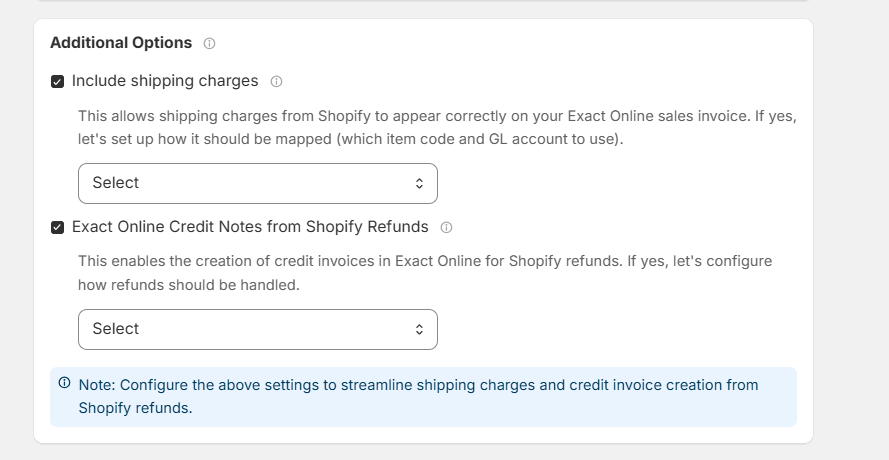 ### Include shipping charges
When enabled, any shipping cost on the Shopify order is added as a separate line on the Exact Online invoice — so your invoice reflects the full amount the customer was charged.
You'll also select which **item code** and **GL account** to use for shipping lines, so they're posted correctly in your books.
### Exact Online credit notes from Shopify refunds
When a customer gets a refund in Shopify, this option automatically creates a matching **credit note** in Exact Online — keeping your accounting in sync without any manual work.
You can configure exactly how refunds should be handled using the dropdown that appears when this option is enabled.
Configure both shipping and refund settings before going live. Leaving these on **Select** means the integration won't know where to post those amounts when they come through.
***
## Field Mappings
Field mappings control which Shopify order data gets written into the invoice header in Exact Online.
### Include shipping charges
When enabled, any shipping cost on the Shopify order is added as a separate line on the Exact Online invoice — so your invoice reflects the full amount the customer was charged.
You'll also select which **item code** and **GL account** to use for shipping lines, so they're posted correctly in your books.
### Exact Online credit notes from Shopify refunds
When a customer gets a refund in Shopify, this option automatically creates a matching **credit note** in Exact Online — keeping your accounting in sync without any manual work.
You can configure exactly how refunds should be handled using the dropdown that appears when this option is enabled.
Configure both shipping and refund settings before going live. Leaving these on **Select** means the integration won't know where to post those amounts when they come through.
***
## Field Mappings
Field mappings control which Shopify order data gets written into the invoice header in Exact Online.
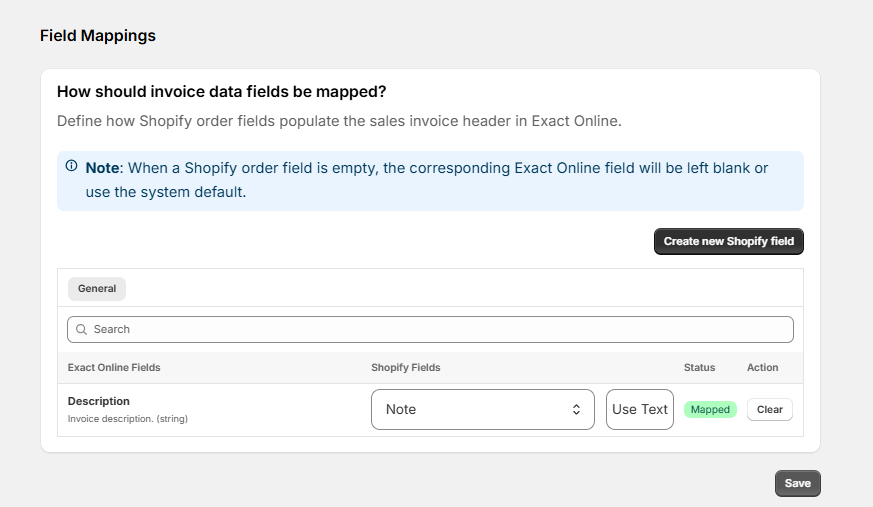 Out of the box, the following is pre-mapped:
| Exact Online field | Pulled from Shopify |
| ------------------ | ------------------- |
| Description | Order Note |
If a Shopify field is empty on an order, the corresponding Exact Online field will either be left blank or fall back to the system default.
You can add more mappings using the **Create new Shopify field** button — for example, mapping a Shopify order tag or custom field to an Exact Online invoice field.
Click **Save** after making any changes. Nothing takes effect until you save.
Out of the box, the following is pre-mapped:
| Exact Online field | Pulled from Shopify |
| ------------------ | ------------------- |
| Description | Order Note |
If a Shopify field is empty on an order, the corresponding Exact Online field will either be left blank or fall back to the system default.
You can add more mappings using the **Create new Shopify field** button — for example, mapping a Shopify order tag or custom field to an Exact Online invoice field.
Click **Save** after making any changes. Nothing takes effect until you save.