> ## Documentation Index
> Fetch the complete documentation index at: https://docs.cloudify.biz/llms.txt
> Use this file to discover all available pages before exploring further.
# Bookkeeping
> Automate Shopify payout reconciliation in Xero — journal entries for payments, fees, and payouts.
The Bookkeeping section lets you automate how Shopify payouts are recorded in Xero. When enabled, the integration creates journal entries for Shopify Payments, fees, and bank payouts — so your books stay accurate without manual work.
***
## How Bookkeeping Works
Understanding how your Shopify transactions move to Xero helps you keep track of your cash flow and reconciliation.
### The 3-Step Process
As soon as a customer pays, the app creates a draft entry in Xero to record the sale and the expected funds.
→ **Invoice created in Xero**
Payments are held by your processor (Stripe/PayPal) in a "Clearing Account" until they are ready to be paid out to your bank.
→ **Funds tracked in clearing account**
When the payout hits your bank, the system automatically moves the funds from the clearing account to your bank account and records any fees.
### Automatic Accounting Entries
Here's what a typical payout looks like when it's recorded in Xero:
| Entry | Amount | What It Means |
| ------------ | --------- | ----------------------------------------- |
| **Clearing** | −\$250.00 | The payment leaves the clearing account |
| **Fee** | −\$7.50 | Shopify's processing fee is deducted |
| **Bank** | +\$242.50 | The net amount lands in your bank account |
The net amount (\$242.50) is balanced against your bank statement automatically.
***
## Enable Bookkeeping
Toggle **Automated Bookkeeping Sync** to enable or disable this feature. When disabled, no payout-related journal entries are created in Xero.
Click **Save** after toggling.
***
## Payout Mode
Choose how payouts are recorded in Xero:
 Cloudify will automatically push your payout data into the Xero journal. No manual action needed — payouts sync as they happen.
Your payouts from Shopify will be available in the Cloudify Dashboard. You can review them and push to Xero manually when you're ready.
***
## Journal Entry Preferences
**Not applicable for Draft Invoices.** Journal entries are only created when your invoice type is set to something other than Draft.
This section lets you set up preferences for adding journal entries to Xero. Journal entries can be created for Shopify Payments (to record customer payments), Shopify fees, and payouts to your bank account. This ensures accurate bookkeeping, with each entry going into the correct journal and account.
Shopify processes merchant payouts cumulatively by consolidating multiple payouts and disbursing the total amount in a scheduled transaction. Set your preferences for journal entries using the settings below.
You can click **"Send to accountant"** to share these settings with your accountant for review.
### Bookkeeping Settings
Configure which Xero accounts each type of transaction is posted to:
Cloudify will automatically push your payout data into the Xero journal. No manual action needed — payouts sync as they happen.
Your payouts from Shopify will be available in the Cloudify Dashboard. You can review them and push to Xero manually when you're ready.
***
## Journal Entry Preferences
**Not applicable for Draft Invoices.** Journal entries are only created when your invoice type is set to something other than Draft.
This section lets you set up preferences for adding journal entries to Xero. Journal entries can be created for Shopify Payments (to record customer payments), Shopify fees, and payouts to your bank account. This ensures accurate bookkeeping, with each entry going into the correct journal and account.
Shopify processes merchant payouts cumulatively by consolidating multiple payouts and disbursing the total amount in a scheduled transaction. Set your preferences for journal entries using the settings below.
You can click **"Send to accountant"** to share these settings with your accountant for review.
### Bookkeeping Settings
Configure which Xero accounts each type of transaction is posted to:
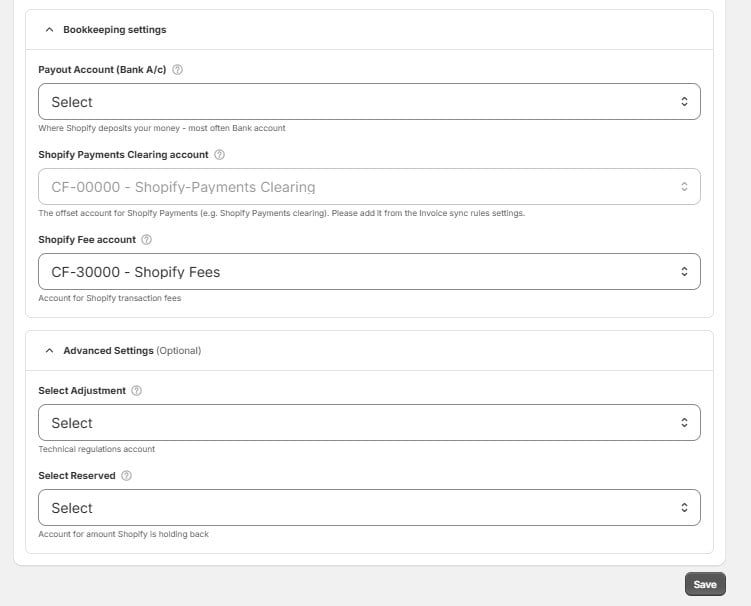 | Setting | Xero Account | Purpose |
| ------------------------------------- | -------------------------------------- | ---------------------------------------------------------------------------------------------------------------------- |
| **Payout Account (Bank A/c)** | Select your bank account | Where Shopify deposits your money — most often your Bank account. |
| **Shopify Payments Clearing account** | `CF-00000` — Shopify-Payments Clearing | The offset account for Shopify Payments (e.g. Shopify Payments clearing). Add it from the Invoice sync rules settings. |
| **Shopify Fee account** | `CF-30000` — Shopify Fees | Account for Shopify transaction fees. |
| **Select Adjustment** | Select | Technical regulations account. |
| **Select Reserved** | Select | Account for amount Shopify is holding back. |
Click **Save** when you're done configuring your bookkeeping accounts.
The Shopify Payments Clearing account and Shopify Fee account are **Cloudify-generated accounts** in Xero. The Payout Account, Adjustment, and Reserved accounts need to be selected from your existing Xero chart of accounts.
| Setting | Xero Account | Purpose |
| ------------------------------------- | -------------------------------------- | ---------------------------------------------------------------------------------------------------------------------- |
| **Payout Account (Bank A/c)** | Select your bank account | Where Shopify deposits your money — most often your Bank account. |
| **Shopify Payments Clearing account** | `CF-00000` — Shopify-Payments Clearing | The offset account for Shopify Payments (e.g. Shopify Payments clearing). Add it from the Invoice sync rules settings. |
| **Shopify Fee account** | `CF-30000` — Shopify Fees | Account for Shopify transaction fees. |
| **Select Adjustment** | Select | Technical regulations account. |
| **Select Reserved** | Select | Account for amount Shopify is holding back. |
Click **Save** when you're done configuring your bookkeeping accounts.
The Shopify Payments Clearing account and Shopify Fee account are **Cloudify-generated accounts** in Xero. The Payout Account, Adjustment, and Reserved accounts need to be selected from your existing Xero chart of accounts.