> ## Documentation Index
> Fetch the complete documentation index at: https://docs.cloudify.biz/llms.txt
> Use this file to discover all available pages before exploring further.
# Invoice Sync Rules
> Control when Xero invoices are created, what type they are, and how shipping and refunds are handled.
The Invoice tab controls **when** and **how** Xero invoices are generated from your Shopify orders. There are two sections: **Sync Rules** and **Additional Options**.
***
## Sync Rules
### Automatically Create (Xero) Invoices
This toggle controls whether invoices are created in Xero automatically when a Shopify order reaches a certain status.
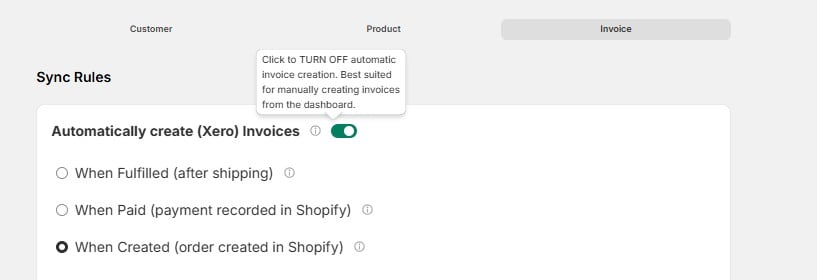 **When enabled**, choose the trigger that fits your workflow:
| Trigger | When the Invoice Is Created |
| ------------------------------------------- | ------------------------------------------------------------------- |
| **When Fulfilled** (after shipping) | Invoice is created once you mark the order as fulfilled in Shopify. |
| **When Paid** (payment recorded in Shopify) | Invoice is created once payment is confirmed. |
| **When Created** (order created in Shopify) | Invoice is created immediately when the order is placed. |
Turn this **off** if you prefer to create invoices manually from the Cloudify dashboard instead of using automated triggers.
### Invoice Type in Xero
Choose what type of invoice is generated in Xero:
**When enabled**, choose the trigger that fits your workflow:
| Trigger | When the Invoice Is Created |
| ------------------------------------------- | ------------------------------------------------------------------- |
| **When Fulfilled** (after shipping) | Invoice is created once you mark the order as fulfilled in Shopify. |
| **When Paid** (payment recorded in Shopify) | Invoice is created once payment is confirmed. |
| **When Created** (order created in Shopify) | Invoice is created immediately when the order is placed. |
Turn this **off** if you prefer to create invoices manually from the Cloudify dashboard instead of using automated triggers.
### Invoice Type in Xero
Choose what type of invoice is generated in Xero:
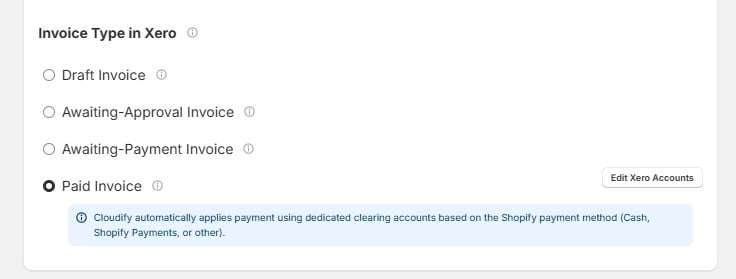 | Invoice Type | What It Means |
| ----------------------------- | ------------------------------------------------------------------------------------------------------- |
| **Draft Invoice** | Created as a draft — you or your accountant review and approve it before it's finalized. |
| **Awaiting-Approval Invoice** | Created and queued for approval in Xero. |
| **Awaiting-Payment Invoice** | Created as approved and ready for payment. |
| **Paid Invoice** | Created and marked as fully paid immediately. Payment is applied automatically using clearing accounts. |
Pick the type that matches your accounting workflow. If you're unsure, **Draft Invoice** is the safest starting point — it gives you a chance to review before anything is finalized.
### Paid Invoice — Payment Accounts
When you select **Paid Invoice**, Cloudify automatically applies payment using dedicated clearing accounts based on the Shopify payment method (Cash, Shopify Payments, or other).
| Invoice Type | What It Means |
| ----------------------------- | ------------------------------------------------------------------------------------------------------- |
| **Draft Invoice** | Created as a draft — you or your accountant review and approve it before it's finalized. |
| **Awaiting-Approval Invoice** | Created and queued for approval in Xero. |
| **Awaiting-Payment Invoice** | Created as approved and ready for payment. |
| **Paid Invoice** | Created and marked as fully paid immediately. Payment is applied automatically using clearing accounts. |
Pick the type that matches your accounting workflow. If you're unsure, **Draft Invoice** is the safest starting point — it gives you a chance to review before anything is finalized.
### Paid Invoice — Payment Accounts
When you select **Paid Invoice**, Cloudify automatically applies payment using dedicated clearing accounts based on the Shopify payment method (Cash, Shopify Payments, or other).
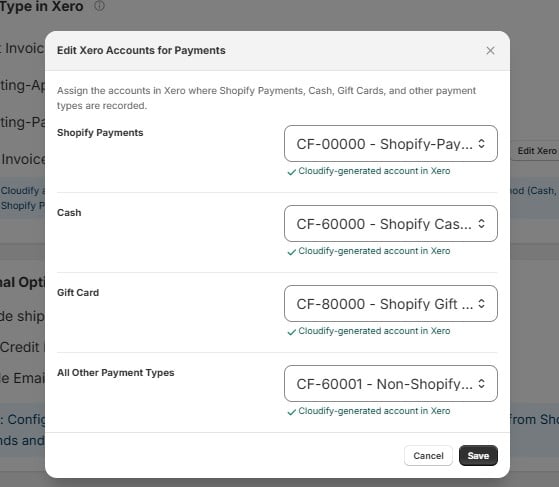 Click **"Edit Xero Accounts"** to configure which Xero account each payment type is recorded to:
| Shopify Payment Type | Xero Account |
| --------------------------- | ------------------------------------------ |
| **Shopify Payments** | `CF-00000` — Shopify-Payments Clearing |
| **Cash** | `CF-60000` — Shopify Cash Clearing |
| **Gift Card** | `CF-80000` — Shopify Gift Cards |
| **All Other Payment Types** | `CF-60001` — Non-Shopify Payments Clearing |
These are **Cloudify-generated accounts** in Xero. They're created automatically — you don't need to set them up manually, but you can reassign them to different accounts if needed.
***
## Additional Options
These settings let you configure shipping, refunds, and email notifications on your Xero invoices.
### Include Shipping Charges
**Include shipping charges**
Enable this to have shipping charges appear as a line item on your Xero invoice. Once enabled, select how shipping should be represented in Xero (e.g. which account or item it maps to).
### Xero Credit Notes from Shopify Refunds
**Xero Credit Notes from Shopify Refunds**
Enable this to automatically create credit notes in Xero when a refund is issued in Shopify. Once enabled, configure how refunds are handled in Xero (e.g. which account they're posted to).
### Enable Email Notification
**Enable Email Notification**
Enable this to send automated invoice emails to your customers from Xero when an invoice is created.
Configure the above settings to streamline shipping charges, credit note creation from Shopify refunds, and manage automated invoice emails to your customers.
Click **"Edit Xero Accounts"** to configure which Xero account each payment type is recorded to:
| Shopify Payment Type | Xero Account |
| --------------------------- | ------------------------------------------ |
| **Shopify Payments** | `CF-00000` — Shopify-Payments Clearing |
| **Cash** | `CF-60000` — Shopify Cash Clearing |
| **Gift Card** | `CF-80000` — Shopify Gift Cards |
| **All Other Payment Types** | `CF-60001` — Non-Shopify Payments Clearing |
These are **Cloudify-generated accounts** in Xero. They're created automatically — you don't need to set them up manually, but you can reassign them to different accounts if needed.
***
## Additional Options
These settings let you configure shipping, refunds, and email notifications on your Xero invoices.
### Include Shipping Charges
**Include shipping charges**
Enable this to have shipping charges appear as a line item on your Xero invoice. Once enabled, select how shipping should be represented in Xero (e.g. which account or item it maps to).
### Xero Credit Notes from Shopify Refunds
**Xero Credit Notes from Shopify Refunds**
Enable this to automatically create credit notes in Xero when a refund is issued in Shopify. Once enabled, configure how refunds are handled in Xero (e.g. which account they're posted to).
### Enable Email Notification
**Enable Email Notification**
Enable this to send automated invoice emails to your customers from Xero when an invoice is created.
Configure the above settings to streamline shipping charges, credit note creation from Shopify refunds, and manage automated invoice emails to your customers.