> ## Documentation Index
> Fetch the complete documentation index at: https://docs.cloudify.biz/llms.txt
> Use this file to discover all available pages before exploring further.
# Overview
Welcome to the official setup guide for the Shopify to e-conomic integration. This comprehensive guide will walk you through connecting your Shopify store and e-conomic accounting system, from initial installation to advanced configuration. By the end, you'll have a fully automated financial workflow that transforms your e-commerce operations.
**Integration Benefits**
By integrating Shopify with e-conomic, your organization can:
* Effortlessly generate invoices in e-conomic directly from Shopify orders.
* Automate journal entries for Shopify payouts, fees, and refunds in e-conomic.
* Quickly retry failed invoice syncs with a single click when errors occur.
* Seamlessly synchronize product and customer data across both platforms.
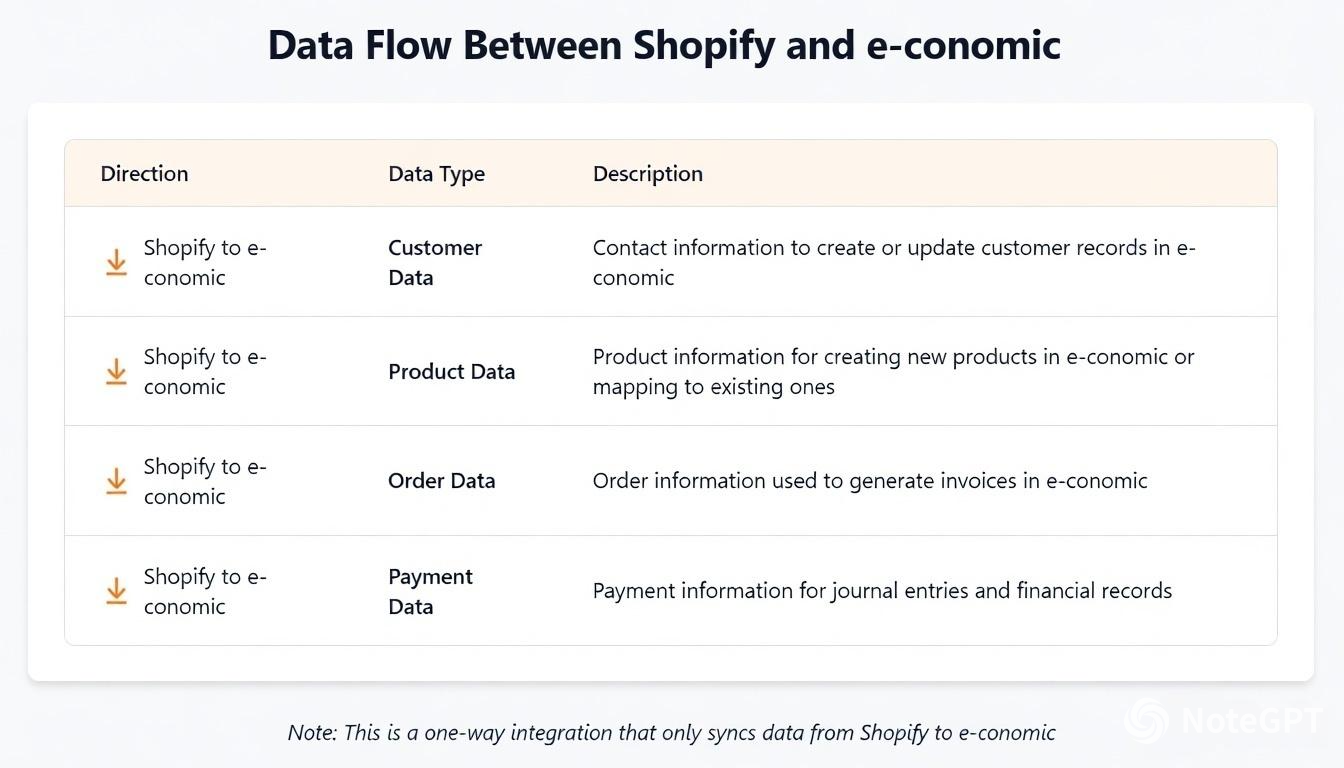
### Data Flow Between Shopify and e-conomic
The table below shows what data is synced between Shopify and Visma e-conomic. The data flow is unidirectional from Shopify to Visma e-conomic except for the invoice number synced back into Shopify order notes.
Click on the image below to enlarge it.