> ## Documentation Index
> Fetch the complete documentation index at: https://docs.cloudify.biz/llms.txt
> Use this file to discover all available pages before exploring further.
# Bookkeeping
> Set up automated journal entries for Shopify payments, fees, and payouts in e-conomic
The Bookkeeping page controls how your Shopify payouts, payments, and fees are recorded as journal entries in e-conomic.
You find it in the app menu under **Bookkeeping**.
Click **How bookkeeping works** in the top right corner of the page for a short explanation directly inside the app.
Bookkeeping is only applicable for **Booked Invoices**. If your Invoice Type is set to Draft Invoice, this section does not apply.
## Bookkeeping toggle
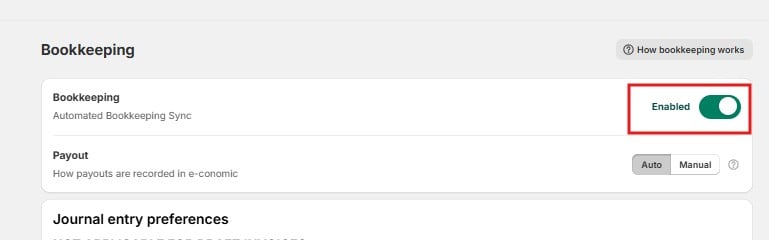
**Bookkeeping (Automated Bookkeeping Sync)** – turns the bookkeeping sync on or off. When enabled, the app creates journal entries in e-conomic based on the preferences you set below.
 ## Payout
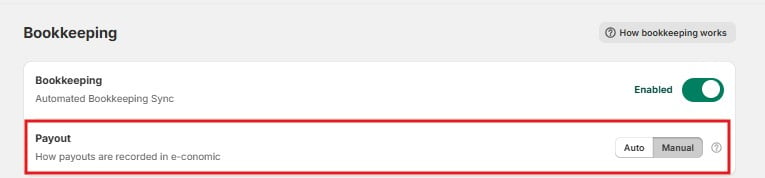
This setting controls how payouts are recorded in e-conomic:
* **Manual** – your payouts from Shopify are made available in the Cloudify Dashboard, and you push them to e-conomic manually. This lets you review each payout before it is recorded.
* **Auto** – Cloudify automatically pushes your payout data into the e-conomic journal, with no manual step.
Start in Manual mode. Review and test your journal entries first, and switch to Auto only once you are confident the entries are correct.
## Payout
This setting controls how payouts are recorded in e-conomic:
* **Manual** – your payouts from Shopify are made available in the Cloudify Dashboard, and you push them to e-conomic manually. This lets you review each payout before it is recorded.
* **Auto** – Cloudify automatically pushes your payout data into the e-conomic journal, with no manual step.
Start in Manual mode. Review and test your journal entries first, and switch to Auto only once you are confident the entries are correct.
 ## Journal entry preferences
This section sets up how journal entries are added to e-conomic. Journal entries are created for:
* **Shopify Payments** – to record customer payments
* **Shopify fees** – the transaction fees Shopify charges you
* **Payouts to your bank account** – the money Shopify transfers to you
> **Each entry goes into the journal and account you specify here. If you're unsure which accounts to pick, click *Send to accountant* and let your accountant choose.**
Shopify processes merchant payouts cumulatively: multiple payouts are consolidated and disbursed as one scheduled transaction. The journal entries reflect this.
The four main fields:
## Journal entry preferences
This section sets up how journal entries are added to e-conomic. Journal entries are created for:
* **Shopify Payments** – to record customer payments
* **Shopify fees** – the transaction fees Shopify charges you
* **Payouts to your bank account** – the money Shopify transfers to you
> **Each entry goes into the journal and account you specify here. If you're unsure which accounts to pick, click *Send to accountant* and let your accountant choose.**
Shopify processes merchant payouts cumulatively: multiple payouts are consolidated and disbursed as one scheduled transaction. The journal entries reflect this.
The four main fields:
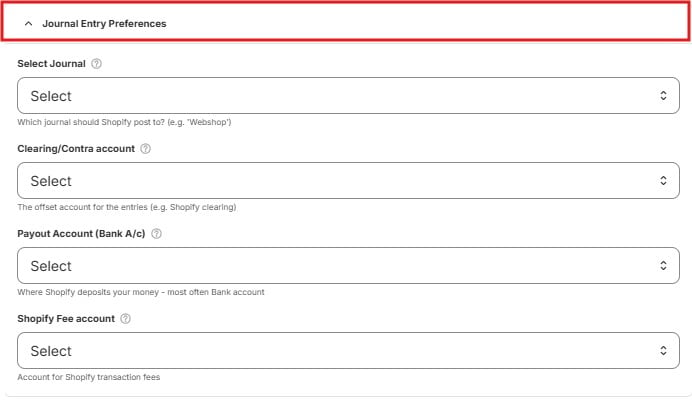 * **Select Journal** – the journal in e-conomic where Shopify entries are posted, for example a journal named "Webshop".
* **Clearing/Contra account** – the offset account for the entries, for example a Shopify clearing account. This is a temporary "waiting" account that holds amounts until the money arrives in your bank.
* **Payout Account (Bank A/c)** – where Shopify deposits your money, most often your bank account.
* **Shopify Fee account** – the account where Shopify transaction fees are recorded as a cost.
## Advanced Settings (optional)
Three additional accounts for less common amounts in your payouts:
* **Select Journal** – the journal in e-conomic where Shopify entries are posted, for example a journal named "Webshop".
* **Clearing/Contra account** – the offset account for the entries, for example a Shopify clearing account. This is a temporary "waiting" account that holds amounts until the money arrives in your bank.
* **Payout Account (Bank A/c)** – where Shopify deposits your money, most often your bank account.
* **Shopify Fee account** – the account where Shopify transaction fees are recorded as a cost.
## Advanced Settings (optional)
Three additional accounts for less common amounts in your payouts:
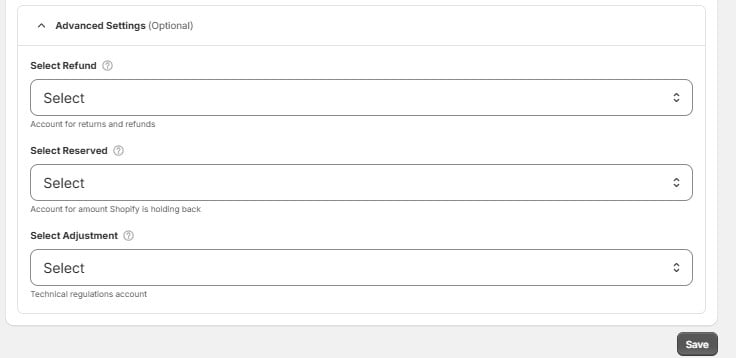 * **Select Refund** – the account for returns and refunds.
* **Select Reserved** – the account for amounts Shopify is holding back (reserves) before paying them out.
* **Select Adjustment** – a technical regulations account, used for small corrections and adjustments in payouts.
Click **Save** when done.
* **Select Refund** – the account for returns and refunds.
* **Select Reserved** – the account for amounts Shopify is holding back (reserves) before paying them out.
* **Select Adjustment** – a technical regulations account, used for small corrections and adjustments in payouts.
Click **Save** when done.