> ## Documentation Index
> Fetch the complete documentation index at: https://docs.cloudify.biz/llms.txt
> Use this file to discover all available pages before exploring further.
# Product Sync Rules
> Configure how WooCommerce products are matched to items in Xero.
When an order syncs, the integration needs to match each WooCommerce product to an item in Xero to build the invoice line items correctly. This step controls how that matching works.
## Product Matching
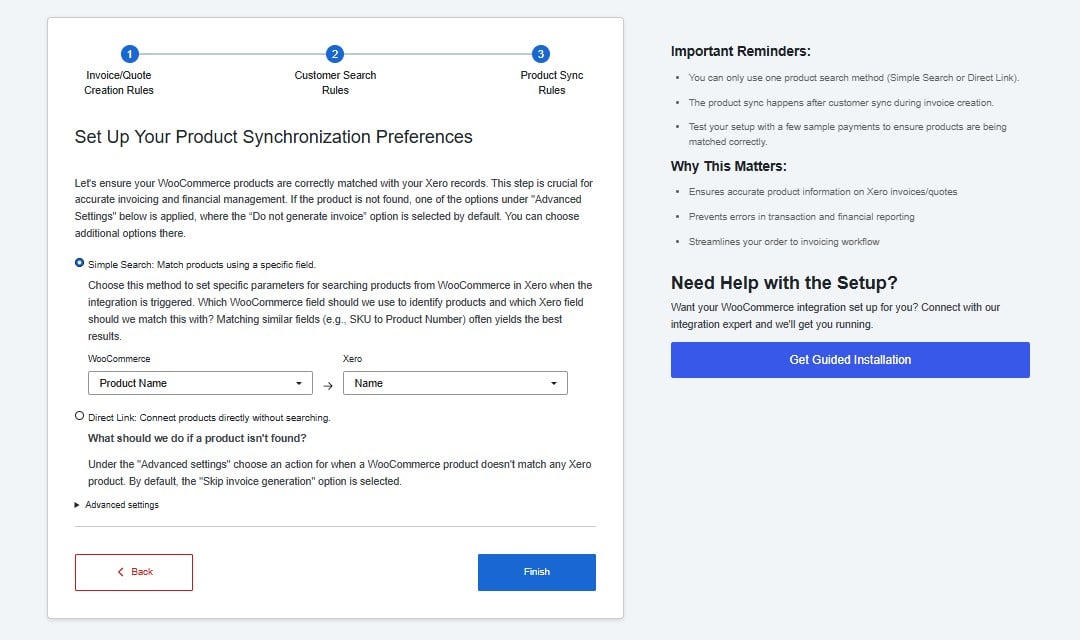 **Simple Search** — The integration automatically searches Xero for a product by comparing a WooCommerce field against a Xero field on every sync. This is the right choice for most stores.
Matching by **SKU to Product Code** gives the most reliable results — SKUs are unique identifiers that rarely change. Matching by product name is less reliable as names can vary slightly between platforms.
**Direct Link** — You manually link each WooCommerce product to a Xero item, one by one. This works well for stores with a small, stable product catalogue where you want precise control over the matching.
## If a Product Is Not Found in Xero
**Simple Search** — The integration automatically searches Xero for a product by comparing a WooCommerce field against a Xero field on every sync. This is the right choice for most stores.
Matching by **SKU to Product Code** gives the most reliable results — SKUs are unique identifiers that rarely change. Matching by product name is less reliable as names can vary slightly between platforms.
**Direct Link** — You manually link each WooCommerce product to a Xero item, one by one. This works well for stores with a small, stable product catalogue where you want precise control over the matching.
## If a Product Is Not Found in Xero
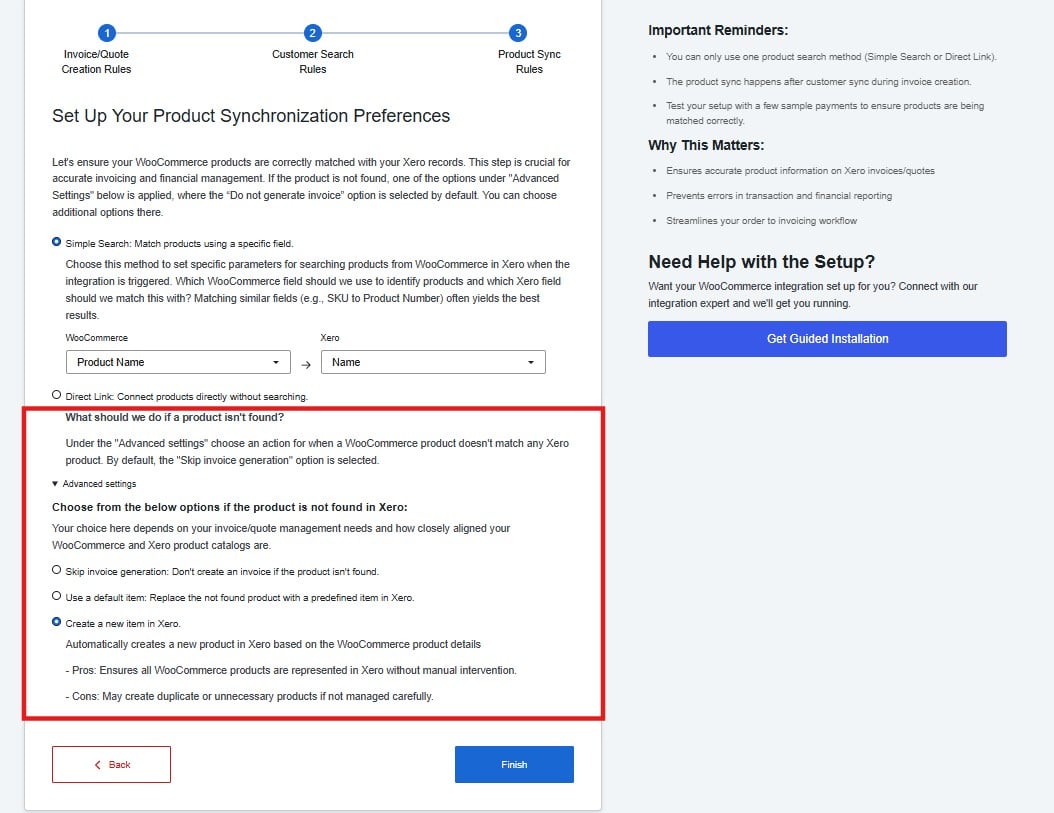 This setting decides what happens when the integration cannot find a matching product in Xero.
| Option | What happens |
| ----------------------- | ------------------------------------------------------------------------------------ |
| Skip invoice generation | The invoice is skipped if the product is not found |
| Use a default item | A predefined fallback item is used in place of the missing product |
| Create a new item | A new product is automatically created in Xero using the WooCommerce product details |
**Create a new item** is the most convenient option but can generate duplicate products in Xero if your product names or SKUs are inconsistent. Review your Xero item list periodically if you use this option.
Click **Finish** to complete the setup.
This setting decides what happens when the integration cannot find a matching product in Xero.
| Option | What happens |
| ----------------------- | ------------------------------------------------------------------------------------ |
| Skip invoice generation | The invoice is skipped if the product is not found |
| Use a default item | A predefined fallback item is used in place of the missing product |
| Create a new item | A new product is automatically created in Xero using the WooCommerce product details |
**Create a new item** is the most convenient option but can generate duplicate products in Xero if your product names or SKUs are inconsistent. Review your Xero item list periodically if you use this option.
Click **Finish** to complete the setup.