

Rate Limiting
Set Max Requests per Second
Use the Delivery Rate setting in your webhook configuration to control how many requests FlowLink can send per second. The source page gives the example that setting this value to 5 means FlowLink will send no more than 5 requests per second. :contentReference[oaicite:1]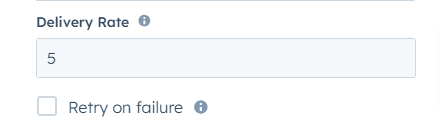
Queue Management
FlowLink automatically queues requests that exceed the configured rate limit and processes them in order as capacity becomes available. The page recommends starting with a conservative rate and increasing it gradually while monitoring performance. :contentReference[oaicite:2]Start with a lower delivery rate first, then increase it gradually once you confirm the receiving system can handle the traffic reliably.
Error Handling
Configure Retry Logic
When retry handling is enabled, you can define how FlowLink should retry failed requests using these settings. :contentReference[oaicite:3]Retry Delay
Set the initial wait time before the first retry attempt, in milliseconds. The source page gives 2000 ms (2 seconds) as an example. :contentReference[oaicite:4]Retry Strategy
Choose one of these retry strategies: :contentReference[oaicite:5]- Linear — consistent intervals between retry attempts
- Exponential — increasing intervals between retry attempts
- Linear: retries at 2s, 4s, 6s, and 8s after the initial failure
- Exponential: retries at 2s, 6s, 14s, and 30s after the initial failure
Max Attempts
Set the maximum number of retry attempts before the action is marked as failed. The page’s example says that if this is set to 4, FlowLink will make the initial attempt plus 4 retries. :contentReference[oaicite:7]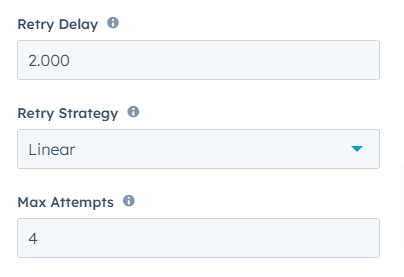
Error Logging
FlowLink automatically logs errors in the HubSpot workflow history. The source page recommends reviewing these logs regularly so you can identify and address recurring issues. :contentReference[oaicite:8]Need something more advanced?
If you need tailored integrations, specialised data mappings, or workflow automations, Cloudify also offers custom integration services. :contentReference[oaicite:9]Need something more advanced?
Get help with tailored mappings, workflow automations, and custom integration setup.