Setting up the Stripe to Microsoft Business Central IntegrationNow that you’ve installed the app and connected your accounts, it’s time to configure how information flows between Stripe and Microsoft Business Central. With this guide, you will be able to customise your app further if needed.To find the settings page:
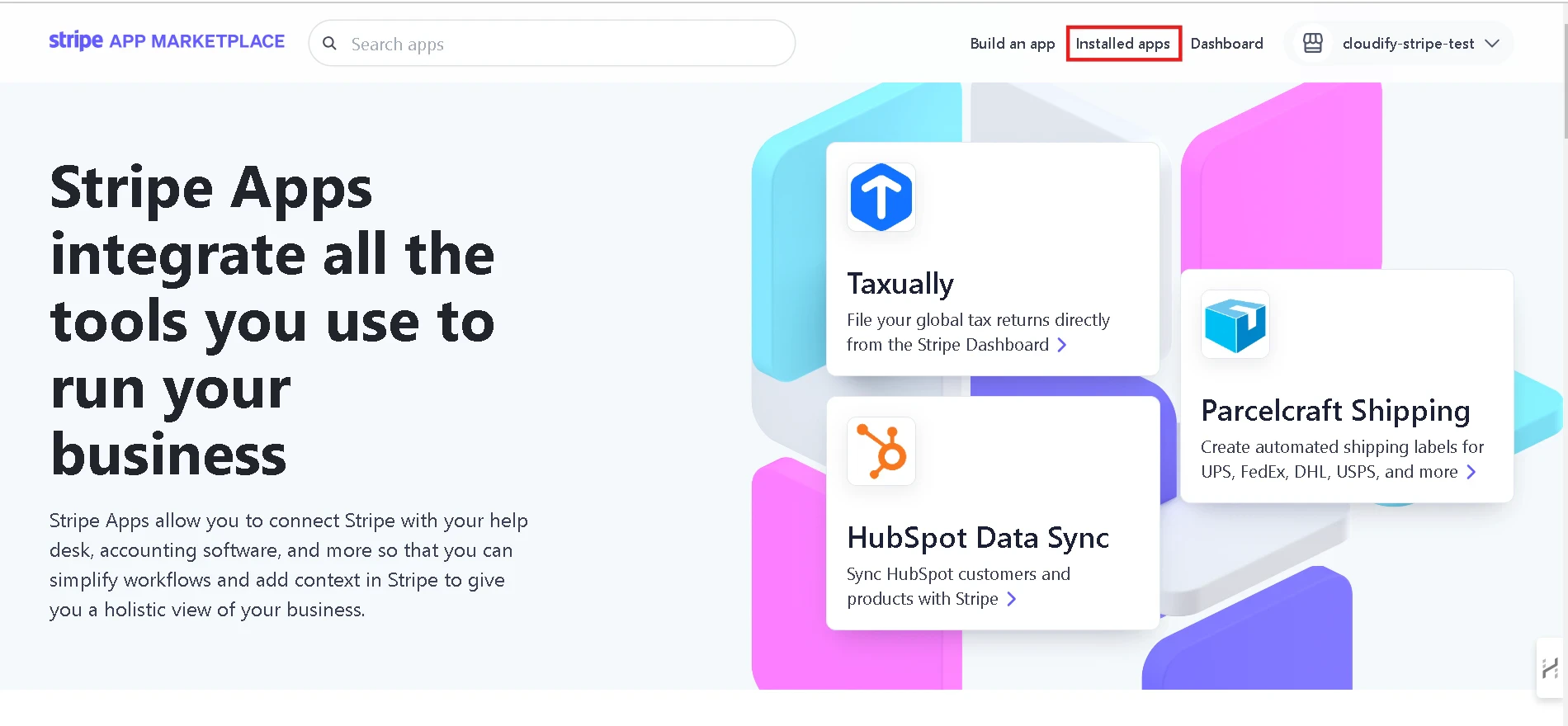
1
Click on “Installed Apps”
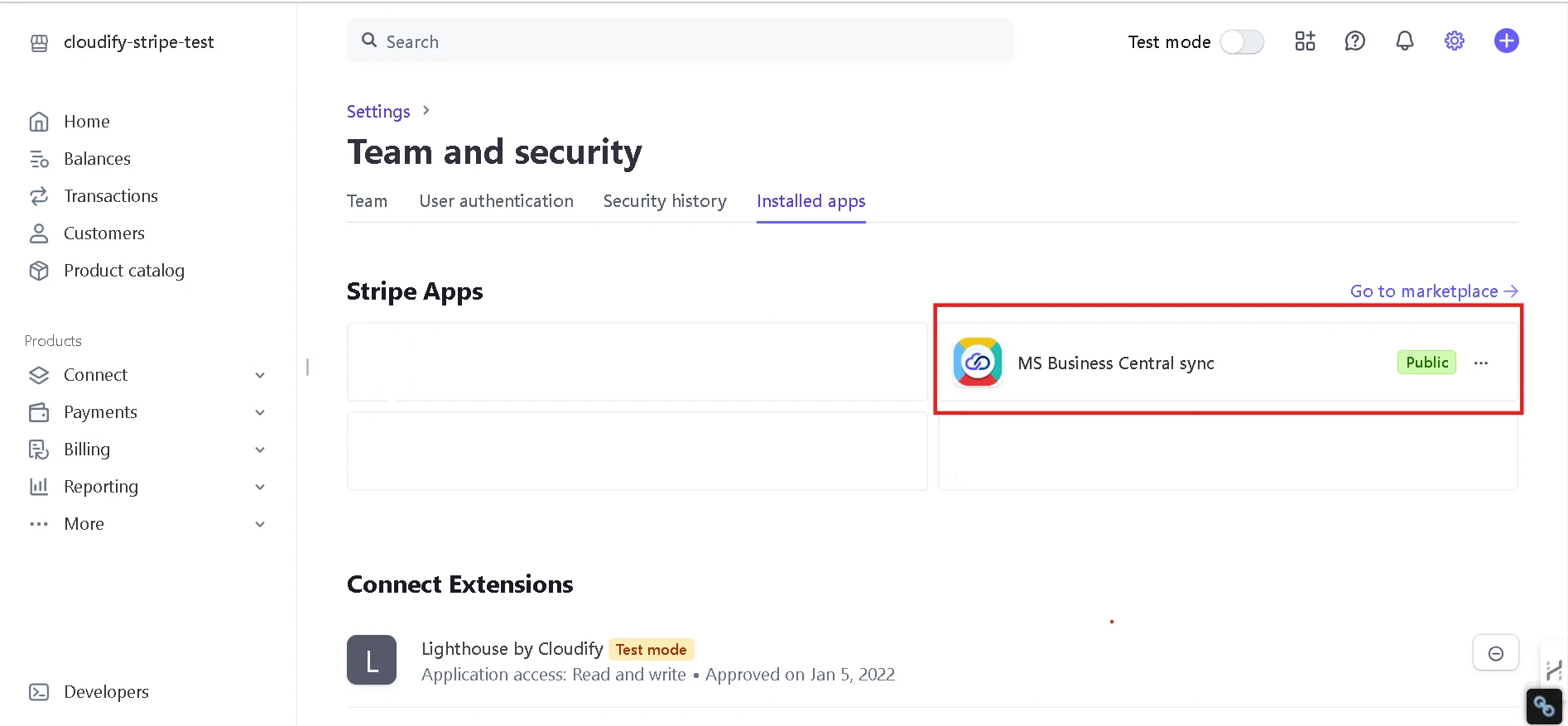
2
Click on “MS Business Central Sync”
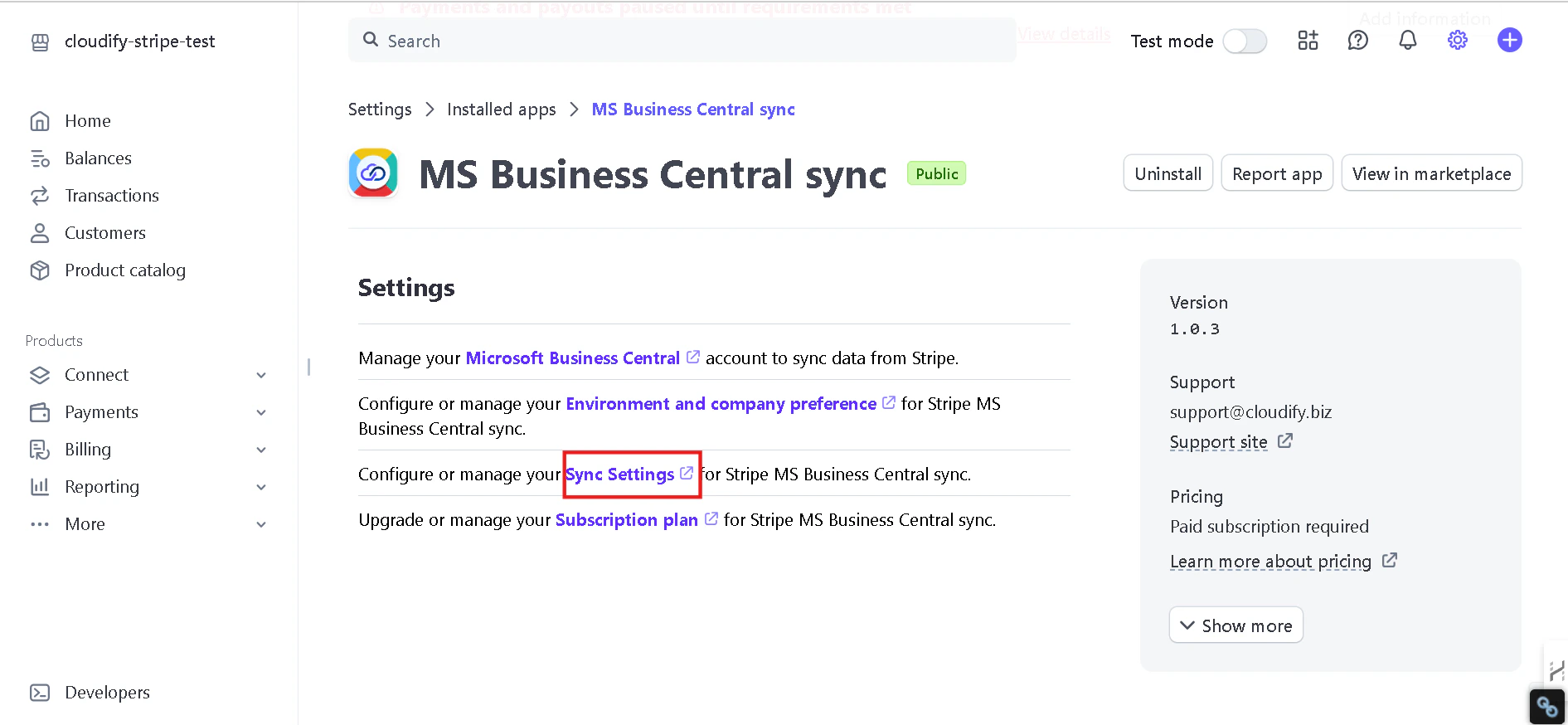
3
Click “Sync Setup”
And you have arrived.
The setup process is divided into two main areas:
Contact Setting
Invoice Settings
Each of these areas plays a crucial role in determining how your data is synchronized and how your business processes are automated.
Was this page helpful?
{"docsConfig":{"theme":"aspen","$schema":"https://mintlify.com/docs.json","name":"Cloudify Documentation","colors":{"primary":"#1a73e8","light":"#E5F2FF","dark":"#1a73e8"},"logo":{"light":"https://mintcdn.com/cloudify-c7720744/Ie43f-kQkw_inATF/images/cloudify_kb_light.svg?fit=max\u0026auto=format\u0026n=Ie43f-kQkw_inATF\u0026q=85\u0026s=e6fee15c45d046196122c85fc772f27f","dark":"https://mintcdn.com/cloudify-c7720744/Ie43f-kQkw_inATF/images/cloudify_kb_dark.svg?fit=max\u0026auto=format\u0026n=Ie43f-kQkw_inATF\u0026q=85\u0026s=e7912f98f52179439d72e912f32f1ee9","href":"/index"},"favicon":"https://mintcdn.com/cloudify-c7720744/yZ6OL23tlT3UIKur/images/cloudify-favicon.png?fit=max\u0026auto=format\u0026n=yZ6OL23tlT3UIKur\u0026q=85\u0026s=e285cca1f639970421f792349055c52c","appearance":{"default":"system"},"background":{"decoration":"gradient"},"navbar":{"links":[{"href":"mailto:support@cloudify.biz","label":"Support"}],"primary":{"type":"button","label":"Book a free consultation","href":"https://meetings.hubspot.com/cloudify/app-assistance"}},"footer":{"socials":{"linkedin":"https://linkedin.com/company/cloudify","facebook":"https://www.facebook.com/cloudify.biz","x":"https://x.com/cloudify_biz"}},"contextual":{"options":["copy","view"],"display":"header"},"markdown":{"schema":true},"styling":{"latex":true},"navigation":{"global":{"anchors":[{"anchor":"Home","icon":"house","href":"/"}]},"pages":[]}},"deployment":{"deploymentMetadataValue":{"subdomain":"cloudify-c7720744","hasAudioNarration":false,"actualSubdomain":"cloudify-c7720744","customDomains":["docs.cloudify.biz"],"gitSource":{"type":"github","owner":"cloudifybiz","repo":"setup-guide-docs","deployBranch":"main","contentDirectory":"","isPrivate":true,"mountPath":"","label":""},"chroma":{"liveDeploymentHistoryId":"6ada6fa389c1f8440295333c","collectionId":"69da6ace-dcb0-4d92-998c-63d321716990","schemaVersion":"v3","latestBuiltDeploymentHistoryId":"6ada6fa389c1f8440295333c"},"feedback":{"thumbs":true},"entitlements":{},"buildId":"6ada6fa389c1f8440295333c","clientVersion":"0.0.3965","searchFilterCounts":[{"language":"default","tag":"Setup Guide","count":212},{"language":"default","tag":"Configuration","count":88},{"language":"default","tag":"Installation","count":80},{"language":"default","tag":"Get the Most Out of the App","count":40},{"language":"default","tag":"Getting Started","count":36},{"language":"default","tag":"HubSpot Xero Integration","count":22},{"language":"default","tag":"Getting-Started","count":21},{"language":"default","tag":"HubSpot e-conomic Integration","count":18},{"language":"default","tag":"Pipedrive Xero Integration","count":17},{"language":"default","tag":"HubSpot Fortnox Integration","count":16}]},"assistantConfig":{"enableAskAiButton":false,"enableStarterQuestions":false,"enableAskAiSearchBar":true},"hasChatPermissions":false,"hasWebMcpPermissions":false,"toggles":[{"name":"kill-isr","enabled":true,"variant":{"name":"disabled","enabled":false,"feature_enabled":true},"impressionData":false},{"name":"agent-mintlify-slack","enabled":true,"variant":{"name":"disabled","enabled":false,"feature_enabled":true},"impressionData":false},{"name":"editor-v7-file-tree","enabled":true,"variant":{"name":"disabled","enabled":false,"feature_enabled":true},"impressionData":false},{"name":"agent-integrations-settings","enabled":true,"variant":{"name":"disabled","enabled":false,"feature_enabled":true},"impressionData":false},{"name":"automations-pr-grouping","enabled":true,"variant":{"name":"disabled","enabled":false,"feature_enabled":true},"impressionData":false},{"name":"custom-prefix","enabled":true,"variant":{"name":"disabled","enabled":false,"feature_enabled":true},"impressionData":false},{"name":"analytics-v7","enabled":true,"variant":{"name":"disabled","enabled":false,"feature_enabled":true},"impressionData":false},{"name":"user-flows-analytics","enabled":true,"variant":{"name":"disabled","enabled":false,"feature_enabled":true},"impressionData":false},{"name":"no-publish-flow","enabled":true,"variant":{"name":"disabled","enabled":false,"feature_enabled":true},"impressionData":false},{"name":"workos-onboarding","enabled":true,"variant":{"name":"disabled","enabled":false,"feature_enabled":true},"impressionData":false},{"name":"llms-txt-v2","enabled":true,"variant":{"name":"disabled","enabled":false,"feature_enabled":true},"impressionData":false},{"name":"pause-universal-search-reconcile","enabled":true,"variant":{"name":"disabled","enabled":false,"feature_enabled":true},"impressionData":false},{"name":"snapshot-serving-live","enabled":true,"variant":{"name":"disabled","enabled":false,"feature_enabled":true},"impressionData":false},{"name":"stripTemperatureMiddleware","enabled":true,"variant":{"name":"disabled","enabled":false,"feature_enabled":true},"impressionData":false},{"name":"per-site-search-delta","enabled":true,"variant":{"name":"disabled","enabled":false,"feature_enabled":true},"impressionData":false},{"name":"support-platform-pylon-zendesk","enabled":true,"variant":{"name":"disabled","enabled":false,"feature_enabled":true},"impressionData":false},{"name":"snapshot-serving","enabled":true,"variant":{"name":"disabled","enabled":false,"feature_enabled":true},"impressionData":false},{"name":"instant-rollback","enabled":true,"variant":{"name":"disabled","enabled":false,"feature_enabled":true},"impressionData":false},{"name":"granular-notifications-server","enabled":true,"variant":{"name":"disabled","enabled":false,"feature_enabled":true},"impressionData":false},{"name":"granular-notifications","enabled":true,"variant":{"name":"disabled","enabled":false,"feature_enabled":true},"impressionData":false},{"name":"editor-private-page-search","enabled":true,"variant":{"name":"disabled","enabled":false,"feature_enabled":true},"impressionData":false},{"name":"automations-fable","enabled":true,"variant":{"name":"disabled","enabled":false,"feature_enabled":true},"impressionData":false},{"name":"fixed-ai-action-pricing","enabled":true,"variant":{"name":"disabled","enabled":false,"feature_enabled":true},"impressionData":false},{"name":"automation-resolve-merge-conflict","enabled":true,"variant":{"name":"disabled","enabled":false,"feature_enabled":true},"impressionData":false},{"name":"scoped-publishing","enabled":true,"variant":{"name":"disabled","enabled":false,"feature_enabled":true},"impressionData":false},{"name":"mintql","enabled":true,"variant":{"name":"disabled","enabled":false,"feature_enabled":true},"impressionData":false},{"name":"page-level-analytics","enabled":true,"variant":{"name":"disabled","enabled":false,"feature_enabled":true},"impressionData":false},{"name":"editor-version-history-v2","enabled":true,"variant":{"name":"disabled","enabled":false,"feature_enabled":true},"impressionData":false},{"name":"editor-nav-generations","enabled":true,"variant":{"name":"disabled","enabled":false,"feature_enabled":true},"impressionData":false},{"name":"billing-page-v2","enabled":true,"variant":{"name":"disabled","enabled":false,"feature_enabled":true},"impressionData":false},{"name":"workspace-projects","enabled":true,"variant":{"name":"disabled","enabled":false,"feature_enabled":true},"impressionData":false},{"name":"assistant-v5","enabled":true,"variant":{"name":"disabled","enabled":false,"feature_enabled":true},"impressionData":false},{"name":"byok-sep-25","enabled":true,"variant":{"name":"disabled","enabled":false,"feature_enabled":true},"impressionData":false},{"name":"fork-pr-previews","enabled":true,"variant":{"name":"disabled","enabled":false,"feature_enabled":true},"impressionData":false},{"name":"revalidation-jwt","enabled":true,"variant":{"name":"disabled","enabled":false,"feature_enabled":true},"impressionData":false},{"name":"vite-origin","enabled":true,"variant":{"name":"disabled","enabled":false,"feature_enabled":true},"impressionData":false},{"name":"editor-agent-model-picker","enabled":true,"variant":{"name":"disabled","enabled":false,"feature_enabled":true},"impressionData":false},{"name":"billing-updated-9-15","enabled":true,"variant":{"name":"disabled","enabled":false,"feature_enabled":true},"impressionData":false},{"name":"hobby-abuse-scan","enabled":true,"variant":{"name":"disabled","enabled":false,"feature_enabled":true},"impressionData":false},{"name":"dashboard-inbox","enabled":true,"variant":{"name":"disabled","enabled":false,"feature_enabled":true},"impressionData":false}],"isAtlas":false,"googleFontsInlined":false},"customCss":[],"page":{"pagePath":"stripe/msbc/configuration/getting-started","slug":"/stripe/msbc/configuration/getting-started","pageMetadata":{"title":"Getting Started","description":null,"href":"/stripe/msbc/configuration/getting-started"},"pageType":"default","mdx":{"mdxSource":{"compiledSource":"\"use strict\";const{Fragment:_Fragment,jsx:_jsx,jsxs:_jsxs}=arguments[0];const{useMDXComponents:_provideComponents}=arguments[0];function _createMdxContent(props){const _components={li:`li`,ol:`ol`,p:`p`,strong:`strong`,..._provideComponents(),...props.components},{Frame,OptimizedImage,Step,Steps}=_components;if(!Frame)_missingMdxReference(`Frame`,true);if(!OptimizedImage)_missingMdxReference(`OptimizedImage`,true);if(!Step)_missingMdxReference(`Step`,true);if(!Steps)_missingMdxReference(`Steps`,true);return _jsxs(_Fragment,{children:[_jsx(_components.p,{children:_jsx(_components.strong,{children:`Setting up the Stripe to Microsoft Business Central Integration`})}),`\n`,_jsx(_components.p,{children:`Now that you’ve installed the app and connected your accounts, it’s time to configure how information flows between Stripe and Microsoft Business Central. With this guide, you will be able to customise your app further if needed.`}),`\n`,_jsx(_components.p,{children:_jsx(_components.strong,{children:`To find the settings page:`})}),`\n`,_jsxs(Steps,{children:[_jsxs(Step,{children:[_jsxs(_components.p,{children:[`Click on “`,_jsx(_components.strong,{children:`Installed Apps`}),`”`]}),_jsx(Frame,{children:_jsx(OptimizedImage,{src:`https://mintcdn.com/cloudify-c7720744/lGXfg-sRr29fzWtD/images/image-493.png?fit=max\u0026auto=format\u0026n=lGXfg-sRr29fzWtD\u0026q=85\u0026s=eba13485cb0c267470f98b6e61049ada`,alt:`Image`,\"data-og-width\":`1900`,width:`1900`,\"data-og-height\":`880`,height:`880`,\"data-path\":`images/image-493.png`,\"data-optimize\":`true`,\"data-opv\":`3`,srcset:`https://mintcdn.com/cloudify-c7720744/lGXfg-sRr29fzWtD/images/image-493.png?w=280\u0026fit=max\u0026auto=format\u0026n=lGXfg-sRr29fzWtD\u0026q=85\u0026s=89c96e865488d68cc78f617e8c8333b4 280w, https://mintcdn.com/cloudify-c7720744/lGXfg-sRr29fzWtD/images/image-493.png?w=560\u0026fit=max\u0026auto=format\u0026n=lGXfg-sRr29fzWtD\u0026q=85\u0026s=61f62b9ccc290935b0f8f0be3d87a70d 560w, https://mintcdn.com/cloudify-c7720744/lGXfg-sRr29fzWtD/images/image-493.png?w=840\u0026fit=max\u0026auto=format\u0026n=lGXfg-sRr29fzWtD\u0026q=85\u0026s=f2e664ba86479c42e8a2d6a4b4afa97c 840w, https://mintcdn.com/cloudify-c7720744/lGXfg-sRr29fzWtD/images/image-493.png?w=1100\u0026fit=max\u0026auto=format\u0026n=lGXfg-sRr29fzWtD\u0026q=85\u0026s=739569f61132e60b2f1f008bdf4441b2 1100w, https://mintcdn.com/cloudify-c7720744/lGXfg-sRr29fzWtD/images/image-493.png?w=1650\u0026fit=max\u0026auto=format\u0026n=lGXfg-sRr29fzWtD\u0026q=85\u0026s=f9e793517f307afbb68b6fcfeff48af3 1650w, https://mintcdn.com/cloudify-c7720744/lGXfg-sRr29fzWtD/images/image-493.png?w=2500\u0026fit=max\u0026auto=format\u0026n=lGXfg-sRr29fzWtD\u0026q=85\u0026s=faf25586ac2088182a6b9dab5beb60bb 2500w`})})]}),_jsxs(Step,{children:[_jsxs(_components.p,{children:[`Click on “`,_jsx(_components.strong,{children:`MS Business Central Sync`}),`”\\xA0`]}),_jsx(Frame,{children:_jsx(OptimizedImage,{src:`https://mintcdn.com/cloudify-c7720744/lGXfg-sRr29fzWtD/images/image-494.png?fit=max\u0026auto=format\u0026n=lGXfg-sRr29fzWtD\u0026q=85\u0026s=c12070acff836c6ca3c48adc7fb24150`,alt:`Image`,\"data-og-width\":`1894`,width:`1894`,\"data-og-height\":`877`,height:`877`,\"data-path\":`images/image-494.png`,\"data-optimize\":`true`,\"data-opv\":`3`,srcset:`https://mintcdn.com/cloudify-c7720744/lGXfg-sRr29fzWtD/images/image-494.png?w=280\u0026fit=max\u0026auto=format\u0026n=lGXfg-sRr29fzWtD\u0026q=85\u0026s=3b3a8f2111808e120c4c123e9fd8a11e 280w, https://mintcdn.com/cloudify-c7720744/lGXfg-sRr29fzWtD/images/image-494.png?w=560\u0026fit=max\u0026auto=format\u0026n=lGXfg-sRr29fzWtD\u0026q=85\u0026s=88eafba085ea88a07d796ab35b5322fa 560w, https://mintcdn.com/cloudify-c7720744/lGXfg-sRr29fzWtD/images/image-494.png?w=840\u0026fit=max\u0026auto=format\u0026n=lGXfg-sRr29fzWtD\u0026q=85\u0026s=5cf7abaa5aa3f2e8f9efa254ea8b7e0c 840w, https://mintcdn.com/cloudify-c7720744/lGXfg-sRr29fzWtD/images/image-494.png?w=1100\u0026fit=max\u0026auto=format\u0026n=lGXfg-sRr29fzWtD\u0026q=85\u0026s=c79e4f2c91b393d26141d3d04b1fd4a0 1100w, https://mintcdn.com/cloudify-c7720744/lGXfg-sRr29fzWtD/images/image-494.png?w=1650\u0026fit=max\u0026auto=format\u0026n=lGXfg-sRr29fzWtD\u0026q=85\u0026s=08a97f842060a6b534ba0ed2fb885db1 1650w, https://mintcdn.com/cloudify-c7720744/lGXfg-sRr29fzWtD/images/image-494.png?w=2500\u0026fit=max\u0026auto=format\u0026n=lGXfg-sRr29fzWtD\u0026q=85\u0026s=975c8be211d1556fd3d3a2df5c13311d 2500w`})})]}),_jsxs(Step,{children:[_jsxs(_components.p,{children:[`Click “`,_jsx(_components.strong,{children:`Sync Setup`}),`”\\xA0`]}),_jsx(Frame,{children:_jsx(OptimizedImage,{src:`https://mintcdn.com/cloudify-c7720744/lGXfg-sRr29fzWtD/images/image-496.png?fit=max\u0026auto=format\u0026n=lGXfg-sRr29fzWtD\u0026q=85\u0026s=e5347e079453071f0f1035c73ef44f2e`,alt:`Image`,\"data-og-width\":`1891`,width:`1891`,\"data-og-height\":`874`,height:`874`,\"data-path\":`images/image-496.png`,\"data-optimize\":`true`,\"data-opv\":`3`,srcset:`https://mintcdn.com/cloudify-c7720744/lGXfg-sRr29fzWtD/images/image-496.png?w=280\u0026fit=max\u0026auto=format\u0026n=lGXfg-sRr29fzWtD\u0026q=85\u0026s=5a7eb4d2c4f43649092e13fbdd3759f5 280w, https://mintcdn.com/cloudify-c7720744/lGXfg-sRr29fzWtD/images/image-496.png?w=560\u0026fit=max\u0026auto=format\u0026n=lGXfg-sRr29fzWtD\u0026q=85\u0026s=cbc6d4952e6cb3c9db670db94992697f 560w, https://mintcdn.com/cloudify-c7720744/lGXfg-sRr29fzWtD/images/image-496.png?w=840\u0026fit=max\u0026auto=format\u0026n=lGXfg-sRr29fzWtD\u0026q=85\u0026s=e1b75399acd0eef6af7f407e1c19fffb 840w, https://mintcdn.com/cloudify-c7720744/lGXfg-sRr29fzWtD/images/image-496.png?w=1100\u0026fit=max\u0026auto=format\u0026n=lGXfg-sRr29fzWtD\u0026q=85\u0026s=5ae60f2a6d129475da7a76a3624e7ad2 1100w, https://mintcdn.com/cloudify-c7720744/lGXfg-sRr29fzWtD/images/image-496.png?w=1650\u0026fit=max\u0026auto=format\u0026n=lGXfg-sRr29fzWtD\u0026q=85\u0026s=9e4ed97950dd93b18b6ebcc64818af57 1650w, https://mintcdn.com/cloudify-c7720744/lGXfg-sRr29fzWtD/images/image-496.png?w=2500\u0026fit=max\u0026auto=format\u0026n=lGXfg-sRr29fzWtD\u0026q=85\u0026s=217800ada10e0ce61b76178fde713c25 2500w`})}),_jsx(_components.p,{children:`And you have arrived.`})]})]}),`\n`,_jsx(_components.p,{children:_jsx(_components.strong,{children:`The setup process is divided into two main areas:`})}),`\n`,_jsxs(_components.ol,{children:[`\n`,_jsx(_components.li,{children:`Contact Setting`}),`\n`,_jsx(_components.li,{children:`Invoice Settings`}),`\n`]}),`\n`,_jsx(_components.p,{children:`Each of these areas plays a crucial role in determining how your data is synchronized and how your business processes are automated.`})]})}function MDXContent(props={}){const{wrapper:MDXLayout}={..._provideComponents(),...props.components};return MDXLayout?_jsx(MDXLayout,{...props,children:_jsx(_createMdxContent,{...props})}):_createMdxContent(props)}return{default:MDXContent};function _missingMdxReference(id,component){throw new Error(`Expected `+(component?`component`:`object`)+\" `\"+id+\"` to be defined: you likely forgot to import, pass, or provide it.\")}","frontmatter":{},"scope":{"config":{},"pageMetadata":{"title":"Getting Started","description":null,"href":"/stripe/msbc/configuration/getting-started"}}},"mdxSourceWithNoJs":null},"mdxExtracts":{"tableOfContents":[],"codeExamples":{}},"jsLinks":[],"subdomain":"cloudify-c7720744","siteName":"Cloudify Documentation","title":"Getting Started - Cloudify Documentation","navMaps":{"firstHrefInVersion":{},"firstHrefInLanguage":{}},"lastModified":"2026-10-01T09:00:33.125Z","originalFileLocation":"stripe/msbc/configuration/getting-started.mdx"},"headHtml":"\u003cscript data-mint-head>(function(){var d=document.documentElement,p=null;if(!p){try{p=localStorage.getItem(\"isDarkMode\")}catch(e){}if(p==='true')p='dark';else if(p==='false')p='light';if(p!=='light'\u0026\u0026p!=='dark'\u0026\u0026p!=='system')p=\"system\"}var r=p==='system'?(matchMedia(\"(prefers-color-scheme: dark)\").matches?'dark':'light'):p;d.classList.remove(r==='dark'?'light':'dark');d.classList.add(r);d.setAttribute(\"data-theme-preference\",p)})();\u003c/script>\u003cmeta data-mint-head name=\"application-name\" content=\"Cloudify Documentation\">\u003cmeta data-mint-head name=\"generator\" content=\"Mintlify\">\u003clink data-mint-head rel=\"icon\" type=\"image/png\" sizes=\"192x192\" href=\"/mintlify-assets/_mintlify/favicons/cloudify-c7720744/6Hmx_AJUh5PJc53T/_generated/favicon/android-chrome-192x192.png\" media=\"(prefers-color-scheme: light)\">\u003clink data-mint-head rel=\"apple-touch-icon\" type=\"image/png\" sizes=\"180x180\" href=\"/mintlify-assets/_mintlify/favicons/cloudify-c7720744/6Hmx_AJUh5PJc53T/_generated/favicon/apple-touch-icon.png\">\u003clink data-mint-head rel=\"icon\" type=\"image/png\" sizes=\"16x16\" href=\"/mintlify-assets/_mintlify/favicons/cloudify-c7720744/6Hmx_AJUh5PJc53T/_generated/favicon/favicon-16x16.png\" media=\"(prefers-color-scheme: light)\">\u003clink data-mint-head rel=\"icon\" type=\"image/png\" sizes=\"32x32\" href=\"/mintlify-assets/_mintlify/favicons/cloudify-c7720744/6Hmx_AJUh5PJc53T/_generated/favicon/favicon-32x32.png\" media=\"(prefers-color-scheme: light)\">\u003clink data-mint-head rel=\"shortcut icon\" type=\"image/x-icon\" href=\"/mintlify-assets/_mintlify/favicons/cloudify-c7720744/6Hmx_AJUh5PJc53T/_generated/favicon/favicon.ico\" media=\"(prefers-color-scheme: light)\">\u003clink data-mint-head rel=\"icon\" type=\"image/png\" sizes=\"192x192\" href=\"/mintlify-assets/_mintlify/favicons/cloudify-c7720744/6Hmx_AJUh5PJc53T/_generated/favicon-dark/android-chrome-192x192.png\" media=\"(prefers-color-scheme: dark)\">\u003clink data-mint-head rel=\"icon\" type=\"image/png\" sizes=\"16x16\" href=\"/mintlify-assets/_mintlify/favicons/cloudify-c7720744/6Hmx_AJUh5PJc53T/_generated/favicon-dark/favicon-16x16.png\" media=\"(prefers-color-scheme: dark)\">\u003clink data-mint-head rel=\"icon\" type=\"image/png\" sizes=\"32x32\" href=\"/mintlify-assets/_mintlify/favicons/cloudify-c7720744/6Hmx_AJUh5PJc53T/_generated/favicon-dark/favicon-32x32.png\" media=\"(prefers-color-scheme: dark)\">\u003clink data-mint-head rel=\"shortcut icon\" type=\"image/x-icon\" href=\"/mintlify-assets/_mintlify/favicons/cloudify-c7720744/6Hmx_AJUh5PJc53T/_generated/favicon-dark/favicon.ico\" media=\"(prefers-color-scheme: dark)\">\u003cmeta data-mint-head property=\"og:title\" content=\"Getting Started - Cloudify Documentation\">\u003cmeta data-mint-head property=\"og:site_name\" content=\"Cloudify Documentation\">\u003cmeta data-mint-head property=\"og:url\" content=\"https://docs.cloudify.biz/stripe/msbc/configuration/getting-started\">\u003cmeta data-mint-head property=\"og:type\" content=\"website\">\u003cmeta data-mint-head property=\"og:image\" content=\"https://cloudify-c7720744.mintlify.app/_mintlify/api/og/v2?division=Configuration\u0026amp;title=Getting+Started\u0026amp;theme=62a6acea7ce93d79ee10b6d5\u0026amp;signature=520c4cb4822c4bd2332d10313b302e653d638be841b0325974bf907b9d88d113\">\u003cmeta data-mint-head property=\"og:image:width\" content=\"1200\">\u003cmeta data-mint-head property=\"og:image:height\" content=\"630\">\u003cmeta data-mint-head name=\"twitter:card\" content=\"summary_large_image\">\u003cmeta data-mint-head name=\"twitter:title\" content=\"Getting Started - Cloudify Documentation\">\u003cmeta data-mint-head name=\"twitter:image\" content=\"https://cloudify-c7720744.mintlify.app/_mintlify/api/og/v2?division=Configuration\u0026amp;title=Getting+Started\u0026amp;theme=62a6acea7ce93d79ee10b6d5\u0026amp;signature=520c4cb4822c4bd2332d10313b302e653d638be841b0325974bf907b9d88d113\">\u003cmeta data-mint-head name=\"twitter:image:width\" content=\"1200\">\u003cmeta data-mint-head name=\"twitter:image:height\" content=\"630\">\u003cmeta data-mint-head name=\"msapplication-config\" content=\"/mintlify-assets/_mintlify/favicons/cloudify-c7720744/6Hmx_AJUh5PJc53T/_generated/favicon/browserconfig.xml\">\u003cmeta data-mint-head name=\"apple-mobile-web-app-title\" content=\"Cloudify Documentation\">\u003cmeta data-mint-head name=\"msapplication-TileColor\" content=\"#1a73e8\">\u003clink data-mint-head rel=\"canonical\" href=\"https://docs.cloudify.biz/stripe/msbc/configuration/getting-started\">\u003clink data-mint-head rel=\"alternate\" type=\"application/xml\" href=\"/sitemap.xml\">\u003clink data-mint-head rel=\"alternate\" type=\"text/markdown\" href=\"/stripe/msbc/configuration/getting-started.md\">\u003cscript data-mint-head type=\"application/ld+json\">{\"@context\":\"https://schema.org\",\"@graph\":[{\"@type\":\"Organization\",\"@id\":\"https://docs.cloudify.biz/#organization\",\"name\":\"Cloudify Documentation\",\"url\":\"https://docs.cloudify.biz\",\"logo\":{\"@type\":\"ImageObject\",\"url\":\"https://mintcdn.com/cloudify-c7720744/Ie43f-kQkw_inATF/images/cloudify_kb_light.svg?fit=max\u0026auto=format\u0026n=Ie43f-kQkw_inATF\u0026q=85\u0026s=e6fee15c45d046196122c85fc772f27f\"}},{\"@type\":\"WebSite\",\"@id\":\"https://docs.cloudify.biz#website\",\"name\":\"Cloudify Documentation\",\"url\":\"https://docs.cloudify.biz\",\"publisher\":{\"@id\":\"https://docs.cloudify.biz/#organization\"}},{\"@type\":\"WebPage\",\"@id\":\"https://docs.cloudify.biz/stripe/msbc/configuration/getting-started#webpage\",\"url\":\"https://docs.cloudify.biz/stripe/msbc/configuration/getting-started\",\"name\":\"Getting Started\",\"dateModified\":\"2026-10-01T09:00:33.125Z\",\"isPartOf\":{\"@id\":\"https://docs.cloudify.biz#website\"},\"breadcrumb\":{\"@id\":\"https://docs.cloudify.biz/stripe/msbc/configuration/getting-started#breadcrumb\"}},{\"@type\":\"BreadcrumbList\",\"@id\":\"https://docs.cloudify.biz/stripe/msbc/configuration/getting-started#breadcrumb\",\"itemListElement\":[{\"@type\":\"ListItem\",\"position\":1,\"name\":\"Cloudify Documentation\",\"item\":\"https://docs.cloudify.biz\"},{\"@type\":\"ListItem\",\"position\":2,\"name\":\"Getting Started\",\"item\":\"https://docs.cloudify.biz/stripe/msbc/configuration/getting-started\"}]},{\"@type\":[\"Article\",\"TechArticle\"],\"@id\":\"https://docs.cloudify.biz/stripe/msbc/configuration/getting-started#article\",\"headline\":\"Getting Started\",\"name\":\"Getting Started\",\"url\":\"https://docs.cloudify.biz/stripe/msbc/configuration/getting-started\",\"mainEntityOfPage\":{\"@id\":\"https://docs.cloudify.biz/stripe/msbc/configuration/getting-started#webpage\"},\"dateModified\":\"2026-10-01T09:00:33.125Z\",\"publisher\":{\"@id\":\"https://docs.cloudify.biz/#organization\"},\"isPartOf\":{\"@id\":\"https://docs.cloudify.biz#website\"}}]}\u003c/script>\u003cscript data-mint-head type=\"application/ld+json\">{\"@context\":\"https://schema.org\",\"@type\":\"WebSite\",\"name\":\"Cloudify Documentation\",\"creator\":{\"@type\":\"Organization\",\"name\":\"Mintlify\",\"url\":\"https://mintlify.com\"}}\u003c/script>","siteName":"Cloudify Documentation","nav":{"global":{"anchors":[{"anchor":"Home","icon":"house","href":"/"}]},"products":[{"product":"Home","pages":[{"title":"Home","href":""}]},{"product":"HubSpot Xero Integration","description":"Integrate HubSpot with Xero to automate invoicing, sync customer data, reduce manual entry, and connect sales and accounting workflows seamlessly.","pages":[{"title":"HubSpot Xero Integration","href":"/hubspot/xero/getting-started/overview"}]},{"product":"HubSpot e-conomic Integration","description":"Integrate HubSpot with Visma e-conomic to automate invoicing, sync customer data, reduce manual work, and connect your sales and accounting workflows.","pages":[{"title":"HubSpot e-conomic Integration","href":"/hubspot/e-conomic/getting-started/overview"}]},{"product":"HubSpot Fortnox Integration","description":"Integrate HubSpot with Fortnox to sync customer and financial data, automate workflows, reduce manual entry, and streamline sales and accounting processes.","pages":[{"title":"HubSpot Fortnox Integration","href":"/hubspot/fortnox/getting-started/overview"}]},{"product":"HubSpot QuickBooks Integration","description":"By integrating HubSpot with QuickBooks Online, your organization can streamline sales and accounting workflows while reducing manual work.","pages":[{"title":"HubSpot QuickBooks Integration","href":"/hubspot/quickbooks/getting-started/overview"}]},{"product":"HubSpot Business Central Integration","description":"Integrate HubSpot with Microsoft Dynamics 365 Business Central to sync data, automate workflows, reduce manual entry, and streamline CRM and business operations.","pages":[{"title":"HubSpot Business Central Integration","href":"/hubspot/msbc/getting-started/overview"}]},{"product":"HubSpot FlowLink Integration","description":"Use FlowLink to enrich new HubSpot leads through a webhook workflow and route them based on the result.","pages":[{"title":"HubSpot FlowLink Integration","href":"/hubspot/flowlink/installation/installing-flowlink"}]},{"product":"HubSpot Tripletex Integration","description":"Integrate HubSpot with Tripletex to sync customer, product, and invoice data, reduce manual entry, and streamline CRM and accounting workflows.","pages":[{"title":"HubSpot Tripletex Integration","href":"/hubspot/tripletex/getting-started/overview"}]},{"product":"HubSpot Company VAT Integration","description":"Learn how the HubSpot Company VAT app validates VAT information using official lookup sources to keep company data accurate and up to date.","pages":[{"title":"HubSpot Company VAT Integration","href":"/hubspot/company-vat/getting-started/overview"}]},{"product":"HubSpot Danish CVR Integration","description":"Learn what the Danish CVR Lookup app does and how it helps enrich HubSpot company data with official Danish business information.","pages":[{"title":"HubSpot Danish CVR Integration","href":"/hubspot/danish-cvr/getting-started/overview"}]},{"product":"Shopify Xero Integration","description":"Integrate Shopify with Xero to sync orders, customers, products, and financial data, reduce manual entry, and streamline e-commerce accounting.","pages":[{"title":"Shopify Xero Integration","href":"/shopify/xero/getting-started/overview"}]},{"product":"Shopify e-conomic Integration","description":"Integrate Shopify with e-conomic to automate accounting workflows, streamline financial data, reduce manual entry, and simplify e-commerce operations.","pages":[{"title":"Shopify e-conomic Integration","href":"/shopify/e-conomic/getting-started/overview"}]},{"product":"Shopify Fortnox Integration","description":"Connect Shopify with Fortnox to sync e-commerce and accounting data, automate workflows, reduce manual entry, and streamline financial operations.","pages":[{"title":"Shopify Fortnox Integration","href":"/shopify/fortnox/getting-started/overview"}]},{"product":"Shopify Tripletex Integration","description":"Connect Shopify with Tripletex using Cloudify to sync e-commerce and accounting data, automate workflows, reduce manual entry, and streamline financial operations.","pages":[{"title":"Shopify Tripletex Integration","href":"/shopi/tripletex/getting-started/overview"}]},{"product":"Stripe e-conomic Integration","description":"Connect Stripe with e-conomic to sync webshop data, manage invoices and orders, reduce manual entry, and streamline your accounting workflow.","pages":[{"title":"Stripe e-conomic Integration","href":"/stripe/e-conomic/getting-started/overview"}]},{"product":"Stripe Business Central Integration","description":"Connect Stripe with Business Central to sync payment data, reduce manual work, improve financial accuracy, and streamline your accounting workflow.","tabs":[{"tab":"Setup Guide","groups":[{"group":"Getting Started","pages":[{"title":"Overview","href":"/stripe/msbc/getting-started/overview"}]},{"group":"Installation","pages":[{"title":"Connect Business Central account","href":"/stripe/msbc/installation/connect-business-central-account"},{"title":"Choose Your Subscription Plans","description":null,"href":"/stripe/msbc/installation/choose-your-subscription-plans"}]},{"group":"Configuration","pages":[{"title":"Getting Started","href":"/stripe/msbc/configuration/getting-started"},{"title":"Contact Settings","description":"Configure how Stripe contacts are matched, created, and mapped in Business Central.","href":"/stripe/msbc/configuration/contact-settings"},{"title":"Invoice Settings","href":"/stripe/msbc/configuration/invoice-settings"}]},{"group":"Get the Most Out of the App","pages":[{"title":"Best Practices and Support","href":"/stripe/msbc/get-the-most-out-of-the-app/best-practices-and-support"},{"title":"Faqs Frequently Asked Questions","href":"/stripe/msbc/get-the-most-out-of-the-app/faqs-frequently-asked-questions"}]}]}]},{"product":"Pipedrive Xero Integration","description":"Step-by-step guide to installing the Cloudify Xero Integration from either the Xero App Store or the Pipedrive Marketplace, and connecting your Xero account.","pages":[{"title":"Pipedrive Xero Integration","href":"/pipedrive/xero/getting-started/overview"}]},{"product":"Pipedrive e-conomic Integration","description":"Step-by-step guide to installing the Visma e-conomic sync app in Pipedrive and connecting your e-conomic account.","pages":[{"title":"Pipedrive e-conomic Integration","href":"/pipedrive/e-conomic/getting-started/overview"}]},{"product":"Pipedrive Fortnox Integration","description":"Integrate Pipedrive with Fortnox to sync CRM and accounting data, reduce manual entry, automate workflows, and streamline sales and financial operations.","pages":[{"title":"Pipedrive Fortnox Integration","href":"/pipedrive/fortnox/getting-started/overview"}]},{"product":"Pipedrive Business Central Integration","description":"Connect Pipedrive with Microsoft Dynamics 365 Business Central to sync CRM and business data, automate workflows, reduce manual entry, and streamline operations.","pages":[{"title":"Pipedrive Business Central Integration","href":"/pipedrive/msbc/getting-started/overview"}]},{"product":"Pipedrive Company VAT Integration","description":"Use Pipedrive Company VAT to verify VAT details, improve company data accuracy, and keep business information up to date directly in your CRM.","pages":[{"title":"Pipedrive Company VAT Integration","href":"/pipedrive/company-vat/getting-started/overview"}]},{"product":"Pipedrive Danish CVR Integration","description":"Integrate Danish CVR data with Pipedrive to improve company information, reduce manual research, and keep customer records accurate and up to date.","pages":[{"title":"Pipedrive Danish CVR Integration","href":"/pipedrive/danish-cvr/getting-started/overview"}]},{"product":"WooCommerce Xero","description":"Integrate WooCommerce with Xero to automate invoices and quotes, sync orders, customers, and products, and reduce manual accounting data entry.","pages":[{"title":"WooCommerce Xero","href":"/woocommerce-xero/getting-started/overview"}]},{"product":"Lighthouse","pages":[{"title":"Lighthouse","href":"/lighthouse-overview"}]},{"product":"Fortnox configuration","pages":[{"title":"Fortnox configuration","href":"/configurations/fortnox/fortnox-configuration"}]},{"product":"Shopify Pennylane","description":"Set up the Shopify-Pennylane integration by Cloudify: connect your account, configure sync rules, and turn Shopify orders into Pennylane invoices automatically","pages":[{"title":"Shopify Pennylane","href":"/shopi/pennylane/getting-started/overview"}]},{"product":"HubSpot e-conomic"},{"product":"WooCommerce-Xero"},{"product":"Shopify Exact Online","pages":[{"title":"Shopify Exact Online","href":"/shopi-exactonline-overview"}]},{"product":"Setting up the Lighthouse HubSpot Connection","pages":[{"title":"Setting up the Lighthouse HubSpot Connection","href":"/setting-up-the-lighthouse-hubspot-connection"}]}]},"title":"Getting Started - Cloudify Documentation","buildId":"dpl_849ArpqvBiCczQiT1Y1stNGpbqHT","deploymentId":"dpl_849ArpqvBiCczQiT1Y1stNGpbqHT","dynamics":["07c022d89b","a74be98ba7"],"chunks":["Frame-Cz91mEGH.js","DynamicMarkdown-a8hUKrw6.js","zoom-image-lightbox-CaUwvYH3.js","lightbox-handle-r17bVUz3.js"]}