Setting up the Pipedrive to Danish CVR IntegrationNow that you’ve installed the app and connected your accounts, it’s time to configure how information flows between Pipedrive and Danish CVR. The install already covered the essential settings. With this guide, you will be able to customise your app further if needed.To find the settings page:
1
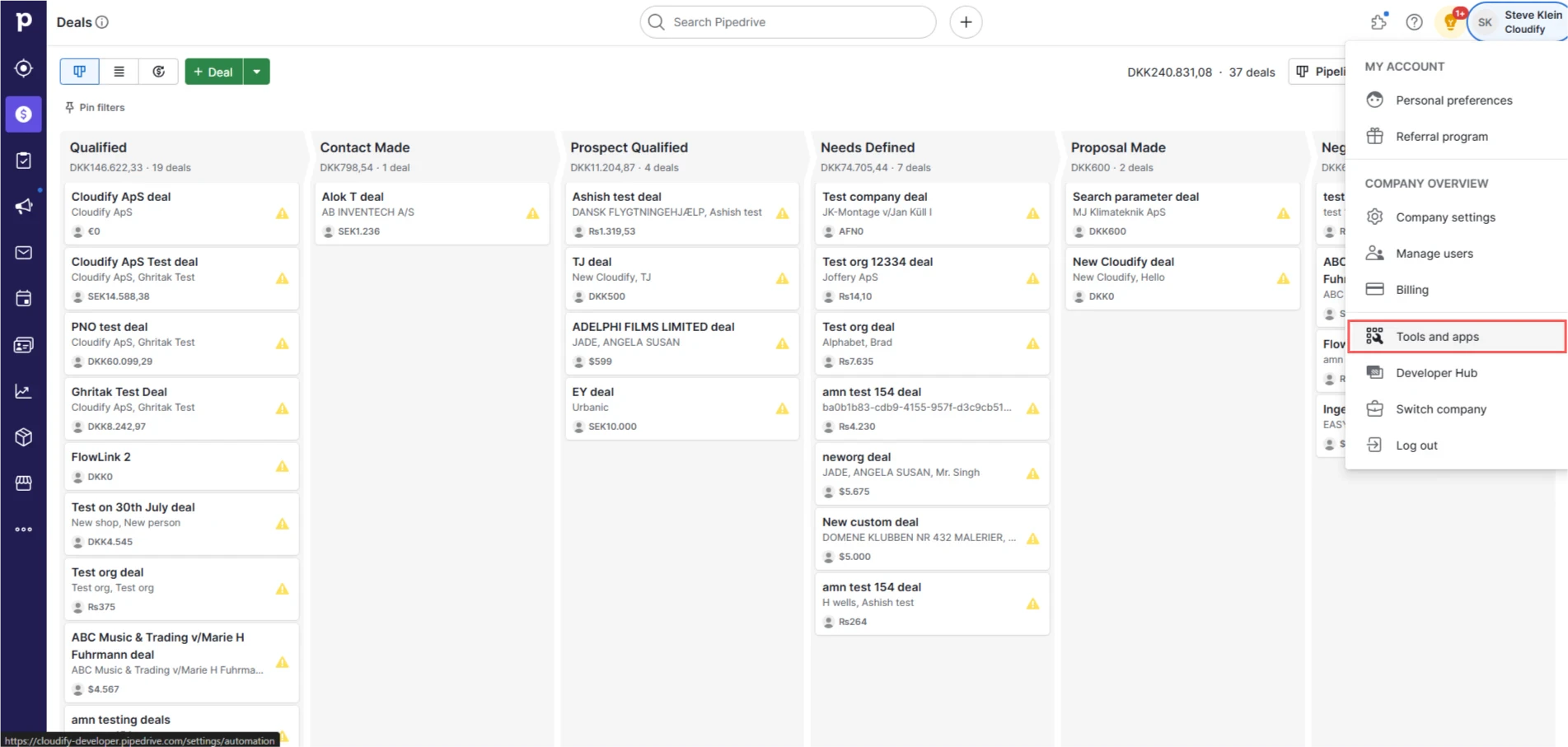
Click the “Tools and apps”
2
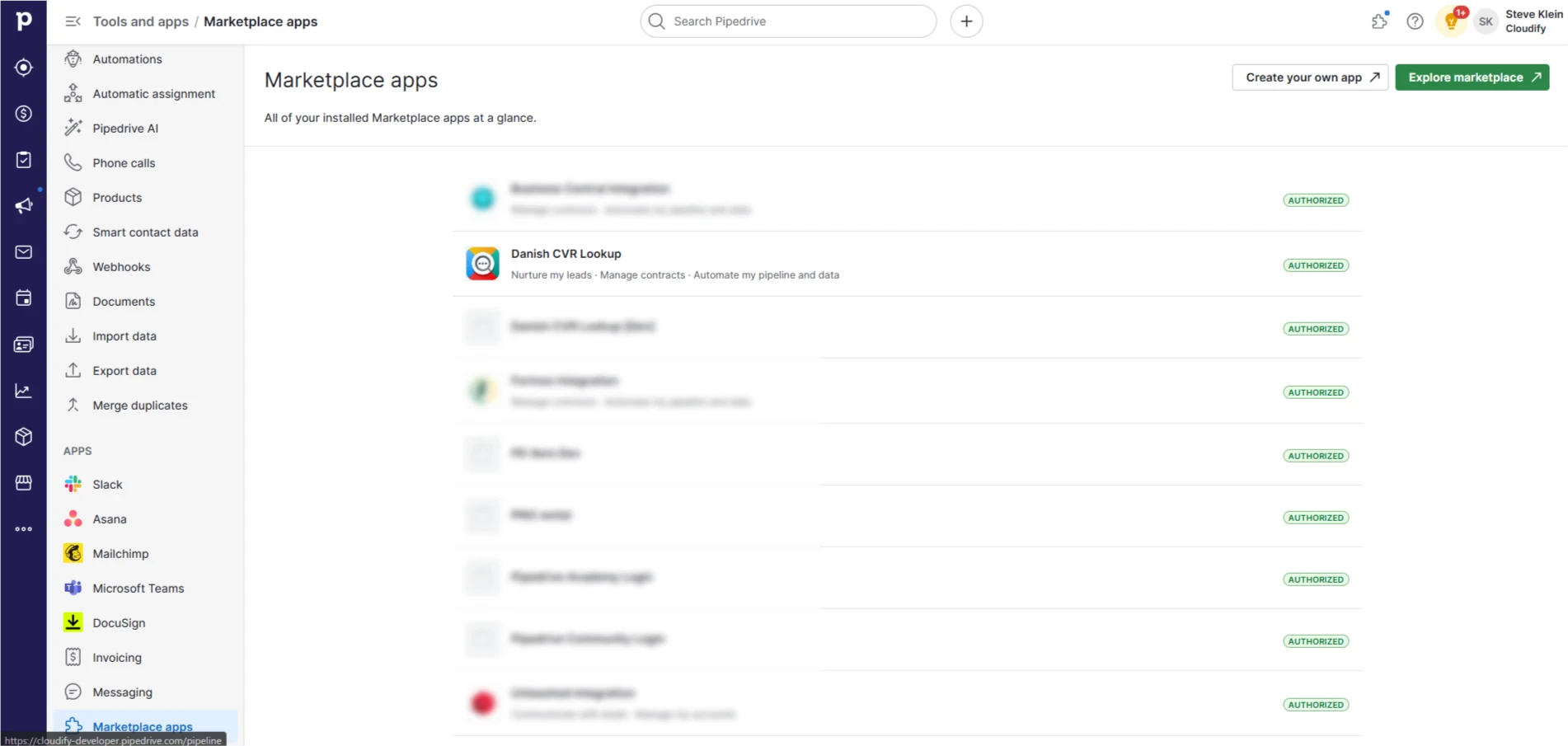
Find the app and click **Actions **> Go to settings.
The setup process is divided into three main areas:
Bulk Update
Search Company
Find Leads
Panel
Each of these areas plays a crucial role in determining how your data is synchronized and how your business processes are automated.
Was this page helpful?
{"docsConfig":{"theme":"aspen","$schema":"https://mintlify.com/docs.json","name":"Cloudify Documentation","colors":{"primary":"#1a73e8","light":"#E5F2FF","dark":"#1a73e8"},"logo":{"light":"https://mintcdn.com/cloudify-c7720744/Ie43f-kQkw_inATF/images/cloudify_kb_light.svg?fit=max\u0026auto=format\u0026n=Ie43f-kQkw_inATF\u0026q=85\u0026s=e6fee15c45d046196122c85fc772f27f","dark":"https://mintcdn.com/cloudify-c7720744/Ie43f-kQkw_inATF/images/cloudify_kb_dark.svg?fit=max\u0026auto=format\u0026n=Ie43f-kQkw_inATF\u0026q=85\u0026s=e7912f98f52179439d72e912f32f1ee9","href":"/index"},"favicon":"https://mintcdn.com/cloudify-c7720744/yZ6OL23tlT3UIKur/images/cloudify-favicon.png?fit=max\u0026auto=format\u0026n=yZ6OL23tlT3UIKur\u0026q=85\u0026s=e285cca1f639970421f792349055c52c","appearance":{"default":"system"},"background":{"decoration":"gradient"},"navbar":{"links":[{"href":"mailto:support@cloudify.biz","label":"Support"}],"primary":{"type":"button","label":"Book a free consultation","href":"https://meetings.hubspot.com/cloudify/app-assistance"}},"footer":{"socials":{"linkedin":"https://linkedin.com/company/cloudify","facebook":"https://www.facebook.com/cloudify.biz","x":"https://x.com/cloudify_biz"}},"contextual":{"options":["copy","view"],"display":"header"},"markdown":{"schema":true},"styling":{"latex":true},"navigation":{"global":{"anchors":[{"anchor":"Home","icon":"house","href":"/"}]},"pages":[]}},"deployment":{"deploymentMetadataValue":{"subdomain":"cloudify-c7720744","hasAudioNarration":false,"actualSubdomain":"cloudify-c7720744","customDomains":["docs.cloudify.biz"],"gitSource":{"type":"github","owner":"cloudifybiz","repo":"setup-guide-docs","deployBranch":"main","contentDirectory":"","isPrivate":true,"mountPath":"","label":""},"chroma":{"liveDeploymentHistoryId":"6ada6fa389c1f8440295333c","collectionId":"69da6ace-dcb0-4d92-998c-63d321716990","schemaVersion":"v3","latestBuiltDeploymentHistoryId":"6ada6fa389c1f8440295333c"},"feedback":{"thumbs":true},"entitlements":{},"buildId":"6ada6fa389c1f8440295333c","clientVersion":"0.0.3965","searchFilterCounts":[{"language":"default","tag":"Setup Guide","count":212},{"language":"default","tag":"Configuration","count":88},{"language":"default","tag":"Installation","count":80},{"language":"default","tag":"Get the Most Out of the App","count":40},{"language":"default","tag":"Getting Started","count":36},{"language":"default","tag":"HubSpot Xero Integration","count":22},{"language":"default","tag":"Getting-Started","count":21},{"language":"default","tag":"HubSpot e-conomic Integration","count":18},{"language":"default","tag":"Pipedrive Xero Integration","count":17},{"language":"default","tag":"HubSpot Fortnox Integration","count":16}]},"assistantConfig":{"enableAskAiButton":false,"enableStarterQuestions":false,"enableAskAiSearchBar":true},"hasChatPermissions":false,"hasWebMcpPermissions":false,"toggles":[{"name":"kill-isr","enabled":true,"variant":{"name":"disabled","enabled":false,"feature_enabled":true},"impressionData":false},{"name":"agent-mintlify-slack","enabled":true,"variant":{"name":"disabled","enabled":false,"feature_enabled":true},"impressionData":false},{"name":"editor-v7-file-tree","enabled":true,"variant":{"name":"disabled","enabled":false,"feature_enabled":true},"impressionData":false},{"name":"agent-integrations-settings","enabled":true,"variant":{"name":"disabled","enabled":false,"feature_enabled":true},"impressionData":false},{"name":"automations-pr-grouping","enabled":true,"variant":{"name":"disabled","enabled":false,"feature_enabled":true},"impressionData":false},{"name":"custom-prefix","enabled":true,"variant":{"name":"disabled","enabled":false,"feature_enabled":true},"impressionData":false},{"name":"analytics-v7","enabled":true,"variant":{"name":"disabled","enabled":false,"feature_enabled":true},"impressionData":false},{"name":"user-flows-analytics","enabled":true,"variant":{"name":"disabled","enabled":false,"feature_enabled":true},"impressionData":false},{"name":"no-publish-flow","enabled":true,"variant":{"name":"disabled","enabled":false,"feature_enabled":true},"impressionData":false},{"name":"workos-onboarding","enabled":true,"variant":{"name":"disabled","enabled":false,"feature_enabled":true},"impressionData":false},{"name":"llms-txt-v2","enabled":true,"variant":{"name":"disabled","enabled":false,"feature_enabled":true},"impressionData":false},{"name":"pause-universal-search-reconcile","enabled":true,"variant":{"name":"disabled","enabled":false,"feature_enabled":true},"impressionData":false},{"name":"snapshot-serving-live","enabled":true,"variant":{"name":"disabled","enabled":false,"feature_enabled":true},"impressionData":false},{"name":"stripTemperatureMiddleware","enabled":true,"variant":{"name":"disabled","enabled":false,"feature_enabled":true},"impressionData":false},{"name":"per-site-search-delta","enabled":true,"variant":{"name":"disabled","enabled":false,"feature_enabled":true},"impressionData":false},{"name":"support-platform-pylon-zendesk","enabled":true,"variant":{"name":"disabled","enabled":false,"feature_enabled":true},"impressionData":false},{"name":"snapshot-serving","enabled":true,"variant":{"name":"disabled","enabled":false,"feature_enabled":true},"impressionData":false},{"name":"instant-rollback","enabled":true,"variant":{"name":"disabled","enabled":false,"feature_enabled":true},"impressionData":false},{"name":"granular-notifications-server","enabled":true,"variant":{"name":"disabled","enabled":false,"feature_enabled":true},"impressionData":false},{"name":"granular-notifications","enabled":true,"variant":{"name":"disabled","enabled":false,"feature_enabled":true},"impressionData":false},{"name":"editor-private-page-search","enabled":true,"variant":{"name":"disabled","enabled":false,"feature_enabled":true},"impressionData":false},{"name":"automations-fable","enabled":true,"variant":{"name":"disabled","enabled":false,"feature_enabled":true},"impressionData":false},{"name":"fixed-ai-action-pricing","enabled":true,"variant":{"name":"disabled","enabled":false,"feature_enabled":true},"impressionData":false},{"name":"automation-resolve-merge-conflict","enabled":true,"variant":{"name":"disabled","enabled":false,"feature_enabled":true},"impressionData":false},{"name":"scoped-publishing","enabled":true,"variant":{"name":"disabled","enabled":false,"feature_enabled":true},"impressionData":false},{"name":"mintql","enabled":true,"variant":{"name":"disabled","enabled":false,"feature_enabled":true},"impressionData":false},{"name":"page-level-analytics","enabled":true,"variant":{"name":"disabled","enabled":false,"feature_enabled":true},"impressionData":false},{"name":"editor-version-history-v2","enabled":true,"variant":{"name":"disabled","enabled":false,"feature_enabled":true},"impressionData":false},{"name":"editor-nav-generations","enabled":true,"variant":{"name":"disabled","enabled":false,"feature_enabled":true},"impressionData":false},{"name":"billing-page-v2","enabled":true,"variant":{"name":"disabled","enabled":false,"feature_enabled":true},"impressionData":false},{"name":"workspace-projects","enabled":true,"variant":{"name":"disabled","enabled":false,"feature_enabled":true},"impressionData":false},{"name":"assistant-v5","enabled":true,"variant":{"name":"disabled","enabled":false,"feature_enabled":true},"impressionData":false},{"name":"byok-sep-25","enabled":true,"variant":{"name":"disabled","enabled":false,"feature_enabled":true},"impressionData":false},{"name":"fork-pr-previews","enabled":true,"variant":{"name":"disabled","enabled":false,"feature_enabled":true},"impressionData":false},{"name":"revalidation-jwt","enabled":true,"variant":{"name":"disabled","enabled":false,"feature_enabled":true},"impressionData":false},{"name":"vite-origin","enabled":true,"variant":{"name":"disabled","enabled":false,"feature_enabled":true},"impressionData":false},{"name":"editor-agent-model-picker","enabled":true,"variant":{"name":"disabled","enabled":false,"feature_enabled":true},"impressionData":false},{"name":"billing-updated-9-15","enabled":true,"variant":{"name":"disabled","enabled":false,"feature_enabled":true},"impressionData":false},{"name":"hobby-abuse-scan","enabled":true,"variant":{"name":"disabled","enabled":false,"feature_enabled":true},"impressionData":false},{"name":"dashboard-inbox","enabled":true,"variant":{"name":"disabled","enabled":false,"feature_enabled":true},"impressionData":false}],"isAtlas":false,"googleFontsInlined":false},"customCss":[],"page":{"pagePath":"pipedrive/danish-cvr/configuration/getting-started","slug":"/pipedrive/danish-cvr/configuration/getting-started","pageMetadata":{"title":"Getting Started","description":null,"href":"/pipedrive/danish-cvr/configuration/getting-started"},"pageType":"default","mdx":{"mdxSource":{"compiledSource":"\"use strict\";const{Fragment:_Fragment,jsx:_jsx,jsxs:_jsxs}=arguments[0];const{useMDXComponents:_provideComponents}=arguments[0];function _createMdxContent(props){const _components={li:`li`,ol:`ol`,p:`p`,strong:`strong`,..._provideComponents(),...props.components},{Frame,OptimizedImage,Step,Steps}=_components;if(!Frame)_missingMdxReference(`Frame`,true);if(!OptimizedImage)_missingMdxReference(`OptimizedImage`,true);if(!Step)_missingMdxReference(`Step`,true);if(!Steps)_missingMdxReference(`Steps`,true);return _jsxs(_Fragment,{children:[_jsx(_components.p,{children:_jsx(_components.strong,{children:`Setting up the Pipedrive to Danish CVR Integration`})}),`\n`,_jsx(_components.p,{children:`Now that you’ve installed the app and connected your accounts, it’s time to configure how information flows between Pipedrive and Danish CVR. The install already covered the essential settings. With this guide, you will be able to customise your app further if needed.`}),`\n`,_jsx(_components.p,{children:`To find the settings page:`}),`\n`,_jsxs(Steps,{children:[_jsxs(Step,{children:[_jsxs(_components.p,{children:[`Click the “`,_jsx(_components.strong,{children:`Tools and apps`}),`”`]}),_jsx(Frame,{children:_jsx(OptimizedImage,{src:`https://mintcdn.com/cloudify-c7720744/25jJXRhcxM9i1VDs/images/image-580.png?fit=max\u0026auto=format\u0026n=25jJXRhcxM9i1VDs\u0026q=85\u0026s=380340976df036445b05aefde95b6121`,alt:`Image`,\"data-og-width\":`1903`,width:`1903`,\"data-og-height\":`907`,height:`907`,\"data-path\":`images/image-580.png`,\"data-optimize\":`true`,\"data-opv\":`3`,srcset:`https://mintcdn.com/cloudify-c7720744/25jJXRhcxM9i1VDs/images/image-580.png?w=280\u0026fit=max\u0026auto=format\u0026n=25jJXRhcxM9i1VDs\u0026q=85\u0026s=4825fc0583ead1d1a125a47ad4507f59 280w, https://mintcdn.com/cloudify-c7720744/25jJXRhcxM9i1VDs/images/image-580.png?w=560\u0026fit=max\u0026auto=format\u0026n=25jJXRhcxM9i1VDs\u0026q=85\u0026s=b352a3ef471266eb0336d2e2c373b9bb 560w, https://mintcdn.com/cloudify-c7720744/25jJXRhcxM9i1VDs/images/image-580.png?w=840\u0026fit=max\u0026auto=format\u0026n=25jJXRhcxM9i1VDs\u0026q=85\u0026s=964d798605bd06871c2dec0b987cab68 840w, https://mintcdn.com/cloudify-c7720744/25jJXRhcxM9i1VDs/images/image-580.png?w=1100\u0026fit=max\u0026auto=format\u0026n=25jJXRhcxM9i1VDs\u0026q=85\u0026s=7910c4117d5b3cc75ad06205f0af073e 1100w, https://mintcdn.com/cloudify-c7720744/25jJXRhcxM9i1VDs/images/image-580.png?w=1650\u0026fit=max\u0026auto=format\u0026n=25jJXRhcxM9i1VDs\u0026q=85\u0026s=e8673ef4c13f1b0a095dd076e51951a4 1650w, https://mintcdn.com/cloudify-c7720744/25jJXRhcxM9i1VDs/images/image-580.png?w=2500\u0026fit=max\u0026auto=format\u0026n=25jJXRhcxM9i1VDs\u0026q=85\u0026s=fe322c8153979e8364393979f5ba28cd 2500w`})})]}),_jsxs(Step,{children:[_jsxs(_components.p,{children:[`Find the app and click **Actions **> Go to `,_jsx(_components.strong,{children:`settings`}),`.\\xA0`]}),_jsx(Frame,{children:_jsx(OptimizedImage,{src:`https://mintcdn.com/cloudify-c7720744/25jJXRhcxM9i1VDs/images/image-581.png?fit=max\u0026auto=format\u0026n=25jJXRhcxM9i1VDs\u0026q=85\u0026s=30648fdeb919d16a0a27aa5c55fe8408`,alt:`Image`,\"data-og-width\":`1902`,width:`1902`,\"data-og-height\":`905`,height:`905`,\"data-path\":`images/image-581.png`,\"data-optimize\":`true`,\"data-opv\":`3`,srcset:`https://mintcdn.com/cloudify-c7720744/25jJXRhcxM9i1VDs/images/image-581.png?w=280\u0026fit=max\u0026auto=format\u0026n=25jJXRhcxM9i1VDs\u0026q=85\u0026s=f21110005432053cf04bce8cef512092 280w, https://mintcdn.com/cloudify-c7720744/25jJXRhcxM9i1VDs/images/image-581.png?w=560\u0026fit=max\u0026auto=format\u0026n=25jJXRhcxM9i1VDs\u0026q=85\u0026s=86f5fe19af40af7188bc3f88a3913e81 560w, https://mintcdn.com/cloudify-c7720744/25jJXRhcxM9i1VDs/images/image-581.png?w=840\u0026fit=max\u0026auto=format\u0026n=25jJXRhcxM9i1VDs\u0026q=85\u0026s=b5450fcb7ede960dc12f4cf47ed999a7 840w, https://mintcdn.com/cloudify-c7720744/25jJXRhcxM9i1VDs/images/image-581.png?w=1100\u0026fit=max\u0026auto=format\u0026n=25jJXRhcxM9i1VDs\u0026q=85\u0026s=e66ab606ea51fb15d44ee2721adb228b 1100w, https://mintcdn.com/cloudify-c7720744/25jJXRhcxM9i1VDs/images/image-581.png?w=1650\u0026fit=max\u0026auto=format\u0026n=25jJXRhcxM9i1VDs\u0026q=85\u0026s=0fb3680e09cd74a6e49d713a652a1bb1 1650w, https://mintcdn.com/cloudify-c7720744/25jJXRhcxM9i1VDs/images/image-581.png?w=2500\u0026fit=max\u0026auto=format\u0026n=25jJXRhcxM9i1VDs\u0026q=85\u0026s=c109882dd191955a5a65cab62a4ca5fb 2500w`})})]})]}),`\n`,_jsx(_components.p,{children:_jsx(_components.strong,{children:`The setup process is divided into three main areas:`})}),`\n`,_jsxs(_components.ol,{children:[`\n`,_jsx(_components.li,{children:`Bulk Update`}),`\n`,_jsx(_components.li,{children:`Search Company`}),`\n`,_jsx(_components.li,{children:`Find Leads`}),`\n`,_jsx(_components.li,{children:`Panel`}),`\n`]}),`\n`,_jsx(_components.p,{children:`Each of these areas plays a crucial role in determining how your data is synchronized and how your business processes are automated.`})]})}function MDXContent(props={}){const{wrapper:MDXLayout}={..._provideComponents(),...props.components};return MDXLayout?_jsx(MDXLayout,{...props,children:_jsx(_createMdxContent,{...props})}):_createMdxContent(props)}return{default:MDXContent};function _missingMdxReference(id,component){throw new Error(`Expected `+(component?`component`:`object`)+\" `\"+id+\"` to be defined: you likely forgot to import, pass, or provide it.\")}","frontmatter":{},"scope":{"config":{},"pageMetadata":{"title":"Getting Started","description":null,"href":"/pipedrive/danish-cvr/configuration/getting-started"}}},"mdxSourceWithNoJs":null},"mdxExtracts":{"tableOfContents":[],"codeExamples":{}},"jsLinks":[],"subdomain":"cloudify-c7720744","siteName":"Cloudify Documentation","title":"Getting Started - Cloudify Documentation","navMaps":{"firstHrefInVersion":{},"firstHrefInLanguage":{}},"lastModified":"2026-10-01T09:00:33.655Z","originalFileLocation":"pipedrive/danish-cvr/configuration/getting-started.mdx"},"headHtml":"\u003cscript data-mint-head>(function(){var d=document.documentElement,p=null;if(!p){try{p=localStorage.getItem(\"isDarkMode\")}catch(e){}if(p==='true')p='dark';else if(p==='false')p='light';if(p!=='light'\u0026\u0026p!=='dark'\u0026\u0026p!=='system')p=\"system\"}var r=p==='system'?(matchMedia(\"(prefers-color-scheme: dark)\").matches?'dark':'light'):p;d.classList.remove(r==='dark'?'light':'dark');d.classList.add(r);d.setAttribute(\"data-theme-preference\",p)})();\u003c/script>\u003cmeta data-mint-head name=\"application-name\" content=\"Cloudify Documentation\">\u003cmeta data-mint-head name=\"generator\" content=\"Mintlify\">\u003clink data-mint-head rel=\"icon\" type=\"image/png\" sizes=\"192x192\" href=\"/mintlify-assets/_mintlify/favicons/cloudify-c7720744/6Hmx_AJUh5PJc53T/_generated/favicon/android-chrome-192x192.png\" media=\"(prefers-color-scheme: light)\">\u003clink data-mint-head rel=\"apple-touch-icon\" type=\"image/png\" sizes=\"180x180\" href=\"/mintlify-assets/_mintlify/favicons/cloudify-c7720744/6Hmx_AJUh5PJc53T/_generated/favicon/apple-touch-icon.png\">\u003clink data-mint-head rel=\"icon\" type=\"image/png\" sizes=\"16x16\" href=\"/mintlify-assets/_mintlify/favicons/cloudify-c7720744/6Hmx_AJUh5PJc53T/_generated/favicon/favicon-16x16.png\" media=\"(prefers-color-scheme: light)\">\u003clink data-mint-head rel=\"icon\" type=\"image/png\" sizes=\"32x32\" href=\"/mintlify-assets/_mintlify/favicons/cloudify-c7720744/6Hmx_AJUh5PJc53T/_generated/favicon/favicon-32x32.png\" media=\"(prefers-color-scheme: light)\">\u003clink data-mint-head rel=\"shortcut icon\" type=\"image/x-icon\" href=\"/mintlify-assets/_mintlify/favicons/cloudify-c7720744/6Hmx_AJUh5PJc53T/_generated/favicon/favicon.ico\" media=\"(prefers-color-scheme: light)\">\u003clink data-mint-head rel=\"icon\" type=\"image/png\" sizes=\"192x192\" href=\"/mintlify-assets/_mintlify/favicons/cloudify-c7720744/6Hmx_AJUh5PJc53T/_generated/favicon-dark/android-chrome-192x192.png\" media=\"(prefers-color-scheme: dark)\">\u003clink data-mint-head rel=\"icon\" type=\"image/png\" sizes=\"16x16\" href=\"/mintlify-assets/_mintlify/favicons/cloudify-c7720744/6Hmx_AJUh5PJc53T/_generated/favicon-dark/favicon-16x16.png\" media=\"(prefers-color-scheme: dark)\">\u003clink data-mint-head rel=\"icon\" type=\"image/png\" sizes=\"32x32\" href=\"/mintlify-assets/_mintlify/favicons/cloudify-c7720744/6Hmx_AJUh5PJc53T/_generated/favicon-dark/favicon-32x32.png\" media=\"(prefers-color-scheme: dark)\">\u003clink data-mint-head rel=\"shortcut icon\" type=\"image/x-icon\" href=\"/mintlify-assets/_mintlify/favicons/cloudify-c7720744/6Hmx_AJUh5PJc53T/_generated/favicon-dark/favicon.ico\" media=\"(prefers-color-scheme: dark)\">\u003cmeta data-mint-head property=\"og:title\" content=\"Getting Started - Cloudify Documentation\">\u003cmeta data-mint-head property=\"og:site_name\" content=\"Cloudify Documentation\">\u003cmeta data-mint-head property=\"og:url\" content=\"https://docs.cloudify.biz/pipedrive/danish-cvr/configuration/getting-started\">\u003cmeta data-mint-head property=\"og:type\" content=\"website\">\u003cmeta data-mint-head property=\"og:image\" content=\"https://cloudify-c7720744.mintlify.app/_mintlify/api/og/v2?division=Configuration\u0026amp;title=Getting+Started\u0026amp;theme=62a6acea7ce93d79ee10b6d5\u0026amp;signature=520c4cb4822c4bd2332d10313b302e653d638be841b0325974bf907b9d88d113\">\u003cmeta data-mint-head property=\"og:image:width\" content=\"1200\">\u003cmeta data-mint-head property=\"og:image:height\" content=\"630\">\u003cmeta data-mint-head name=\"twitter:card\" content=\"summary_large_image\">\u003cmeta data-mint-head name=\"twitter:title\" content=\"Getting Started - Cloudify Documentation\">\u003cmeta data-mint-head name=\"twitter:image\" content=\"https://cloudify-c7720744.mintlify.app/_mintlify/api/og/v2?division=Configuration\u0026amp;title=Getting+Started\u0026amp;theme=62a6acea7ce93d79ee10b6d5\u0026amp;signature=520c4cb4822c4bd2332d10313b302e653d638be841b0325974bf907b9d88d113\">\u003cmeta data-mint-head name=\"twitter:image:width\" content=\"1200\">\u003cmeta data-mint-head name=\"twitter:image:height\" content=\"630\">\u003cmeta data-mint-head name=\"msapplication-config\" content=\"/mintlify-assets/_mintlify/favicons/cloudify-c7720744/6Hmx_AJUh5PJc53T/_generated/favicon/browserconfig.xml\">\u003cmeta data-mint-head name=\"apple-mobile-web-app-title\" content=\"Cloudify Documentation\">\u003cmeta data-mint-head name=\"msapplication-TileColor\" content=\"#1a73e8\">\u003clink data-mint-head rel=\"canonical\" href=\"https://docs.cloudify.biz/pipedrive/danish-cvr/configuration/getting-started\">\u003clink data-mint-head rel=\"alternate\" type=\"application/xml\" href=\"/sitemap.xml\">\u003clink data-mint-head rel=\"alternate\" type=\"text/markdown\" href=\"/pipedrive/danish-cvr/configuration/getting-started.md\">\u003cscript data-mint-head type=\"application/ld+json\">{\"@context\":\"https://schema.org\",\"@graph\":[{\"@type\":\"Organization\",\"@id\":\"https://docs.cloudify.biz/#organization\",\"name\":\"Cloudify Documentation\",\"url\":\"https://docs.cloudify.biz\",\"logo\":{\"@type\":\"ImageObject\",\"url\":\"https://mintcdn.com/cloudify-c7720744/Ie43f-kQkw_inATF/images/cloudify_kb_light.svg?fit=max\u0026auto=format\u0026n=Ie43f-kQkw_inATF\u0026q=85\u0026s=e6fee15c45d046196122c85fc772f27f\"}},{\"@type\":\"WebSite\",\"@id\":\"https://docs.cloudify.biz#website\",\"name\":\"Cloudify Documentation\",\"url\":\"https://docs.cloudify.biz\",\"publisher\":{\"@id\":\"https://docs.cloudify.biz/#organization\"}},{\"@type\":\"WebPage\",\"@id\":\"https://docs.cloudify.biz/pipedrive/danish-cvr/configuration/getting-started#webpage\",\"url\":\"https://docs.cloudify.biz/pipedrive/danish-cvr/configuration/getting-started\",\"name\":\"Getting Started\",\"dateModified\":\"2026-10-01T09:00:33.655Z\",\"isPartOf\":{\"@id\":\"https://docs.cloudify.biz#website\"},\"breadcrumb\":{\"@id\":\"https://docs.cloudify.biz/pipedrive/danish-cvr/configuration/getting-started#breadcrumb\"}},{\"@type\":\"BreadcrumbList\",\"@id\":\"https://docs.cloudify.biz/pipedrive/danish-cvr/configuration/getting-started#breadcrumb\",\"itemListElement\":[{\"@type\":\"ListItem\",\"position\":1,\"name\":\"Cloudify Documentation\",\"item\":\"https://docs.cloudify.biz\"},{\"@type\":\"ListItem\",\"position\":2,\"name\":\"Getting Started\",\"item\":\"https://docs.cloudify.biz/pipedrive/danish-cvr/configuration/getting-started\"}]},{\"@type\":[\"Article\",\"TechArticle\"],\"@id\":\"https://docs.cloudify.biz/pipedrive/danish-cvr/configuration/getting-started#article\",\"headline\":\"Getting Started\",\"name\":\"Getting Started\",\"url\":\"https://docs.cloudify.biz/pipedrive/danish-cvr/configuration/getting-started\",\"mainEntityOfPage\":{\"@id\":\"https://docs.cloudify.biz/pipedrive/danish-cvr/configuration/getting-started#webpage\"},\"dateModified\":\"2026-10-01T09:00:33.655Z\",\"publisher\":{\"@id\":\"https://docs.cloudify.biz/#organization\"},\"isPartOf\":{\"@id\":\"https://docs.cloudify.biz#website\"}}]}\u003c/script>\u003cscript data-mint-head type=\"application/ld+json\">{\"@context\":\"https://schema.org\",\"@type\":\"WebSite\",\"name\":\"Cloudify Documentation\",\"creator\":{\"@type\":\"Organization\",\"name\":\"Mintlify\",\"url\":\"https://mintlify.com\"}}\u003c/script>","siteName":"Cloudify Documentation","nav":{"global":{"anchors":[{"anchor":"Home","icon":"house","href":"/"}]},"products":[{"product":"Home","pages":[{"title":"Home","href":""}]},{"product":"HubSpot Xero Integration","description":"Integrate HubSpot with Xero to automate invoicing, sync customer data, reduce manual entry, and connect sales and accounting workflows seamlessly.","pages":[{"title":"HubSpot Xero Integration","href":"/hubspot/xero/getting-started/overview"}]},{"product":"HubSpot e-conomic Integration","description":"Integrate HubSpot with Visma e-conomic to automate invoicing, sync customer data, reduce manual work, and connect your sales and accounting workflows.","pages":[{"title":"HubSpot e-conomic Integration","href":"/hubspot/e-conomic/getting-started/overview"}]},{"product":"HubSpot Fortnox Integration","description":"Integrate HubSpot with Fortnox to sync customer and financial data, automate workflows, reduce manual entry, and streamline sales and accounting processes.","pages":[{"title":"HubSpot Fortnox Integration","href":"/hubspot/fortnox/getting-started/overview"}]},{"product":"HubSpot QuickBooks Integration","description":"By integrating HubSpot with QuickBooks Online, your organization can streamline sales and accounting workflows while reducing manual work.","pages":[{"title":"HubSpot QuickBooks Integration","href":"/hubspot/quickbooks/getting-started/overview"}]},{"product":"HubSpot Business Central Integration","description":"Integrate HubSpot with Microsoft Dynamics 365 Business Central to sync data, automate workflows, reduce manual entry, and streamline CRM and business operations.","pages":[{"title":"HubSpot Business Central Integration","href":"/hubspot/msbc/getting-started/overview"}]},{"product":"HubSpot FlowLink Integration","description":"Use FlowLink to enrich new HubSpot leads through a webhook workflow and route them based on the result.","pages":[{"title":"HubSpot FlowLink Integration","href":"/hubspot/flowlink/installation/installing-flowlink"}]},{"product":"HubSpot Tripletex Integration","description":"Integrate HubSpot with Tripletex to sync customer, product, and invoice data, reduce manual entry, and streamline CRM and accounting workflows.","pages":[{"title":"HubSpot Tripletex Integration","href":"/hubspot/tripletex/getting-started/overview"}]},{"product":"HubSpot Company VAT Integration","description":"Learn how the HubSpot Company VAT app validates VAT information using official lookup sources to keep company data accurate and up to date.","pages":[{"title":"HubSpot Company VAT Integration","href":"/hubspot/company-vat/getting-started/overview"}]},{"product":"HubSpot Danish CVR Integration","description":"Learn what the Danish CVR Lookup app does and how it helps enrich HubSpot company data with official Danish business information.","pages":[{"title":"HubSpot Danish CVR Integration","href":"/hubspot/danish-cvr/getting-started/overview"}]},{"product":"Shopify Xero Integration","description":"Integrate Shopify with Xero to sync orders, customers, products, and financial data, reduce manual entry, and streamline e-commerce accounting.","pages":[{"title":"Shopify Xero Integration","href":"/shopify/xero/getting-started/overview"}]},{"product":"Shopify e-conomic Integration","description":"Integrate Shopify with e-conomic to automate accounting workflows, streamline financial data, reduce manual entry, and simplify e-commerce operations.","pages":[{"title":"Shopify e-conomic Integration","href":"/shopify/e-conomic/getting-started/overview"}]},{"product":"Shopify Fortnox Integration","description":"Connect Shopify with Fortnox to sync e-commerce and accounting data, automate workflows, reduce manual entry, and streamline financial operations.","pages":[{"title":"Shopify Fortnox Integration","href":"/shopify/fortnox/getting-started/overview"}]},{"product":"Shopify Tripletex Integration","description":"Connect Shopify with Tripletex using Cloudify to sync e-commerce and accounting data, automate workflows, reduce manual entry, and streamline financial operations.","pages":[{"title":"Shopify Tripletex Integration","href":"/shopi/tripletex/getting-started/overview"}]},{"product":"Stripe e-conomic Integration","description":"Connect Stripe with e-conomic to sync webshop data, manage invoices and orders, reduce manual entry, and streamline your accounting workflow.","pages":[{"title":"Stripe e-conomic Integration","href":"/stripe/e-conomic/getting-started/overview"}]},{"product":"Stripe Business Central Integration","description":"Connect Stripe with Business Central to sync payment data, reduce manual work, improve financial accuracy, and streamline your accounting workflow.","pages":[{"title":"Stripe Business Central Integration","href":"/stripe/msbc/getting-started/overview"}]},{"product":"Pipedrive Xero Integration","description":"Step-by-step guide to installing the Cloudify Xero Integration from either the Xero App Store or the Pipedrive Marketplace, and connecting your Xero account.","pages":[{"title":"Pipedrive Xero Integration","href":"/pipedrive/xero/getting-started/overview"}]},{"product":"Pipedrive e-conomic Integration","description":"Step-by-step guide to installing the Visma e-conomic sync app in Pipedrive and connecting your e-conomic account.","pages":[{"title":"Pipedrive e-conomic Integration","href":"/pipedrive/e-conomic/getting-started/overview"}]},{"product":"Pipedrive Fortnox Integration","description":"Integrate Pipedrive with Fortnox to sync CRM and accounting data, reduce manual entry, automate workflows, and streamline sales and financial operations.","pages":[{"title":"Pipedrive Fortnox Integration","href":"/pipedrive/fortnox/getting-started/overview"}]},{"product":"Pipedrive Business Central Integration","description":"Connect Pipedrive with Microsoft Dynamics 365 Business Central to sync CRM and business data, automate workflows, reduce manual entry, and streamline operations.","pages":[{"title":"Pipedrive Business Central Integration","href":"/pipedrive/msbc/getting-started/overview"}]},{"product":"Pipedrive Company VAT Integration","description":"Use Pipedrive Company VAT to verify VAT details, improve company data accuracy, and keep business information up to date directly in your CRM.","pages":[{"title":"Pipedrive Company VAT Integration","href":"/pipedrive/company-vat/getting-started/overview"}]},{"product":"Pipedrive Danish CVR Integration","description":"Integrate Danish CVR data with Pipedrive to improve company information, reduce manual research, and keep customer records accurate and up to date.","tabs":[{"tab":"Setup Guide","groups":[{"group":"Getting Started","pages":[{"title":"Overview","href":"/pipedrive/danish-cvr/getting-started/overview"},{"title":"Prerequisites","href":"/pipedrive/danish-cvr/getting-started/prerequisites"}]},{"group":"Installation","pages":[{"title":"Connect Danish CVR Account","href":"/pipedrive/danish-cvr/installation/connect-danish-cvr-account"},{"title":"Choose Your Subscription Plans","href":"/pipedrive/danish-cvr/installation/choose-your-subscription-plans"},{"title":"Mapping Window","href":"/pipedrive/danish-cvr/installation/mapping-window"},{"title":"Confirmation Page","description":null,"href":"/pipedrive/danish-cvr/installation/confirmation-page"}]},{"group":"Configuration","pages":[{"title":"Getting Started","href":"/pipedrive/danish-cvr/configuration/getting-started"},{"title":"Bulk Update","description":null,"href":"/pipedrive/danish-cvr/configuration/bulk-update"},{"title":"Search Company","href":"/pipedrive/danish-cvr/configuration/search-company"},{"title":"Find Leads","href":"/pipedrive/danish-cvr/configuration/find-leads"},{"title":"Panel","href":"/pipedrive/danish-cvr/configuration/panel"}]},{"group":"Get the Most Out of the App","pages":[{"title":"FAQs - Frequently Asked Questions","href":"/pipedrive/danish-cvr/get-the-most/faqs"}]}]}]},{"product":"WooCommerce Xero","description":"Integrate WooCommerce with Xero to automate invoices and quotes, sync orders, customers, and products, and reduce manual accounting data entry.","pages":[{"title":"WooCommerce Xero","href":"/woocommerce-xero/getting-started/overview"}]},{"product":"Lighthouse","pages":[{"title":"Lighthouse","href":"/lighthouse-overview"}]},{"product":"Fortnox configuration","pages":[{"title":"Fortnox configuration","href":"/configurations/fortnox/fortnox-configuration"}]},{"product":"Shopify Pennylane","description":"Set up the Shopify-Pennylane integration by Cloudify: connect your account, configure sync rules, and turn Shopify orders into Pennylane invoices automatically","pages":[{"title":"Shopify Pennylane","href":"/shopi/pennylane/getting-started/overview"}]},{"product":"HubSpot e-conomic"},{"product":"WooCommerce-Xero"},{"product":"Shopify Exact Online","pages":[{"title":"Shopify Exact Online","href":"/shopi-exactonline-overview"}]},{"product":"Setting up the Lighthouse HubSpot Connection","pages":[{"title":"Setting up the Lighthouse HubSpot Connection","href":"/setting-up-the-lighthouse-hubspot-connection"}]}]},"title":"Getting Started - Cloudify Documentation","buildId":"dpl_849ArpqvBiCczQiT1Y1stNGpbqHT","deploymentId":"dpl_849ArpqvBiCczQiT1Y1stNGpbqHT","dynamics":["07c022d89b","a74be98ba7"],"chunks":["Frame-Cz91mEGH.js","DynamicMarkdown-a8hUKrw6.js","zoom-image-lightbox-CaUwvYH3.js","lightbox-handle-r17bVUz3.js"]}