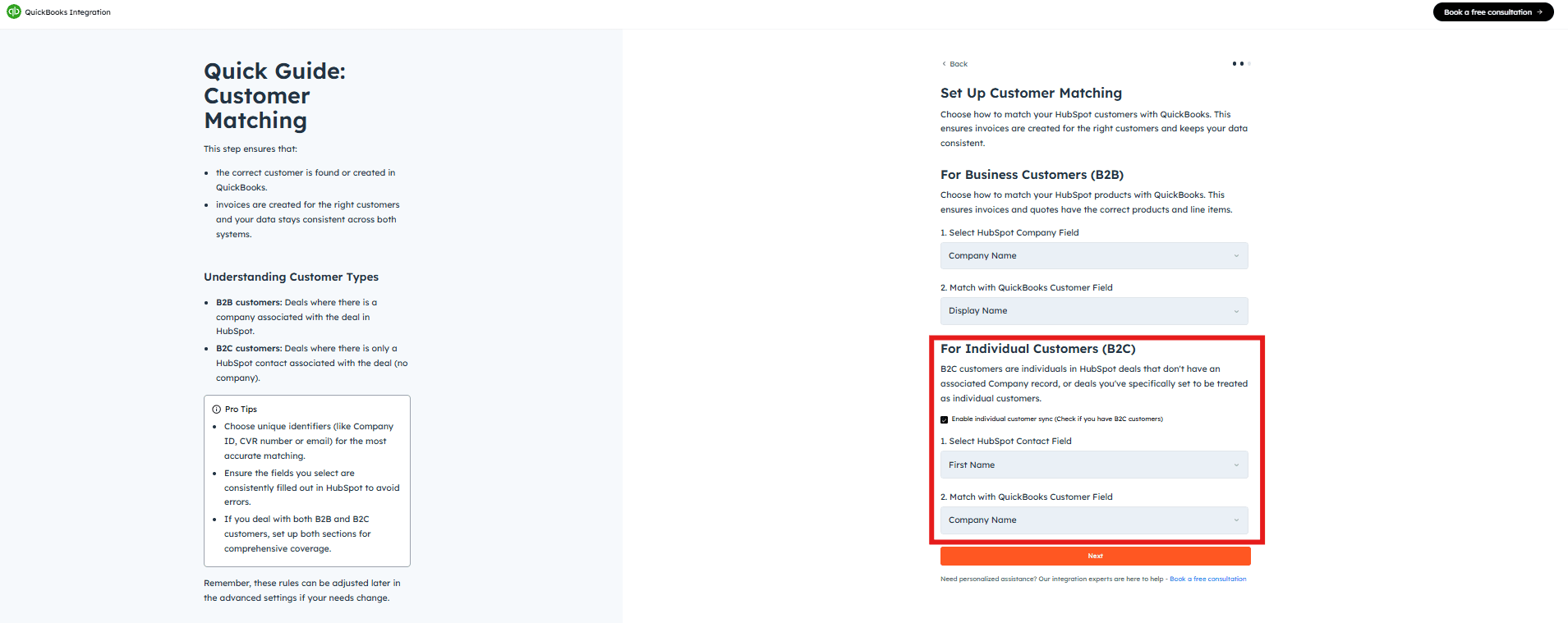
Set up Customer Search Rules to seamlessly synchronize customer information between HubSpot and QuickBooks, ensuring data consistency and avoiding duplicate entries. The integration actively searches for customers based on your defined parameters — if a match is found that record is used; otherwise, a new customer profile is created to maintain a comprehensive database.
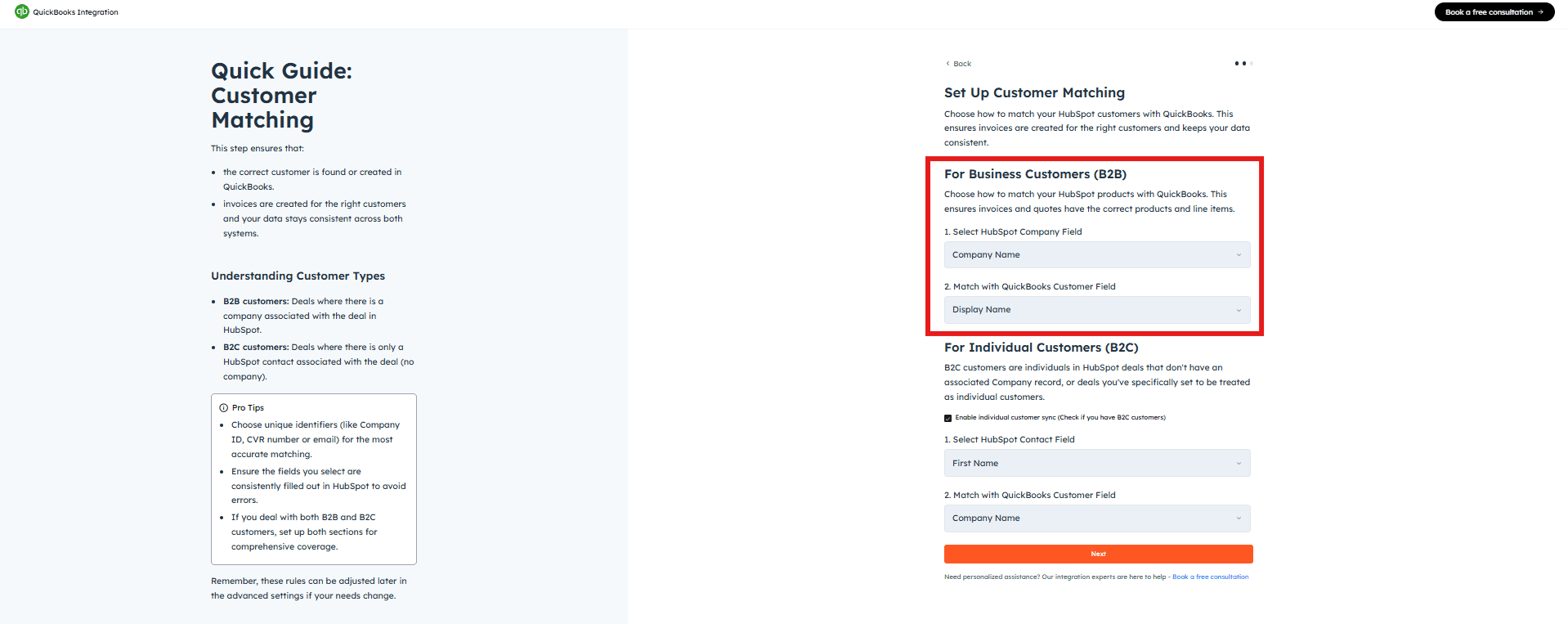
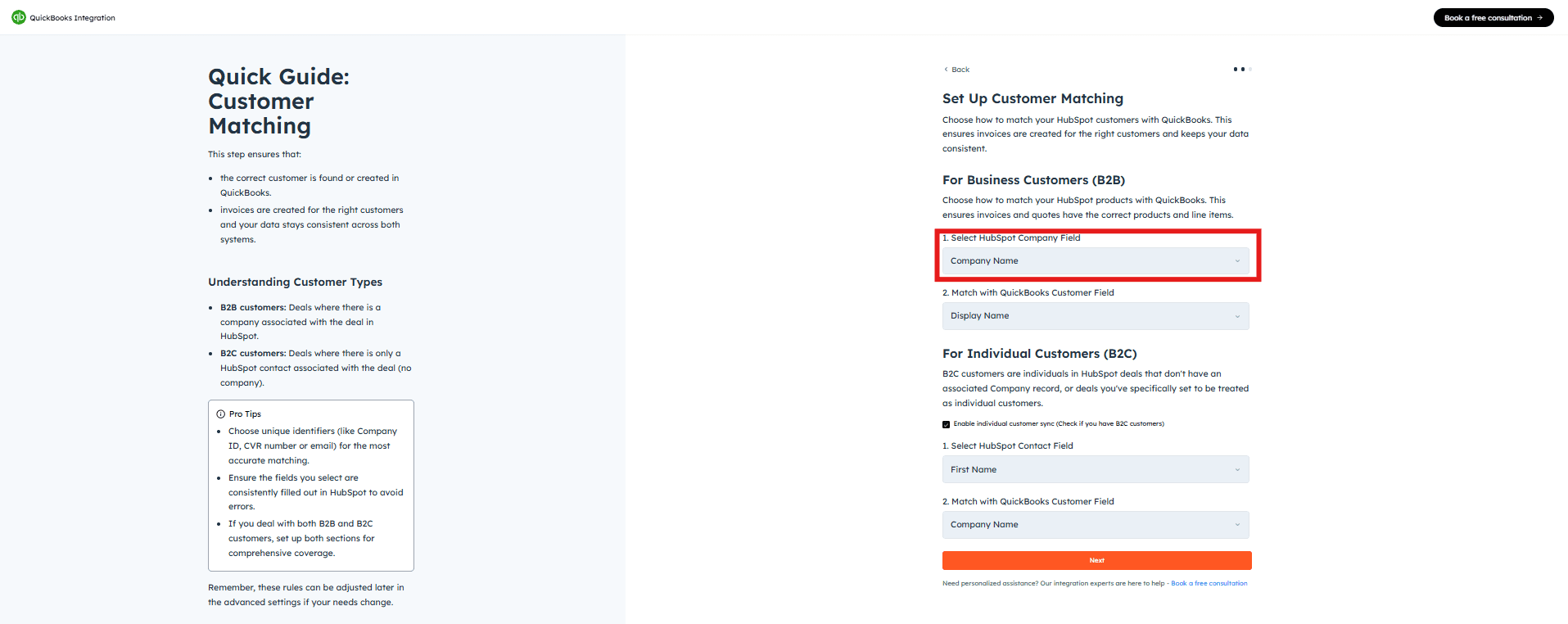
From the “HubSpot Company Identifier” dropdown, select the HubSpot field you want to use for matching (e.g., Company Name, Email).
2
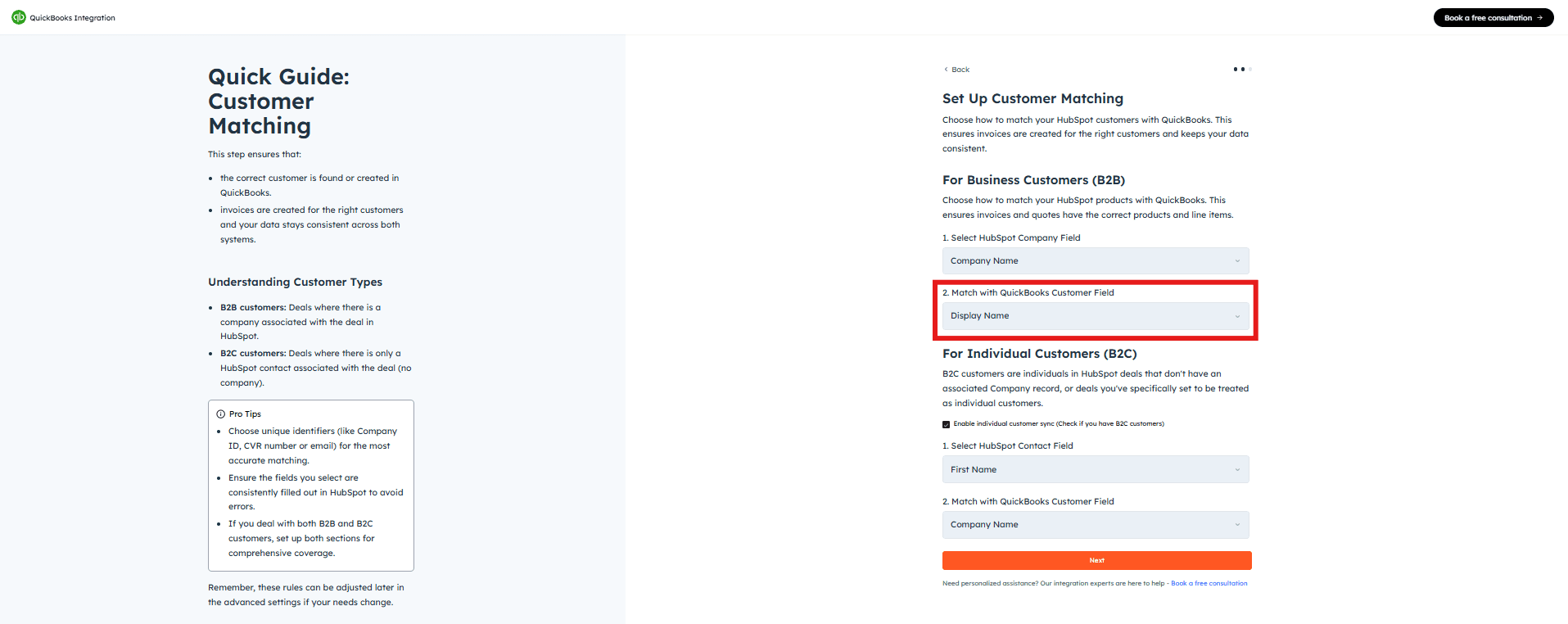
From the “QuickBooks Company Field” dropdown, select the corresponding field in QuickBooks. This ensures both platforms refer to the same company data when syncing, maintaining consistency across systems.
Enable this only if you deal with individual contacts as well.
This feature is essential for businesses dealing directly with consumers. It allows individual contacts from HubSpot to be added to QuickBooks as customers when there is no associated company.
1
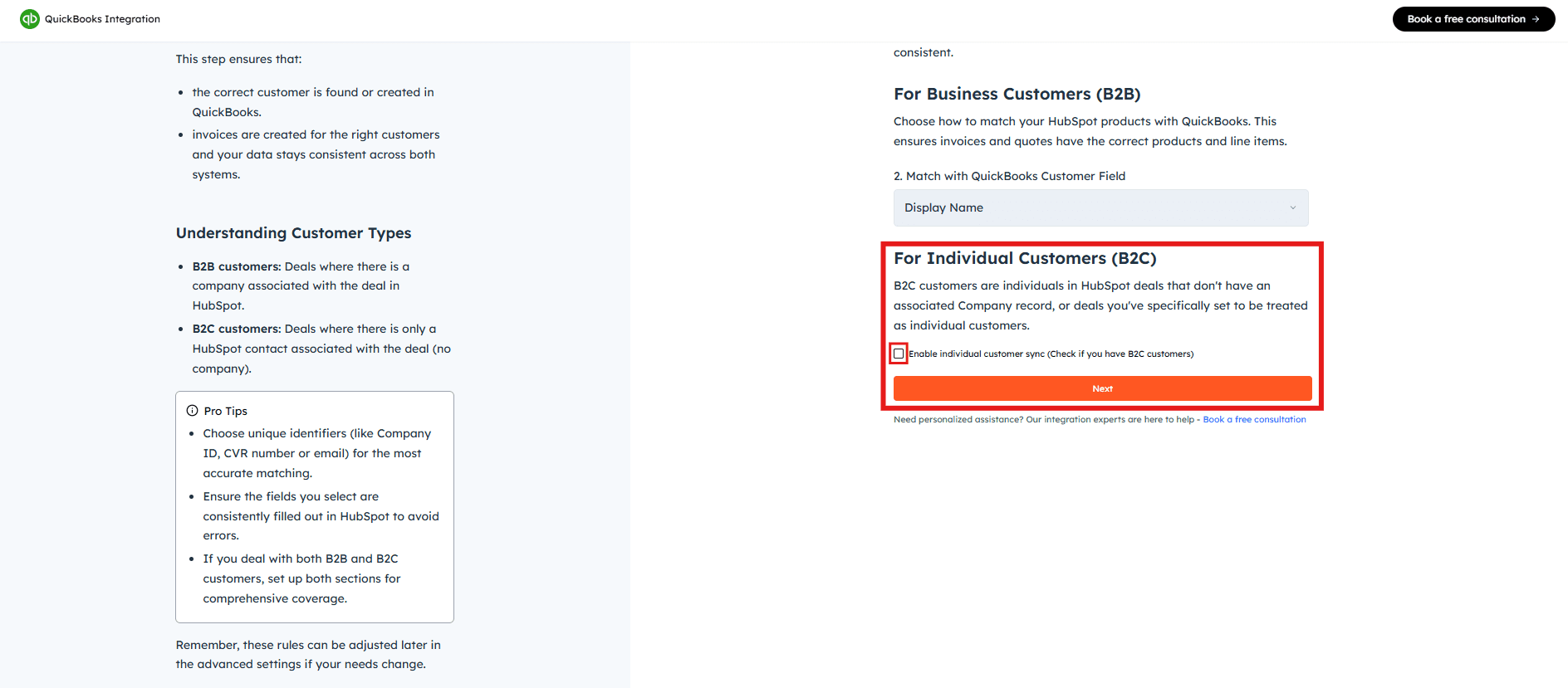
Tick “Enable Individual Customer Sync” if your contacts are not associated with a company.
2
Once you have selected your preferences, click “Next”.
Got unique integration needs?
Our custom team can build tailored integrations, specialized data mappings, and workflow automations to perfectly match your specific business processes.Advanced integration settings
Was this page helpful?
{"docsConfig":{"theme":"aspen","$schema":"https://mintlify.com/docs.json","name":"Cloudify Documentation","colors":{"primary":"#1a73e8","light":"#E5F2FF","dark":"#1a73e8"},"logo":{"light":"https://mintcdn.com/cloudify-c7720744/Ie43f-kQkw_inATF/images/cloudify_kb_light.svg?fit=max\u0026auto=format\u0026n=Ie43f-kQkw_inATF\u0026q=85\u0026s=e6fee15c45d046196122c85fc772f27f","dark":"https://mintcdn.com/cloudify-c7720744/Ie43f-kQkw_inATF/images/cloudify_kb_dark.svg?fit=max\u0026auto=format\u0026n=Ie43f-kQkw_inATF\u0026q=85\u0026s=e7912f98f52179439d72e912f32f1ee9","href":"/index"},"favicon":"https://mintcdn.com/cloudify-c7720744/yZ6OL23tlT3UIKur/images/cloudify-favicon.png?fit=max\u0026auto=format\u0026n=yZ6OL23tlT3UIKur\u0026q=85\u0026s=e285cca1f639970421f792349055c52c","appearance":{"default":"system"},"background":{"decoration":"gradient"},"navbar":{"links":[{"href":"mailto:support@cloudify.biz","label":"Support"}],"primary":{"type":"button","label":"Book a free consultation","href":"https://meetings.hubspot.com/cloudify/app-assistance"}},"footer":{"socials":{"linkedin":"https://linkedin.com/company/cloudify","facebook":"https://www.facebook.com/cloudify.biz","x":"https://x.com/cloudify_biz"}},"contextual":{"options":["copy","view"],"display":"header"},"markdown":{"schema":true},"styling":{"latex":true},"navigation":{"global":{"anchors":[{"anchor":"Home","icon":"house","href":"/"}]},"pages":[]}},"deployment":{"deploymentMetadataValue":{"subdomain":"cloudify-c7720744","hasAudioNarration":false,"actualSubdomain":"cloudify-c7720744","customDomains":["docs.cloudify.biz"],"gitSource":{"type":"github","owner":"cloudifybiz","repo":"setup-guide-docs","deployBranch":"main","contentDirectory":"","isPrivate":true,"mountPath":"","label":""},"chroma":{"liveDeploymentHistoryId":"6ada6fa389c1f8440295333c","collectionId":"69da6ace-dcb0-4d92-998c-63d321716990","schemaVersion":"v3","latestBuiltDeploymentHistoryId":"6ada6fa389c1f8440295333c"},"feedback":{"thumbs":true},"entitlements":{},"buildId":"6ada6fa389c1f8440295333c","clientVersion":"0.0.3965","searchFilterCounts":[{"language":"default","tag":"Setup Guide","count":212},{"language":"default","tag":"Configuration","count":88},{"language":"default","tag":"Installation","count":80},{"language":"default","tag":"Get the Most Out of the App","count":40},{"language":"default","tag":"Getting Started","count":36},{"language":"default","tag":"HubSpot Xero Integration","count":22},{"language":"default","tag":"Getting-Started","count":21},{"language":"default","tag":"HubSpot e-conomic Integration","count":18},{"language":"default","tag":"Pipedrive Xero Integration","count":17},{"language":"default","tag":"HubSpot Fortnox Integration","count":16}]},"assistantConfig":{"enableAskAiButton":false,"enableStarterQuestions":false,"enableAskAiSearchBar":true},"hasChatPermissions":false,"hasWebMcpPermissions":false,"toggles":[{"name":"kill-isr","enabled":true,"variant":{"name":"disabled","enabled":false,"feature_enabled":true},"impressionData":false},{"name":"agent-mintlify-slack","enabled":true,"variant":{"name":"disabled","enabled":false,"feature_enabled":true},"impressionData":false},{"name":"editor-v7-file-tree","enabled":true,"variant":{"name":"disabled","enabled":false,"feature_enabled":true},"impressionData":false},{"name":"agent-integrations-settings","enabled":true,"variant":{"name":"disabled","enabled":false,"feature_enabled":true},"impressionData":false},{"name":"automations-pr-grouping","enabled":true,"variant":{"name":"disabled","enabled":false,"feature_enabled":true},"impressionData":false},{"name":"custom-prefix","enabled":true,"variant":{"name":"disabled","enabled":false,"feature_enabled":true},"impressionData":false},{"name":"analytics-v7","enabled":true,"variant":{"name":"disabled","enabled":false,"feature_enabled":true},"impressionData":false},{"name":"user-flows-analytics","enabled":true,"variant":{"name":"disabled","enabled":false,"feature_enabled":true},"impressionData":false},{"name":"no-publish-flow","enabled":true,"variant":{"name":"disabled","enabled":false,"feature_enabled":true},"impressionData":false},{"name":"workos-onboarding","enabled":true,"variant":{"name":"disabled","enabled":false,"feature_enabled":true},"impressionData":false},{"name":"llms-txt-v2","enabled":true,"variant":{"name":"disabled","enabled":false,"feature_enabled":true},"impressionData":false},{"name":"pause-universal-search-reconcile","enabled":true,"variant":{"name":"disabled","enabled":false,"feature_enabled":true},"impressionData":false},{"name":"snapshot-serving-live","enabled":true,"variant":{"name":"disabled","enabled":false,"feature_enabled":true},"impressionData":false},{"name":"stripTemperatureMiddleware","enabled":true,"variant":{"name":"disabled","enabled":false,"feature_enabled":true},"impressionData":false},{"name":"per-site-search-delta","enabled":true,"variant":{"name":"disabled","enabled":false,"feature_enabled":true},"impressionData":false},{"name":"support-platform-pylon-zendesk","enabled":true,"variant":{"name":"disabled","enabled":false,"feature_enabled":true},"impressionData":false},{"name":"snapshot-serving","enabled":true,"variant":{"name":"disabled","enabled":false,"feature_enabled":true},"impressionData":false},{"name":"instant-rollback","enabled":true,"variant":{"name":"disabled","enabled":false,"feature_enabled":true},"impressionData":false},{"name":"granular-notifications-server","enabled":true,"variant":{"name":"disabled","enabled":false,"feature_enabled":true},"impressionData":false},{"name":"granular-notifications","enabled":true,"variant":{"name":"disabled","enabled":false,"feature_enabled":true},"impressionData":false},{"name":"editor-private-page-search","enabled":true,"variant":{"name":"disabled","enabled":false,"feature_enabled":true},"impressionData":false},{"name":"automations-fable","enabled":true,"variant":{"name":"disabled","enabled":false,"feature_enabled":true},"impressionData":false},{"name":"fixed-ai-action-pricing","enabled":true,"variant":{"name":"disabled","enabled":false,"feature_enabled":true},"impressionData":false},{"name":"automation-resolve-merge-conflict","enabled":true,"variant":{"name":"disabled","enabled":false,"feature_enabled":true},"impressionData":false},{"name":"scoped-publishing","enabled":true,"variant":{"name":"disabled","enabled":false,"feature_enabled":true},"impressionData":false},{"name":"mintql","enabled":true,"variant":{"name":"disabled","enabled":false,"feature_enabled":true},"impressionData":false},{"name":"page-level-analytics","enabled":true,"variant":{"name":"disabled","enabled":false,"feature_enabled":true},"impressionData":false},{"name":"editor-version-history-v2","enabled":true,"variant":{"name":"disabled","enabled":false,"feature_enabled":true},"impressionData":false},{"name":"editor-nav-generations","enabled":true,"variant":{"name":"disabled","enabled":false,"feature_enabled":true},"impressionData":false},{"name":"billing-page-v2","enabled":true,"variant":{"name":"disabled","enabled":false,"feature_enabled":true},"impressionData":false},{"name":"workspace-projects","enabled":true,"variant":{"name":"disabled","enabled":false,"feature_enabled":true},"impressionData":false},{"name":"assistant-v5","enabled":true,"variant":{"name":"disabled","enabled":false,"feature_enabled":true},"impressionData":false},{"name":"byok-sep-25","enabled":true,"variant":{"name":"disabled","enabled":false,"feature_enabled":true},"impressionData":false},{"name":"fork-pr-previews","enabled":true,"variant":{"name":"disabled","enabled":false,"feature_enabled":true},"impressionData":false},{"name":"revalidation-jwt","enabled":true,"variant":{"name":"disabled","enabled":false,"feature_enabled":true},"impressionData":false},{"name":"vite-origin","enabled":true,"variant":{"name":"disabled","enabled":false,"feature_enabled":true},"impressionData":false},{"name":"editor-agent-model-picker","enabled":true,"variant":{"name":"disabled","enabled":false,"feature_enabled":true},"impressionData":false},{"name":"billing-updated-9-15","enabled":true,"variant":{"name":"disabled","enabled":false,"feature_enabled":true},"impressionData":false},{"name":"hobby-abuse-scan","enabled":true,"variant":{"name":"disabled","enabled":false,"feature_enabled":true},"impressionData":false},{"name":"dashboard-inbox","enabled":true,"variant":{"name":"disabled","enabled":false,"feature_enabled":true},"impressionData":false}],"isAtlas":false,"googleFontsInlined":false},"customCss":[],"page":{"pagePath":"hubspot/quickbooks/installation/customer-search-rules","slug":"/hubspot/quickbooks/installation/customer-search-rules","pageMetadata":{"title":"Customer Search Rules","description":null,"href":"/hubspot/quickbooks/installation/customer-search-rules"},"pageType":"default","mdx":{"mdxSource":{"compiledSource":"\"use strict\";const{Fragment:_Fragment,jsx:_jsx,jsxs:_jsxs}=arguments[0];const{useMDXComponents:_provideComponents}=arguments[0];function _createMdxContent(props){const _components={a:`a`,br:`br`,hr:`hr`,img:`img`,p:`p`,strong:`strong`,..._provideComponents(),...props.components},{Frame,Heading,Note,Step,Steps,Tip}=_components;if(!Frame)_missingMdxReference(`Frame`,true);if(!Heading)_missingMdxReference(`Heading`,true);if(!Note)_missingMdxReference(`Note`,true);if(!Step)_missingMdxReference(`Step`,true);if(!Steps)_missingMdxReference(`Steps`,true);if(!Tip)_missingMdxReference(`Tip`,true);return _jsxs(_Fragment,{children:[_jsx(_components.p,{children:`Set up Customer Search Rules to seamlessly synchronize customer information between HubSpot and QuickBooks, ensuring data consistency and avoiding duplicate entries. The integration actively searches for customers based on your defined parameters — if a match is found that record is used; otherwise, a new customer profile is created to maintain a comprehensive database.`}),`\n`,_jsx(_components.hr,{}),`\n`,_jsx(Heading,{level:`2`,id:`company-matching-criteria-b2b`,children:`Company Matching Criteria (B2B)`}),`\n`,_jsxs(Steps,{children:[_jsx(Step,{children:_jsxs(_components.p,{children:[`From the `,_jsx(_components.strong,{children:`“HubSpot Company Identifier”`}),` dropdown, select the HubSpot field you want to use for matching (e.g., Company Name, Email).`]})}),_jsxs(Step,{children:[_jsxs(_components.p,{children:[`From the `,_jsx(_components.strong,{children:`“QuickBooks Company Field”`}),` dropdown, select the corresponding field in QuickBooks. This ensures both platforms refer to the same company data when syncing, maintaining consistency across systems.`]}),_jsx(Frame,{children:_jsx(_components.p,{children:_jsx(_components.img,{src:`https://framerusercontent.com/images/Za1z4ujIaApUjmYp8mbSsU5w.png`,alt:`Customer Search Rules`})})}),_jsx(Frame,{children:_jsx(_components.p,{children:_jsx(_components.img,{src:`https://framerusercontent.com/images/oFMuI5H0GLjFWa708si5ODfFdo.png`,alt:`Customer Search Rules`})})}),_jsx(Frame,{children:_jsx(_components.p,{children:_jsx(_components.img,{src:`https://framerusercontent.com/images/cEpMoB4nllNriRSqACArt7MDSE.png`,alt:`Customer Search Rules`})})})]})]}),`\n`,_jsx(_components.hr,{}),`\n`,_jsx(Heading,{level:`2`,id:`enable-individual-contact-sync-b2c`,children:`Enable Individual Contact Sync (B2C)`}),`\n`,_jsx(Note,{children:_jsx(_components.p,{children:`Enable this only if you deal with individual contacts as well.`})}),`\n`,_jsx(_components.p,{children:`This feature is essential for businesses dealing directly with consumers. It allows individual contacts from HubSpot to be added to QuickBooks as customers when there is no associated company.`}),`\n`,_jsxs(Steps,{children:[_jsxs(Step,{children:[_jsxs(_components.p,{children:[`Tick `,_jsx(_components.strong,{children:`“Enable Individual Customer Sync”`}),` if your contacts are not associated with a company.`]}),_jsx(Frame,{children:_jsx(_components.p,{children:_jsx(_components.img,{src:`https://framerusercontent.com/images/mXrwIfVzhX749fmhDMxjUj3H0.png`,alt:`Customer Search Rules`})})})]}),_jsxs(Step,{children:[_jsxs(_components.p,{children:[`Once you have selected your preferences, click `,_jsx(_components.strong,{children:`“Next”`}),`.`]}),_jsx(Frame,{children:_jsx(_components.p,{children:_jsx(_components.img,{src:`https://framerusercontent.com/images/F7Xy5itpSeioLnCs4rt2kriNumQ.png`,alt:`Customer Search Rules`})})})]})]}),`\n`,_jsxs(Tip,{children:[_jsxs(_components.p,{children:[_jsx(_components.strong,{children:`Got unique integration needs?`}),_jsx(_components.br,{}),`\n`,`Our custom team can build tailored integrations, specialized data mappings, and workflow automations to perfectly match your specific business processes.`]}),_jsx(_components.p,{children:_jsx(_components.a,{href:`https://custom.cloudify.biz/`,children:`Advanced integration settings`})})]})]})}function MDXContent(props={}){const{wrapper:MDXLayout}={..._provideComponents(),...props.components};return MDXLayout?_jsx(MDXLayout,{...props,children:_jsx(_createMdxContent,{...props})}):_createMdxContent(props)}return{default:MDXContent};function _missingMdxReference(id,component){throw new Error(`Expected `+(component?`component`:`object`)+\" `\"+id+\"` to be defined: you likely forgot to import, pass, or provide it.\")}","frontmatter":{},"scope":{"config":{},"pageMetadata":{"title":"Customer Search Rules","description":null,"href":"/hubspot/quickbooks/installation/customer-search-rules"}}},"mdxSourceWithNoJs":null},"mdxExtracts":{"tableOfContents":[{"title":"Company Matching Criteria (B2B)","slug":"company-matching-criteria-b2b","depth":2,"children":[]},{"title":"Enable Individual Contact Sync (B2C)","slug":"enable-individual-contact-sync-b2c","depth":2,"children":[]}],"codeExamples":{}},"jsLinks":[],"subdomain":"cloudify-c7720744","siteName":"Cloudify Documentation","title":"Customer Search Rules - Cloudify Documentation","navMaps":{"firstHrefInVersion":{},"firstHrefInLanguage":{}},"lastModified":"2026-10-01T09:00:33.814Z","originalFileLocation":"hubspot/quickbooks/installation/customer-search-rules.mdx"},"headHtml":"\u003cscript data-mint-head>(function(){var d=document.documentElement,p=null;if(!p){try{p=localStorage.getItem(\"isDarkMode\")}catch(e){}if(p==='true')p='dark';else if(p==='false')p='light';if(p!=='light'\u0026\u0026p!=='dark'\u0026\u0026p!=='system')p=\"system\"}var r=p==='system'?(matchMedia(\"(prefers-color-scheme: dark)\").matches?'dark':'light'):p;d.classList.remove(r==='dark'?'light':'dark');d.classList.add(r);d.setAttribute(\"data-theme-preference\",p)})();\u003c/script>\u003cmeta data-mint-head name=\"application-name\" content=\"Cloudify Documentation\">\u003cmeta data-mint-head name=\"generator\" content=\"Mintlify\">\u003clink data-mint-head rel=\"icon\" type=\"image/png\" sizes=\"192x192\" href=\"/mintlify-assets/_mintlify/favicons/cloudify-c7720744/6Hmx_AJUh5PJc53T/_generated/favicon/android-chrome-192x192.png\" media=\"(prefers-color-scheme: light)\">\u003clink data-mint-head rel=\"apple-touch-icon\" type=\"image/png\" sizes=\"180x180\" href=\"/mintlify-assets/_mintlify/favicons/cloudify-c7720744/6Hmx_AJUh5PJc53T/_generated/favicon/apple-touch-icon.png\">\u003clink data-mint-head rel=\"icon\" type=\"image/png\" sizes=\"16x16\" href=\"/mintlify-assets/_mintlify/favicons/cloudify-c7720744/6Hmx_AJUh5PJc53T/_generated/favicon/favicon-16x16.png\" media=\"(prefers-color-scheme: light)\">\u003clink data-mint-head rel=\"icon\" type=\"image/png\" sizes=\"32x32\" href=\"/mintlify-assets/_mintlify/favicons/cloudify-c7720744/6Hmx_AJUh5PJc53T/_generated/favicon/favicon-32x32.png\" media=\"(prefers-color-scheme: light)\">\u003clink data-mint-head rel=\"shortcut icon\" type=\"image/x-icon\" href=\"/mintlify-assets/_mintlify/favicons/cloudify-c7720744/6Hmx_AJUh5PJc53T/_generated/favicon/favicon.ico\" media=\"(prefers-color-scheme: light)\">\u003clink data-mint-head rel=\"icon\" type=\"image/png\" sizes=\"192x192\" href=\"/mintlify-assets/_mintlify/favicons/cloudify-c7720744/6Hmx_AJUh5PJc53T/_generated/favicon-dark/android-chrome-192x192.png\" media=\"(prefers-color-scheme: dark)\">\u003clink data-mint-head rel=\"icon\" type=\"image/png\" sizes=\"16x16\" href=\"/mintlify-assets/_mintlify/favicons/cloudify-c7720744/6Hmx_AJUh5PJc53T/_generated/favicon-dark/favicon-16x16.png\" media=\"(prefers-color-scheme: dark)\">\u003clink data-mint-head rel=\"icon\" type=\"image/png\" sizes=\"32x32\" href=\"/mintlify-assets/_mintlify/favicons/cloudify-c7720744/6Hmx_AJUh5PJc53T/_generated/favicon-dark/favicon-32x32.png\" media=\"(prefers-color-scheme: dark)\">\u003clink data-mint-head rel=\"shortcut icon\" type=\"image/x-icon\" href=\"/mintlify-assets/_mintlify/favicons/cloudify-c7720744/6Hmx_AJUh5PJc53T/_generated/favicon-dark/favicon.ico\" media=\"(prefers-color-scheme: dark)\">\u003cmeta data-mint-head property=\"og:title\" content=\"Customer Search Rules - Cloudify Documentation\">\u003cmeta data-mint-head property=\"og:site_name\" content=\"Cloudify Documentation\">\u003cmeta data-mint-head property=\"og:url\" content=\"https://docs.cloudify.biz/hubspot/quickbooks/installation/customer-search-rules\">\u003cmeta data-mint-head property=\"og:type\" content=\"website\">\u003cmeta data-mint-head property=\"og:image\" content=\"https://cloudify-c7720744.mintlify.app/_mintlify/api/og/v2?division=Installation\u0026amp;title=Customer+Search+Rules\u0026amp;theme=62a6acea7ce93d79ee10b6d5\u0026amp;signature=3e8e4bd3d194fe38e9248a58e38eb42c3ab8babe111ffd37e3ac94e7df24712a\">\u003cmeta data-mint-head property=\"og:image:width\" content=\"1200\">\u003cmeta data-mint-head property=\"og:image:height\" content=\"630\">\u003cmeta data-mint-head name=\"twitter:card\" content=\"summary_large_image\">\u003cmeta data-mint-head name=\"twitter:title\" content=\"Customer Search Rules - Cloudify Documentation\">\u003cmeta data-mint-head name=\"twitter:image\" content=\"https://cloudify-c7720744.mintlify.app/_mintlify/api/og/v2?division=Installation\u0026amp;title=Customer+Search+Rules\u0026amp;theme=62a6acea7ce93d79ee10b6d5\u0026amp;signature=3e8e4bd3d194fe38e9248a58e38eb42c3ab8babe111ffd37e3ac94e7df24712a\">\u003cmeta data-mint-head name=\"twitter:image:width\" content=\"1200\">\u003cmeta data-mint-head name=\"twitter:image:height\" content=\"630\">\u003cmeta data-mint-head name=\"msapplication-config\" content=\"/mintlify-assets/_mintlify/favicons/cloudify-c7720744/6Hmx_AJUh5PJc53T/_generated/favicon/browserconfig.xml\">\u003cmeta data-mint-head name=\"apple-mobile-web-app-title\" content=\"Cloudify Documentation\">\u003cmeta data-mint-head name=\"msapplication-TileColor\" content=\"#1a73e8\">\u003clink data-mint-head rel=\"canonical\" href=\"https://docs.cloudify.biz/hubspot/quickbooks/installation/customer-search-rules\">\u003clink data-mint-head rel=\"alternate\" type=\"application/xml\" href=\"/sitemap.xml\">\u003clink data-mint-head rel=\"alternate\" type=\"text/markdown\" href=\"/hubspot/quickbooks/installation/customer-search-rules.md\">\u003cscript data-mint-head type=\"application/ld+json\">{\"@context\":\"https://schema.org\",\"@graph\":[{\"@type\":\"Organization\",\"@id\":\"https://docs.cloudify.biz/#organization\",\"name\":\"Cloudify Documentation\",\"url\":\"https://docs.cloudify.biz\",\"logo\":{\"@type\":\"ImageObject\",\"url\":\"https://mintcdn.com/cloudify-c7720744/Ie43f-kQkw_inATF/images/cloudify_kb_light.svg?fit=max\u0026auto=format\u0026n=Ie43f-kQkw_inATF\u0026q=85\u0026s=e6fee15c45d046196122c85fc772f27f\"}},{\"@type\":\"WebSite\",\"@id\":\"https://docs.cloudify.biz#website\",\"name\":\"Cloudify Documentation\",\"url\":\"https://docs.cloudify.biz\",\"publisher\":{\"@id\":\"https://docs.cloudify.biz/#organization\"}},{\"@type\":\"WebPage\",\"@id\":\"https://docs.cloudify.biz/hubspot/quickbooks/installation/customer-search-rules#webpage\",\"url\":\"https://docs.cloudify.biz/hubspot/quickbooks/installation/customer-search-rules\",\"name\":\"Customer Search Rules\",\"dateModified\":\"2026-10-01T09:00:33.814Z\",\"isPartOf\":{\"@id\":\"https://docs.cloudify.biz#website\"},\"breadcrumb\":{\"@id\":\"https://docs.cloudify.biz/hubspot/quickbooks/installation/customer-search-rules#breadcrumb\"}},{\"@type\":\"BreadcrumbList\",\"@id\":\"https://docs.cloudify.biz/hubspot/quickbooks/installation/customer-search-rules#breadcrumb\",\"itemListElement\":[{\"@type\":\"ListItem\",\"position\":1,\"name\":\"Installation\",\"item\":\"https://docs.cloudify.biz/hubspot/quickbooks/installation/connect-quickbooks-account\"},{\"@type\":\"ListItem\",\"position\":2,\"name\":\"Customer Search Rules\",\"item\":\"https://docs.cloudify.biz/hubspot/quickbooks/installation/customer-search-rules\"}]},{\"@type\":[\"Article\",\"TechArticle\"],\"@id\":\"https://docs.cloudify.biz/hubspot/quickbooks/installation/customer-search-rules#article\",\"headline\":\"Customer Search Rules\",\"name\":\"Customer Search Rules\",\"url\":\"https://docs.cloudify.biz/hubspot/quickbooks/installation/customer-search-rules\",\"mainEntityOfPage\":{\"@id\":\"https://docs.cloudify.biz/hubspot/quickbooks/installation/customer-search-rules#webpage\"},\"dateModified\":\"2026-10-01T09:00:33.814Z\",\"publisher\":{\"@id\":\"https://docs.cloudify.biz/#organization\"},\"isPartOf\":{\"@id\":\"https://docs.cloudify.biz#website\"}}]}\u003c/script>\u003cscript data-mint-head type=\"application/ld+json\">{\"@context\":\"https://schema.org\",\"@type\":\"WebSite\",\"name\":\"Cloudify Documentation\",\"creator\":{\"@type\":\"Organization\",\"name\":\"Mintlify\",\"url\":\"https://mintlify.com\"}}\u003c/script>","siteName":"Cloudify Documentation","nav":{"global":{"anchors":[{"anchor":"Home","icon":"house","href":"/"}]},"products":[{"product":"Home","pages":[{"title":"Home","href":""}]},{"product":"HubSpot Xero Integration","description":"Integrate HubSpot with Xero to automate invoicing, sync customer data, reduce manual entry, and connect sales and accounting workflows seamlessly.","pages":[{"title":"HubSpot Xero Integration","href":"/hubspot/xero/getting-started/overview"}]},{"product":"HubSpot e-conomic Integration","description":"Integrate HubSpot with Visma e-conomic to automate invoicing, sync customer data, reduce manual work, and connect your sales and accounting workflows.","pages":[{"title":"HubSpot e-conomic Integration","href":"/hubspot/e-conomic/getting-started/overview"}]},{"product":"HubSpot Fortnox Integration","description":"Integrate HubSpot with Fortnox to sync customer and financial data, automate workflows, reduce manual entry, and streamline sales and accounting processes.","pages":[{"title":"HubSpot Fortnox Integration","href":"/hubspot/fortnox/getting-started/overview"}]},{"product":"HubSpot QuickBooks Integration","description":"By integrating HubSpot with QuickBooks Online, your organization can streamline sales and accounting workflows while reducing manual work.","groups":[{"group":"Getting-Started","pages":[{"title":"Overview","href":"/hubspot/quickbooks/getting-started/overview"},{"title":"Prerequisites","href":"/hubspot/quickbooks/getting-started/prerequistes"},{"title":"Choose your Subscription Plans","href":"/hubspot/quickbooks/getting-started/check-subscription-plans"}]},{"group":"Installation","pages":[{"title":"Connect QuickBooks Online Account","href":"/hubspot/quickbooks/installation/connect-quickbooks-account"},{"title":"Invoice/Estimate Search Rules","description":null,"href":"/hubspot/quickbooks/installation/invoice-estimate-rules"},{"title":"Customer Search Rules","href":"/hubspot/quickbooks/installation/customer-search-rules"},{"title":"Product Search Rules","description":null,"href":"/hubspot/quickbooks/installation/product-search-rules"}]},{"group":"Configuration","pages":[{"title":"Getting Started ","href":"/hubspot/quickbooks/configuration/getting-started"},{"title":"Customer Sync Rules","href":"/hubspot/quickbooks/configuration/customer-settings"},{"title":"Product Sync Rules","href":"/hubspot/quickbooks/configuration/product-settings"},{"title":"Invoice/Estimate Search Rules","href":"/hubspot/quickbooks/configuration/invoice-estimate-settings"}]},{"group":"Get-the-Most-of-the-App","pages":[{"title":"Explore App Features","href":"/hubspot/quickbooks/get-the-most-out-of-the-app/explore-app-features"},{"title":"Frequently Asked Questions","href":"/hubspot/quickbooks/get-the-most-out-of-the-app/frequently-asked-questions"}]}]},{"product":"HubSpot Business Central Integration","description":"Integrate HubSpot with Microsoft Dynamics 365 Business Central to sync data, automate workflows, reduce manual entry, and streamline CRM and business operations.","pages":[{"title":"HubSpot Business Central Integration","href":"/hubspot/msbc/getting-started/overview"}]},{"product":"HubSpot FlowLink Integration","description":"Use FlowLink to enrich new HubSpot leads through a webhook workflow and route them based on the result.","pages":[{"title":"HubSpot FlowLink Integration","href":"/hubspot/flowlink/installation/installing-flowlink"}]},{"product":"HubSpot Tripletex Integration","description":"Integrate HubSpot with Tripletex to sync customer, product, and invoice data, reduce manual entry, and streamline CRM and accounting workflows.","pages":[{"title":"HubSpot Tripletex Integration","href":"/hubspot/tripletex/getting-started/overview"}]},{"product":"HubSpot Company VAT Integration","description":"Learn how the HubSpot Company VAT app validates VAT information using official lookup sources to keep company data accurate and up to date.","pages":[{"title":"HubSpot Company VAT Integration","href":"/hubspot/company-vat/getting-started/overview"}]},{"product":"HubSpot Danish CVR Integration","description":"Learn what the Danish CVR Lookup app does and how it helps enrich HubSpot company data with official Danish business information.","pages":[{"title":"HubSpot Danish CVR Integration","href":"/hubspot/danish-cvr/getting-started/overview"}]},{"product":"Shopify Xero Integration","description":"Integrate Shopify with Xero to sync orders, customers, products, and financial data, reduce manual entry, and streamline e-commerce accounting.","pages":[{"title":"Shopify Xero Integration","href":"/shopify/xero/getting-started/overview"}]},{"product":"Shopify e-conomic Integration","description":"Integrate Shopify with e-conomic to automate accounting workflows, streamline financial data, reduce manual entry, and simplify e-commerce operations.","pages":[{"title":"Shopify e-conomic Integration","href":"/shopify/e-conomic/getting-started/overview"}]},{"product":"Shopify Fortnox Integration","description":"Connect Shopify with Fortnox to sync e-commerce and accounting data, automate workflows, reduce manual entry, and streamline financial operations.","pages":[{"title":"Shopify Fortnox Integration","href":"/shopify/fortnox/getting-started/overview"}]},{"product":"Shopify Tripletex Integration","description":"Connect Shopify with Tripletex using Cloudify to sync e-commerce and accounting data, automate workflows, reduce manual entry, and streamline financial operations.","pages":[{"title":"Shopify Tripletex Integration","href":"/shopi/tripletex/getting-started/overview"}]},{"product":"Stripe e-conomic Integration","description":"Connect Stripe with e-conomic to sync webshop data, manage invoices and orders, reduce manual entry, and streamline your accounting workflow.","pages":[{"title":"Stripe e-conomic Integration","href":"/stripe/e-conomic/getting-started/overview"}]},{"product":"Stripe Business Central Integration","description":"Connect Stripe with Business Central to sync payment data, reduce manual work, improve financial accuracy, and streamline your accounting workflow.","pages":[{"title":"Stripe Business Central Integration","href":"/stripe/msbc/getting-started/overview"}]},{"product":"Pipedrive Xero Integration","description":"Step-by-step guide to installing the Cloudify Xero Integration from either the Xero App Store or the Pipedrive Marketplace, and connecting your Xero account.","pages":[{"title":"Pipedrive Xero Integration","href":"/pipedrive/xero/getting-started/overview"}]},{"product":"Pipedrive e-conomic Integration","description":"Step-by-step guide to installing the Visma e-conomic sync app in Pipedrive and connecting your e-conomic account.","pages":[{"title":"Pipedrive e-conomic Integration","href":"/pipedrive/e-conomic/getting-started/overview"}]},{"product":"Pipedrive Fortnox Integration","description":"Integrate Pipedrive with Fortnox to sync CRM and accounting data, reduce manual entry, automate workflows, and streamline sales and financial operations.","pages":[{"title":"Pipedrive Fortnox Integration","href":"/pipedrive/fortnox/getting-started/overview"}]},{"product":"Pipedrive Business Central Integration","description":"Connect Pipedrive with Microsoft Dynamics 365 Business Central to sync CRM and business data, automate workflows, reduce manual entry, and streamline operations.","pages":[{"title":"Pipedrive Business Central Integration","href":"/pipedrive/msbc/getting-started/overview"}]},{"product":"Pipedrive Company VAT Integration","description":"Use Pipedrive Company VAT to verify VAT details, improve company data accuracy, and keep business information up to date directly in your CRM.","pages":[{"title":"Pipedrive Company VAT Integration","href":"/pipedrive/company-vat/getting-started/overview"}]},{"product":"Pipedrive Danish CVR Integration","description":"Integrate Danish CVR data with Pipedrive to improve company information, reduce manual research, and keep customer records accurate and up to date.","pages":[{"title":"Pipedrive Danish CVR Integration","href":"/pipedrive/danish-cvr/getting-started/overview"}]},{"product":"WooCommerce Xero","description":"Integrate WooCommerce with Xero to automate invoices and quotes, sync orders, customers, and products, and reduce manual accounting data entry.","pages":[{"title":"WooCommerce Xero","href":"/woocommerce-xero/getting-started/overview"}]},{"product":"Lighthouse","pages":[{"title":"Lighthouse","href":"/lighthouse-overview"}]},{"product":"Fortnox configuration","pages":[{"title":"Fortnox configuration","href":"/configurations/fortnox/fortnox-configuration"}]},{"product":"Shopify Pennylane","description":"Set up the Shopify-Pennylane integration by Cloudify: connect your account, configure sync rules, and turn Shopify orders into Pennylane invoices automatically","pages":[{"title":"Shopify Pennylane","href":"/shopi/pennylane/getting-started/overview"}]},{"product":"HubSpot e-conomic"},{"product":"WooCommerce-Xero"},{"product":"Shopify Exact Online","pages":[{"title":"Shopify Exact Online","href":"/shopi-exactonline-overview"}]},{"product":"Setting up the Lighthouse HubSpot Connection","pages":[{"title":"Setting up the Lighthouse HubSpot Connection","href":"/setting-up-the-lighthouse-hubspot-connection"}]}]},"title":"Customer Search Rules - Cloudify Documentation","buildId":"dpl_849ArpqvBiCczQiT1Y1stNGpbqHT","deploymentId":"dpl_849ArpqvBiCczQiT1Y1stNGpbqHT","dynamics":["07c022d89b","a74be98ba7"],"chunks":["Frame-Cz91mEGH.js","DynamicMarkdown-a8hUKrw6.js","zoom-image-lightbox-CaUwvYH3.js","lightbox-handle-r17bVUz3.js"]}