

Sync Rules
Automatically Create (Xero) Invoices
This toggle controls whether invoices are created in Xero automatically when a Shopify order reaches a certain status.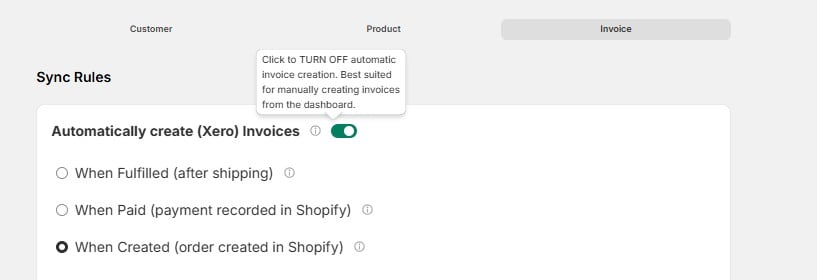
Invoice Type in Xero
Choose what type of invoice is generated in Xero: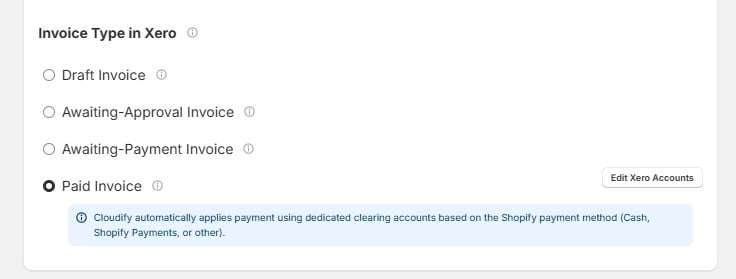
Pick the type that matches your accounting workflow. If you’re unsure, Draft Invoice is the safest starting point — it gives you a chance to review before anything is finalized.
Paid Invoice — Payment Accounts
When you select Paid Invoice, Cloudify automatically applies payment using dedicated clearing accounts based on the Shopify payment method (Cash, Shopify Payments, or other).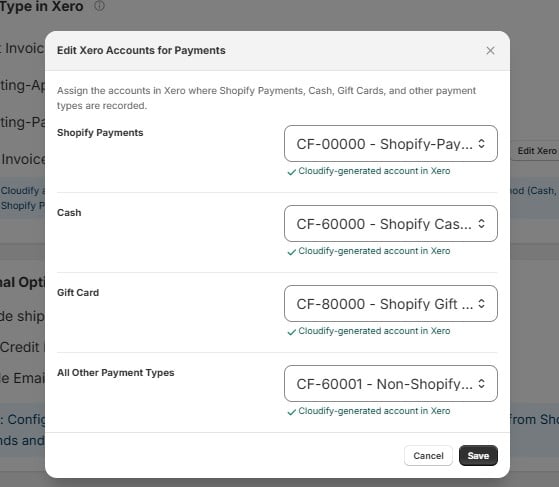
These are Cloudify-generated accounts in Xero. They’re created automatically — you don’t need to set them up manually, but you can reassign them to different accounts if needed.
Additional Options
These settings let you configure shipping, refunds, and email notifications on your Xero invoices.Include Shipping Charges
Include shipping charges
Xero Credit Notes from Shopify Refunds
Xero Credit Notes from Shopify Refunds
Enable Email Notification
Enable Email Notification
Configure the above settings to streamline shipping charges, credit note creation from Shopify refunds, and manage automated invoice emails to your customers.