

How It Works
For transactions that occurred in Shopify the previous day, Cloudify automatically aggregates them into a single Invoice (for sales) and a single Credit Note (for refunds) inside Xero.1. Single Invoice (Sales)
One invoice covering all of yesterday’s sales, broken down by:
- Sales with VAT / Tax
- Sales without VAT / Tax
- Shipping with VAT / Tax
- Shipping without VAT / Tax
- Gift card sales (tracked to Liability)
- Discounts (adjusted directly against sales)
2. Single Credit Note (Refunds)
One credit note covering all of yesterday’s refunds, broken down by:
- Refunds with VAT / Tax
- Refunds with no tax (custom refunds)
- Shipping refunds
- Gift card refunds
Configuration
Transfer Frequency
Controls when the daily summary is generated and pushed to Xero. The default is Daily Summary — covering transactions from 00:00:00 to 23:59:59 each day. A summarized invoice and credit note for your previous day’s Shopify transactions will be generated in Xero.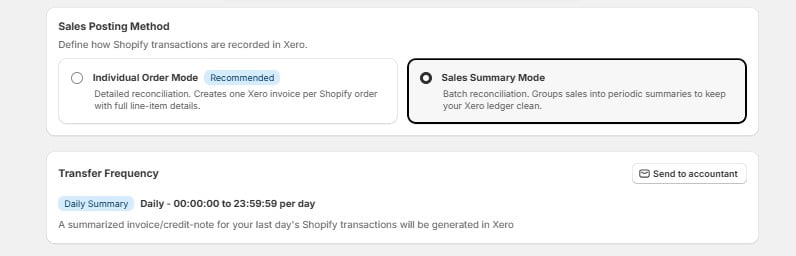
Tax Rate Mapping
Configure how Shopify tax data maps to Xero tax rates.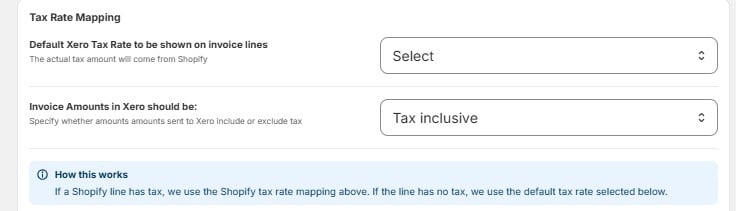
For Shopify line items that have no tax, you assign a default Xero tax rate for each type:
How this works: If a Shopify line has tax, the integration uses the Shopify tax rate mapping above. If the line has no tax, it falls back to the default tax rate you’ve selected for that line type.
Xero Account Selection
Choose which Xero accounts your Shopify revenue and transactions are posted to: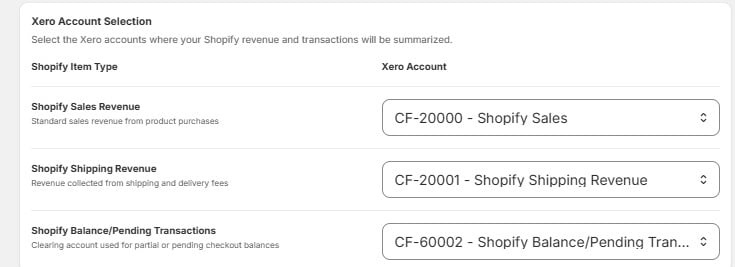
Payment Methods
Map your Shopify payment methods to the correct Xero clearing accounts so payouts reconcile correctly: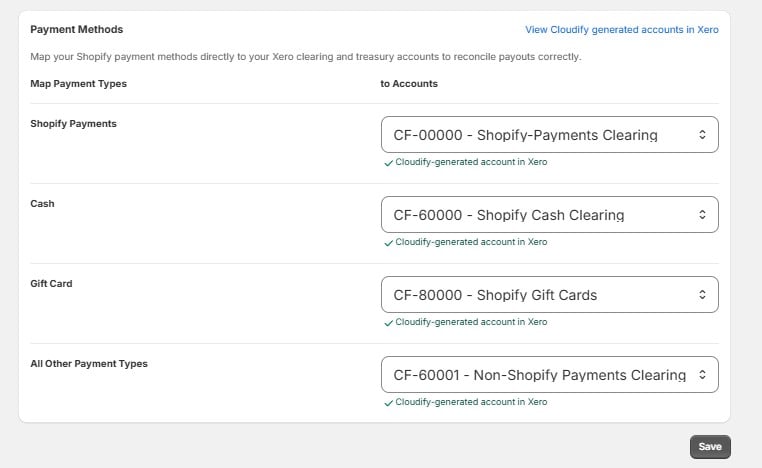
All
CF- accounts are created automatically by Cloudify in your Xero org. You don’t need to set them up manually. Click “View Cloudify generated accounts in Xero” to see them.Channel-Wise Sales & POS Distinction
To prevent mixups, orders are automatically separated based on where they came from:
Cloudify creates three dedicated customer records in Xero to keep these channels segregated:
Xero References & Layout
Every invoice and credit note follows a consistent naming pattern so you can find them easily:- Invoice & Credit Note Reference —
Shopify Orders Paid/Partially paid on {transaction-date}(e.g. Shopify Orders Fully/Partially Paid on 16 June 2026) - Payment Reference in Xero — set to the actual payment method (e.g. Cash, Manual, or Credit card)
- Partially Paid Orders — the full sale goes to the Sales Account, while the unpaid balance goes into
CF-60002(Shopify Balance/Pending Transactions). It clears to zero once the order is fully paid.