

IMPORTANT: The integration logs can be found inside the specific transaction or the invoice created within Stripe. Click on the Stripe transaction or Stripe invoice and check the “Metadata” section for the integration status.
What exactly does this integration do?
What exactly does this integration do?
This integration helps you:
- Turn your Stripe payments into e-conomic invoices & orders
- Keep your Stripe and e-conomic product and customer data in sync
- Automatically create journal entries for all transactions
- Track sync status and manage your financial records efficiently
- Create draft invoices/orders or booked invoices based on your preferences
My Stripe payment was processed. Where do I check if the invoice/order creation was successful?
My Stripe payment was processed. Where do I check if the invoice/order creation was successful?
Open your e-conomic account and check the invoices/orders section. If the integration ran into any errors, you can view the details in your Stripe invoice metadata and use the ‘Replay’ feature to retry the sync.
I have installed the Cloudify app, but how do I create the invoice/order in e-conomic now?
I have installed the Cloudify app, but how do I create the invoice/order in e-conomic now?
Once you’ve installed the app, log into your Stripe dashboard, navigate to the “Transactions” section, click on “Create Payment” and select the relevant option (Invoice/Payment Link/Subscription/Manual Payment). For you to successfully create a document in e-conomic, you either need to create a manual payment or an invoice needs to be first created within Stripe, which will initiate the creation of a corresponding invoice/order within e-conomic.Note: If you are selecting “Payment Link”, make sure to enable “Create an invoice PDF” under the “After payment” section in order to create an invoice within Stripe. This will ensure that your invoice/order in e-conomic gets created (this will work if your trigger in the app-settings from Stripe is “Invoice Paid”).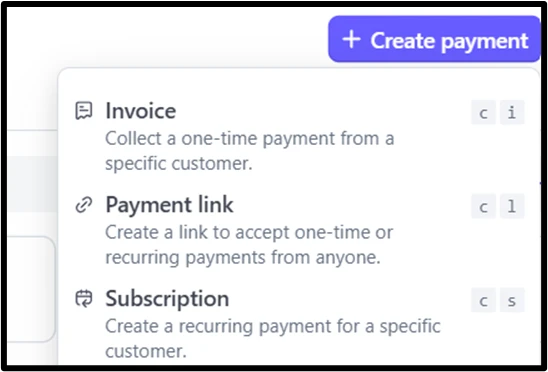
How does the integration handle customer data between Stripe and e-conomic?
How does the integration handle customer data between Stripe and e-conomic?
The integration searches for existing customers using your configured matching fields. If a customer isn’t found, it will create a new one using the Stripe customer data. You can choose which fields to use for matching (email, name, phone, etc.).
I've connected my e-conomic account but can't see the created invoice/order
I've connected my e-conomic account but can't see the created invoice/order
Check:
- Your e-conomic connection status
- Your invoice creation settings
- If all required fields are properly mapped
- Contact support@cloudify.biz if issues persist
How often the synchronisation happen?
How often the synchronisation happen?
The synchronisation frequency is determined by the integration cycle set up on Stripe. You can customise this as per your requirements.
Will I be charged for failed integration attempts?
Will I be charged for failed integration attempts?
No. Failed integration attempts don’t count toward your usage limits. You’re only charged for successful invoice/order creations.
How do I handle special characters in field mappings?
How do I handle special characters in field mappings?
Make sure to:
- Test your field mappings with sample data first
- Avoid using special characters in critical fields where possible
- Contact support if you encounter persistent issues
The generated invoice/order is missing some information. How can I fix this?
The generated invoice/order is missing some information. How can I fix this?
- Go to your integration settings
- Review and update your field mappings (this is available in the app settings under ‘Customers’, ‘Products’ and ‘Invoices/Orders’ sections)
- Save your changes
- Try creating the invoice/order again using the ‘Replay’ feature
How do I handle metadata and custom fields?
How do I handle metadata and custom fields?
- Ensure metadata keys don’t contain spaces
- Map custom fields through metadata options
- Configure field mappings during initial setup
- Test the mappings before full deployment
Can I update existing product information in e-conomic through the integration?
Can I update existing product information in e-conomic through the integration?
No. The integration is designed to find existing products or create new ones, but it won’t update information for existing products in e-conomic. This ensures the integrity of your e-conomic product catalog.
How do I connect my e-conomic account?
How do I connect my e-conomic account?
Follow these steps:
- Go to “Installed apps” on Stripe (you can simply search for “apps” to find this option)
- Select “Visma e-conomic Integration”
- Click on “Manage e-conomic account”
- Select “Continue to e-conomic”
- Log in to your e-conomic account
- Authorize the integration to ensure it’s connected with Stripe.