

What exactly does this integration do?
What exactly does this integration do?
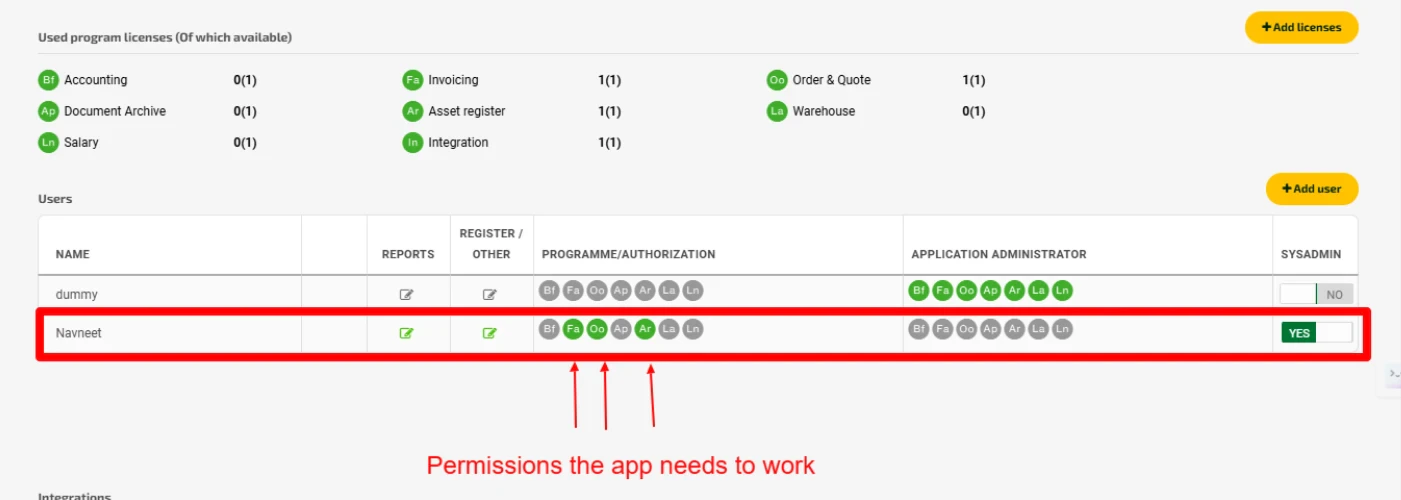
I get this error when I try to create invoices/orders in Fortnox: 'The workflow execution failed due to this error: There is no active license for the desired scope'. How do I fix this?
I get this error when I try to create invoices/orders in Fortnox: 'The workflow execution failed due to this error: There is no active license for the desired scope'. How do I fix this?
My HubSpot deal has moved to the required deal stage. Where do I check if the invoice/order creation was successful?
My HubSpot deal has moved to the required deal stage. Where do I check if the invoice/order creation was successful?
I don't have access to HubSpot Workflows. What should I do?
I don't have access to HubSpot Workflows. What should I do?
I have installed the app, but how do I create the invoice/order now?
I have installed the app, but how do I create the invoice/order now?
- Use automatic creation: Set up triggers for specific deal stages in Sync Settings > Customer Sync Settings
- Use the app as a workflow-action in HubSpot Workflows Don’t forget to check the deal notes after the integration runs
Will the invoice/order be directly sent to my customer after it is created?
Will the invoice/order be directly sent to my customer after it is created?
I do not want to create invoices/orders automatically when a deal is moved from one stage to another. Is there any other way to create invoices/orders?
I do not want to create invoices/orders automatically when a deal is moved from one stage to another. Is there any other way to create invoices/orders?
Can I connect my HubSpot account with multiple Fortnox accounts using Cloudify's app?
Can I connect my HubSpot account with multiple Fortnox accounts using Cloudify's app?
I am unable to import my Fortnox customer and product data to HubSpot with this application.
I am unable to import my Fortnox customer and product data to HubSpot with this application.
What if my HubSpot customer is not present in Fortnox? Will the integration work?
What if my HubSpot customer is not present in Fortnox? Will the integration work?
How do I just create a customer in my accounting system from HubSpot if I don't want to create an invoice/order?
How do I just create a customer in my accounting system from HubSpot if I don't want to create an invoice/order?
What if I don't want to manually go to each company or contact and update it?
What if I don't want to manually go to each company or contact and update it?
What if my HubSpot product is not present in Fortnox? Will the integration work?
What if my HubSpot product is not present in Fortnox? Will the integration work?
- Take no action by skipping invoice/order generation
- Choose from a default product that serves as a placeholder
- Create a new product in Fortnox
I have connected my Fortnox account to HubSpot but I can't see the created invoice/order in Fortnox.
I have connected my Fortnox account to HubSpot but I can't see the created invoice/order in Fortnox.