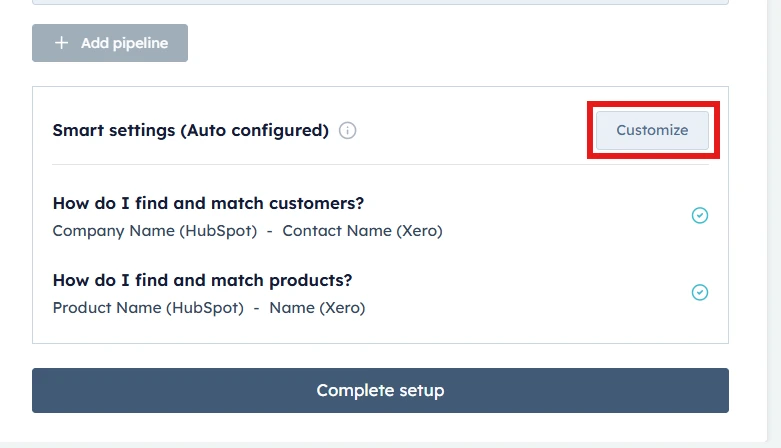
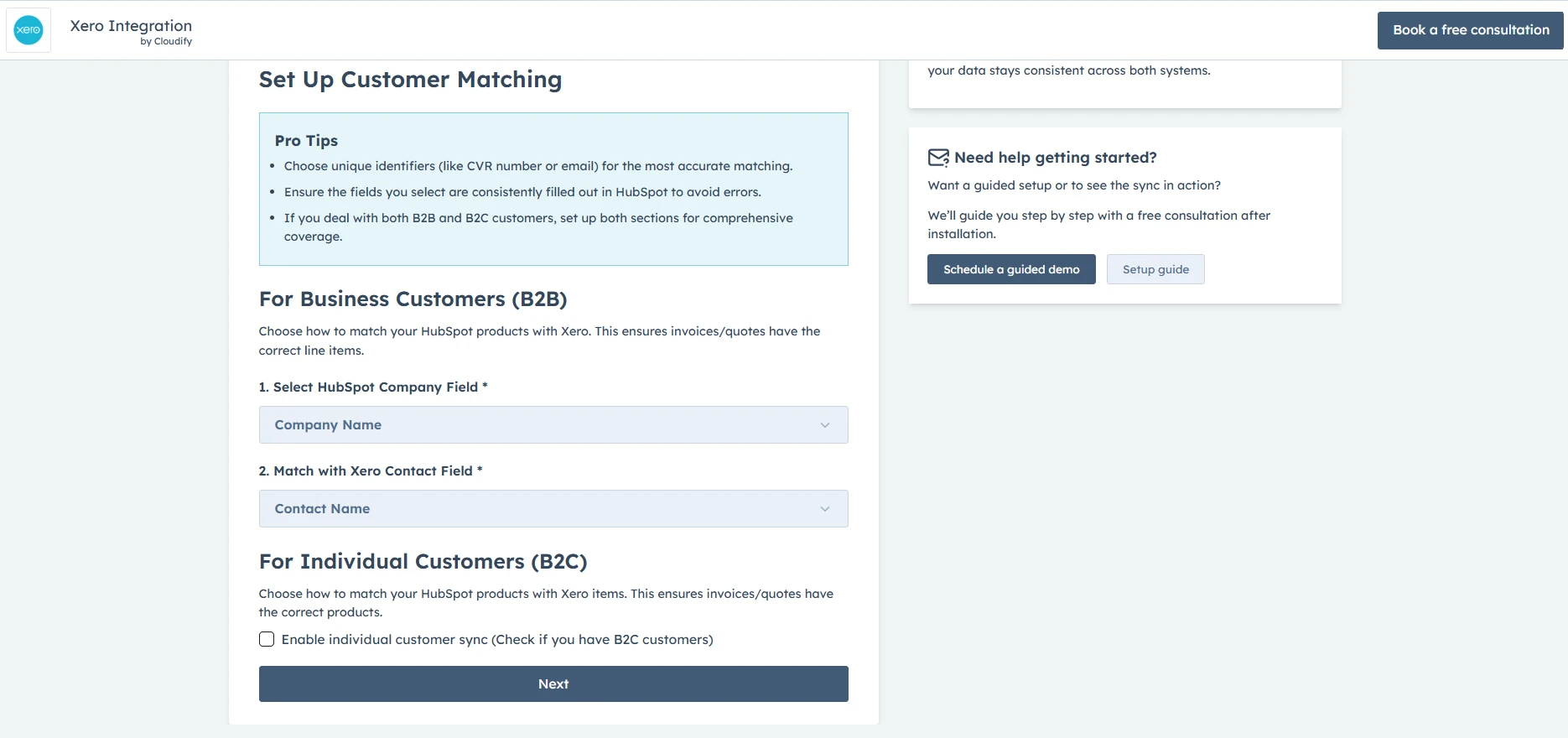
Company Matching Criteria (For Business Customers - B2B)
You can configure company matching criteria by selecting a field in HubSpot (e.g., Company Name, Email) corresponding to the chosen Xero field. This ensures both platforms refer to the same company data when syncing information, maintaining consistency across systems
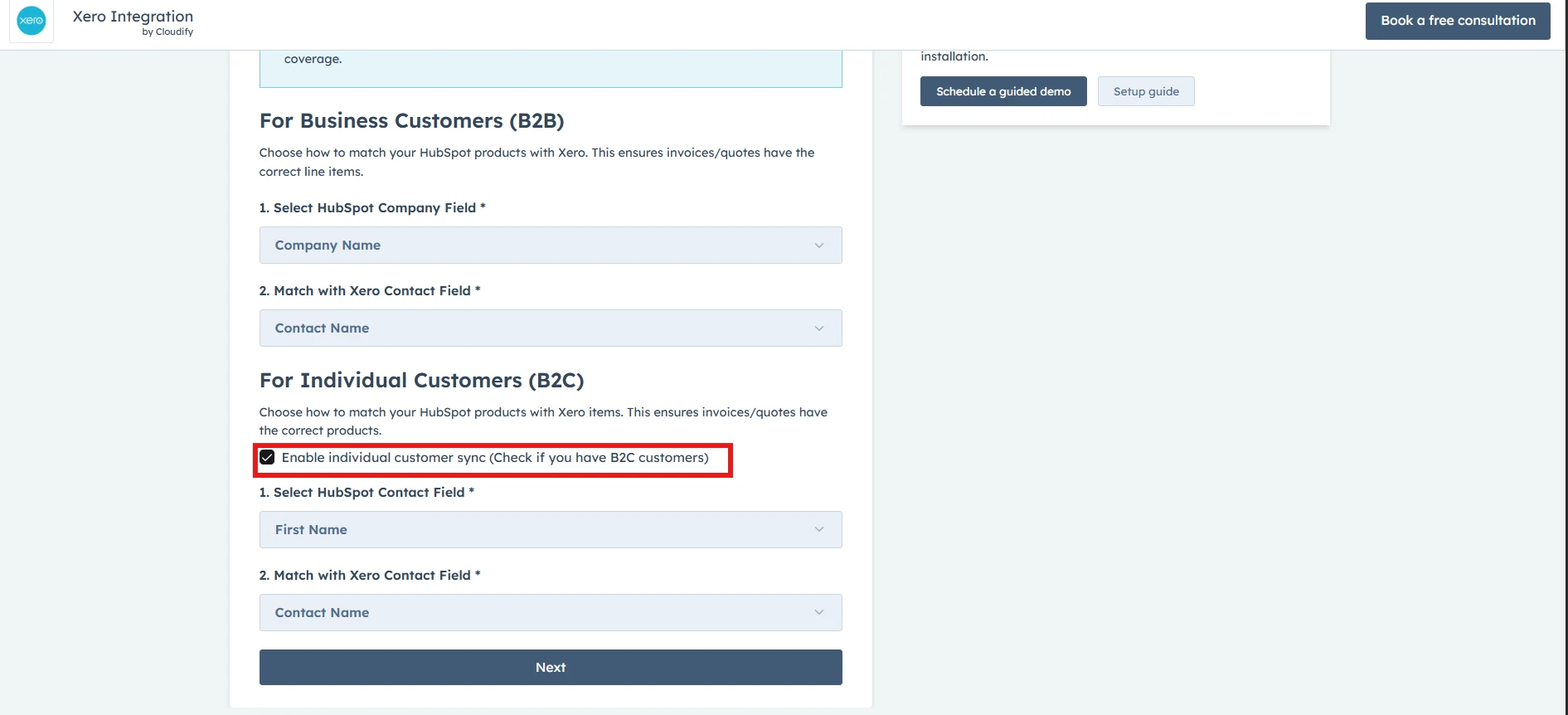
Note: Enable this only if you deal with individual contacts as well
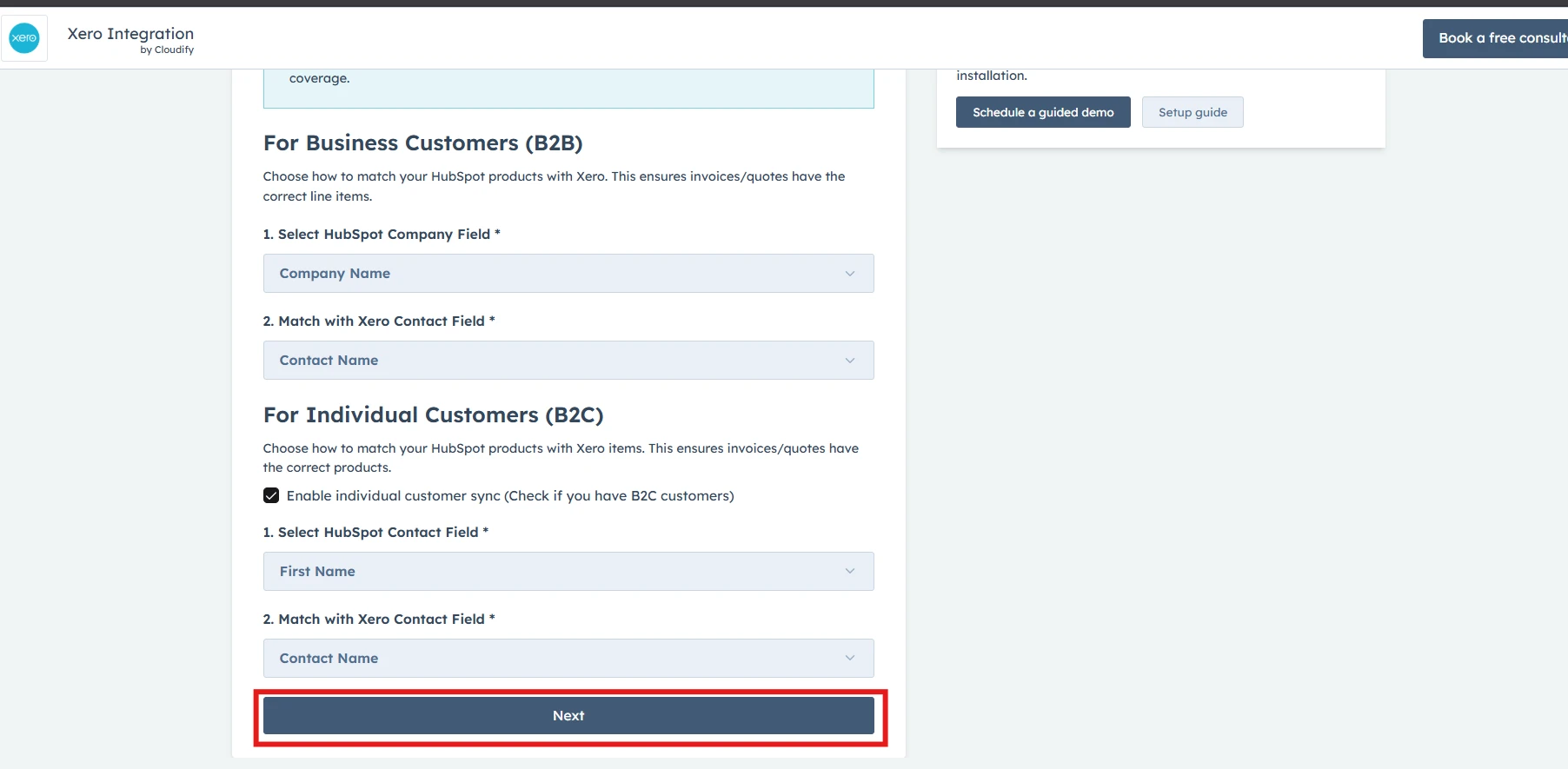
This feature is essential for businesses dealing directly with consumers. It allows the seamless addition of individual contacts from HubSpot to Xero as customers when there’s no associated company. Therefore, if this is the case, tick “Enable individual customer sync”.Once you have selected your preferences, click on the “Next” button.
Got unique integration needs? Our custom team can build tailored integrations, specialized data mappings, and workflow automations to perfectly match your specific business processes.Advanced integration settings
Was this page helpful?
{"docsConfig":{"theme":"aspen","$schema":"https://mintlify.com/docs.json","name":"Cloudify Documentation","colors":{"primary":"#1a73e8","light":"#E5F2FF","dark":"#1a73e8"},"logo":{"light":"https://mintcdn.com/cloudify-c7720744/Ie43f-kQkw_inATF/images/cloudify_kb_light.svg?fit=max\u0026auto=format\u0026n=Ie43f-kQkw_inATF\u0026q=85\u0026s=e6fee15c45d046196122c85fc772f27f","dark":"https://mintcdn.com/cloudify-c7720744/Ie43f-kQkw_inATF/images/cloudify_kb_dark.svg?fit=max\u0026auto=format\u0026n=Ie43f-kQkw_inATF\u0026q=85\u0026s=e7912f98f52179439d72e912f32f1ee9","href":"/index"},"favicon":"https://mintcdn.com/cloudify-c7720744/yZ6OL23tlT3UIKur/images/cloudify-favicon.png?fit=max\u0026auto=format\u0026n=yZ6OL23tlT3UIKur\u0026q=85\u0026s=e285cca1f639970421f792349055c52c","appearance":{"default":"system"},"background":{"decoration":"gradient"},"navbar":{"links":[{"href":"mailto:support@cloudify.biz","label":"Support"}],"primary":{"type":"button","label":"Book a free consultation","href":"https://meetings.hubspot.com/cloudify/app-assistance"}},"footer":{"socials":{"linkedin":"https://linkedin.com/company/cloudify","facebook":"https://www.facebook.com/cloudify.biz","x":"https://x.com/cloudify_biz"}},"contextual":{"options":["copy","view"],"display":"header"},"markdown":{"schema":true},"styling":{"latex":true},"navigation":{"global":{"anchors":[{"anchor":"Home","icon":"house","href":"/"}]},"pages":[]}},"deployment":{"deploymentMetadataValue":{"subdomain":"cloudify-c7720744","hasAudioNarration":false,"actualSubdomain":"cloudify-c7720744","customDomains":["docs.cloudify.biz"],"gitSource":{"type":"github","owner":"cloudifybiz","repo":"setup-guide-docs","deployBranch":"main","contentDirectory":"","isPrivate":true,"mountPath":"","label":""},"chroma":{"liveDeploymentHistoryId":"6ada6fa389c1f8440295333c","collectionId":"69da6ace-dcb0-4d92-998c-63d321716990","schemaVersion":"v3","latestBuiltDeploymentHistoryId":"6ada6fa389c1f8440295333c"},"feedback":{"thumbs":true},"entitlements":{},"buildId":"6ada6fa389c1f8440295333c","clientVersion":"0.0.3965","searchFilterCounts":[{"language":"default","tag":"Setup Guide","count":212},{"language":"default","tag":"Configuration","count":88},{"language":"default","tag":"Installation","count":80},{"language":"default","tag":"Get the Most Out of the App","count":40},{"language":"default","tag":"Getting Started","count":36},{"language":"default","tag":"HubSpot Xero Integration","count":22},{"language":"default","tag":"Getting-Started","count":21},{"language":"default","tag":"HubSpot e-conomic Integration","count":18},{"language":"default","tag":"Pipedrive Xero Integration","count":17},{"language":"default","tag":"HubSpot Fortnox Integration","count":16}]},"assistantConfig":{"enableAskAiButton":false,"enableStarterQuestions":false,"enableAskAiSearchBar":true},"hasChatPermissions":false,"hasWebMcpPermissions":false,"toggles":[{"name":"kill-isr","enabled":true,"variant":{"name":"disabled","enabled":false,"feature_enabled":true},"impressionData":false},{"name":"agent-mintlify-slack","enabled":true,"variant":{"name":"disabled","enabled":false,"feature_enabled":true},"impressionData":false},{"name":"editor-v7-file-tree","enabled":true,"variant":{"name":"disabled","enabled":false,"feature_enabled":true},"impressionData":false},{"name":"agent-integrations-settings","enabled":true,"variant":{"name":"disabled","enabled":false,"feature_enabled":true},"impressionData":false},{"name":"automations-pr-grouping","enabled":true,"variant":{"name":"disabled","enabled":false,"feature_enabled":true},"impressionData":false},{"name":"custom-prefix","enabled":true,"variant":{"name":"disabled","enabled":false,"feature_enabled":true},"impressionData":false},{"name":"analytics-v7","enabled":true,"variant":{"name":"disabled","enabled":false,"feature_enabled":true},"impressionData":false},{"name":"user-flows-analytics","enabled":true,"variant":{"name":"disabled","enabled":false,"feature_enabled":true},"impressionData":false},{"name":"no-publish-flow","enabled":true,"variant":{"name":"disabled","enabled":false,"feature_enabled":true},"impressionData":false},{"name":"workos-onboarding","enabled":true,"variant":{"name":"disabled","enabled":false,"feature_enabled":true},"impressionData":false},{"name":"llms-txt-v2","enabled":true,"variant":{"name":"disabled","enabled":false,"feature_enabled":true},"impressionData":false},{"name":"pause-universal-search-reconcile","enabled":true,"variant":{"name":"disabled","enabled":false,"feature_enabled":true},"impressionData":false},{"name":"snapshot-serving-live","enabled":true,"variant":{"name":"disabled","enabled":false,"feature_enabled":true},"impressionData":false},{"name":"stripTemperatureMiddleware","enabled":true,"variant":{"name":"disabled","enabled":false,"feature_enabled":true},"impressionData":false},{"name":"per-site-search-delta","enabled":true,"variant":{"name":"disabled","enabled":false,"feature_enabled":true},"impressionData":false},{"name":"support-platform-pylon-zendesk","enabled":true,"variant":{"name":"disabled","enabled":false,"feature_enabled":true},"impressionData":false},{"name":"snapshot-serving","enabled":true,"variant":{"name":"disabled","enabled":false,"feature_enabled":true},"impressionData":false},{"name":"instant-rollback","enabled":true,"variant":{"name":"disabled","enabled":false,"feature_enabled":true},"impressionData":false},{"name":"granular-notifications-server","enabled":true,"variant":{"name":"disabled","enabled":false,"feature_enabled":true},"impressionData":false},{"name":"granular-notifications","enabled":true,"variant":{"name":"disabled","enabled":false,"feature_enabled":true},"impressionData":false},{"name":"editor-private-page-search","enabled":true,"variant":{"name":"disabled","enabled":false,"feature_enabled":true},"impressionData":false},{"name":"automations-fable","enabled":true,"variant":{"name":"disabled","enabled":false,"feature_enabled":true},"impressionData":false},{"name":"fixed-ai-action-pricing","enabled":true,"variant":{"name":"disabled","enabled":false,"feature_enabled":true},"impressionData":false},{"name":"automation-resolve-merge-conflict","enabled":true,"variant":{"name":"disabled","enabled":false,"feature_enabled":true},"impressionData":false},{"name":"scoped-publishing","enabled":true,"variant":{"name":"disabled","enabled":false,"feature_enabled":true},"impressionData":false},{"name":"mintql","enabled":true,"variant":{"name":"disabled","enabled":false,"feature_enabled":true},"impressionData":false},{"name":"page-level-analytics","enabled":true,"variant":{"name":"disabled","enabled":false,"feature_enabled":true},"impressionData":false},{"name":"editor-version-history-v2","enabled":true,"variant":{"name":"disabled","enabled":false,"feature_enabled":true},"impressionData":false},{"name":"editor-nav-generations","enabled":true,"variant":{"name":"disabled","enabled":false,"feature_enabled":true},"impressionData":false},{"name":"billing-page-v2","enabled":true,"variant":{"name":"disabled","enabled":false,"feature_enabled":true},"impressionData":false},{"name":"workspace-projects","enabled":true,"variant":{"name":"disabled","enabled":false,"feature_enabled":true},"impressionData":false},{"name":"assistant-v5","enabled":true,"variant":{"name":"disabled","enabled":false,"feature_enabled":true},"impressionData":false},{"name":"byok-sep-25","enabled":true,"variant":{"name":"disabled","enabled":false,"feature_enabled":true},"impressionData":false},{"name":"fork-pr-previews","enabled":true,"variant":{"name":"disabled","enabled":false,"feature_enabled":true},"impressionData":false},{"name":"revalidation-jwt","enabled":true,"variant":{"name":"disabled","enabled":false,"feature_enabled":true},"impressionData":false},{"name":"vite-origin","enabled":true,"variant":{"name":"disabled","enabled":false,"feature_enabled":true},"impressionData":false},{"name":"editor-agent-model-picker","enabled":true,"variant":{"name":"disabled","enabled":false,"feature_enabled":true},"impressionData":false},{"name":"billing-updated-9-15","enabled":true,"variant":{"name":"disabled","enabled":false,"feature_enabled":true},"impressionData":false},{"name":"hobby-abuse-scan","enabled":true,"variant":{"name":"disabled","enabled":false,"feature_enabled":true},"impressionData":false},{"name":"dashboard-inbox","enabled":true,"variant":{"name":"disabled","enabled":false,"feature_enabled":true},"impressionData":false}],"isAtlas":false,"googleFontsInlined":false},"customCss":[],"page":{"pagePath":"hubspot/xero/installation/setup-customer-matching","slug":"/hubspot/xero/installation/setup-customer-matching","pageMetadata":{"title":"Set Up Customer Matching","description":"To begin customizing your customer mappings and preferences, click on the “Customize” button.","icon":"contact-book","keywords":["Sync hubspot with xero","HubSpot xero","Xero hubspot","hubspot xero integration"],"href":"/hubspot/xero/installation/setup-customer-matching"},"description":{"compiledSource":"\"use strict\";\nconst {jsx: _jsx} = arguments[0];\nconst {useMDXComponents: _provideComponents} = arguments[0];\nfunction _createMdxContent(props) {\n const _components = {\n p: \"p\",\n ..._provideComponents(),\n ...props.components\n };\n return _jsx(_components.p, {\n children: \"To begin customizing your customer mappings and preferences, click on the “Customize” button.\"\n });\n}\nfunction MDXContent(props = {}) {\n const {wrapper: MDXLayout} = {\n ..._provideComponents(),\n ...props.components\n };\n return MDXLayout ? _jsx(MDXLayout, {\n ...props,\n children: _jsx(_createMdxContent, {\n ...props\n })\n }) : _createMdxContent(props);\n}\nreturn {\n default: MDXContent\n};\n","frontmatter":{},"scope":{}},"pageType":"default","mdx":{"mdxSource":{"compiledSource":"\"use strict\";const{Fragment:_Fragment,jsx:_jsx,jsxs:_jsxs}=arguments[0];const{useMDXComponents:_provideComponents}=arguments[0];function _createMdxContent(props){const _components={a:`a`,p:`p`,strong:`strong`,..._provideComponents(),...props.components},{Heading,Info,OptimizedImage,Tip}=_components;if(!Heading)_missingMdxReference(`Heading`,true);if(!Info)_missingMdxReference(`Info`,true);if(!OptimizedImage)_missingMdxReference(`OptimizedImage`,true);if(!Tip)_missingMdxReference(`Tip`,true);return _jsxs(_Fragment,{children:[_jsx(OptimizedImage,{src:`https://mintcdn.com/cloudify-c7720744/2vGy4hn5Tg_wrzfN/images/image-32.png?fit=max\u0026auto=format\u0026n=2vGy4hn5Tg_wrzfN\u0026q=85\u0026s=f0beaa4ee4061d1fb7383f19ffe23c8e`,alt:`Main dashboard interface`,style:{height:`100%`,width:`100%`,borderRadius:`15px`,border:`1px solid #e2e8f0`,padding:`4px`},\"data-og-width\":`781`,width:`781`,\"data-og-height\":`448`,height:`448`,\"data-path\":`images/image-32.png`,\"data-optimize\":`true`,\"data-opv\":`3`,srcset:`https://mintcdn.com/cloudify-c7720744/2vGy4hn5Tg_wrzfN/images/image-32.png?w=280\u0026fit=max\u0026auto=format\u0026n=2vGy4hn5Tg_wrzfN\u0026q=85\u0026s=8c30c578e98800401c321ed32720f6a8 280w, https://mintcdn.com/cloudify-c7720744/2vGy4hn5Tg_wrzfN/images/image-32.png?w=560\u0026fit=max\u0026auto=format\u0026n=2vGy4hn5Tg_wrzfN\u0026q=85\u0026s=775f0aea2c7b0e9202bc49dc8a3f9dab 560w, https://mintcdn.com/cloudify-c7720744/2vGy4hn5Tg_wrzfN/images/image-32.png?w=840\u0026fit=max\u0026auto=format\u0026n=2vGy4hn5Tg_wrzfN\u0026q=85\u0026s=8b75d0d6cbbf1581228844e712bc6851 840w, https://mintcdn.com/cloudify-c7720744/2vGy4hn5Tg_wrzfN/images/image-32.png?w=1100\u0026fit=max\u0026auto=format\u0026n=2vGy4hn5Tg_wrzfN\u0026q=85\u0026s=75b9960be2c4ab90e47ff102a048734a 1100w, https://mintcdn.com/cloudify-c7720744/2vGy4hn5Tg_wrzfN/images/image-32.png?w=1650\u0026fit=max\u0026auto=format\u0026n=2vGy4hn5Tg_wrzfN\u0026q=85\u0026s=4b4ea4f70a943c619f0fbe0e5f2211bf 1650w, https://mintcdn.com/cloudify-c7720744/2vGy4hn5Tg_wrzfN/images/image-32.png?w=2500\u0026fit=max\u0026auto=format\u0026n=2vGy4hn5Tg_wrzfN\u0026q=85\u0026s=88f883fa4545893e33379b6a689936b3 2500w`}),`\n`,_jsx(Heading,{level:`2`,id:`company-matching-criteria-for-business-customers-b2b`,children:`Company Matching Criteria (For Business Customers - B2B)`}),`\n`,_jsx(_components.p,{children:`You can configure company matching criteria by selecting a field in HubSpot (e.g., Company Name, Email) corresponding to the chosen Xero field. This ensures both platforms refer to the same company data when syncing information, maintaining consistency across systems`}),`\n`,_jsx(OptimizedImage,{src:`https://mintcdn.com/cloudify-c7720744/2vGy4hn5Tg_wrzfN/images/image-33.png?fit=max\u0026auto=format\u0026n=2vGy4hn5Tg_wrzfN\u0026q=85\u0026s=476d569f2eb3ea423d208c09987e25c6`,alt:`Main dashboard interface`,style:{height:`100%`,width:`100%`,borderRadius:`15px`,border:`1px solid #e2e8f0`,padding:`4px`},\"data-og-width\":`1870`,width:`1870`,\"data-og-height\":`880`,height:`880`,\"data-path\":`images/image-33.png`,\"data-optimize\":`true`,\"data-opv\":`3`,srcset:`https://mintcdn.com/cloudify-c7720744/2vGy4hn5Tg_wrzfN/images/image-33.png?w=280\u0026fit=max\u0026auto=format\u0026n=2vGy4hn5Tg_wrzfN\u0026q=85\u0026s=192b09cfbc9b180a17c1fede497861c4 280w, https://mintcdn.com/cloudify-c7720744/2vGy4hn5Tg_wrzfN/images/image-33.png?w=560\u0026fit=max\u0026auto=format\u0026n=2vGy4hn5Tg_wrzfN\u0026q=85\u0026s=ecedee401325f5bef287e13c2ffc2e81 560w, https://mintcdn.com/cloudify-c7720744/2vGy4hn5Tg_wrzfN/images/image-33.png?w=840\u0026fit=max\u0026auto=format\u0026n=2vGy4hn5Tg_wrzfN\u0026q=85\u0026s=6c8c3457951e29a5fd12e29dc17a47d2 840w, https://mintcdn.com/cloudify-c7720744/2vGy4hn5Tg_wrzfN/images/image-33.png?w=1100\u0026fit=max\u0026auto=format\u0026n=2vGy4hn5Tg_wrzfN\u0026q=85\u0026s=c5390ab629dc7b0b737887ca6b2101a6 1100w, https://mintcdn.com/cloudify-c7720744/2vGy4hn5Tg_wrzfN/images/image-33.png?w=1650\u0026fit=max\u0026auto=format\u0026n=2vGy4hn5Tg_wrzfN\u0026q=85\u0026s=e6e8dfa17caa3b7e99219a56dbbeaa4b 1650w, https://mintcdn.com/cloudify-c7720744/2vGy4hn5Tg_wrzfN/images/image-33.png?w=2500\u0026fit=max\u0026auto=format\u0026n=2vGy4hn5Tg_wrzfN\u0026q=85\u0026s=a98465b3ef69cf7b4cb7030ef1ef8da3 2500w`}),`\n`,_jsx(Heading,{level:`2`,id:`enable-individual-contact-sync-for-individual-customers-b2c`,children:`Enable Individual Contact Sync (For Individual Customers - B2C)`}),`\n`,_jsx(Info,{children:_jsxs(_components.p,{children:[_jsx(_components.strong,{children:`Note`}),`: Enable this only if you deal with individual contacts as well`]})}),`\n`,_jsxs(_components.p,{children:[`This feature is essential for businesses dealing directly with consumers. It allows the seamless addition of individual contacts from HubSpot to Xero as customers when there’s no associated company. Therefore, if this is the case, tick `,_jsx(_components.strong,{children:`“Enable individual customer sync`}),`”.`]}),`\n`,_jsx(OptimizedImage,{src:`https://mintcdn.com/cloudify-c7720744/2vGy4hn5Tg_wrzfN/images/image-34.png?fit=max\u0026auto=format\u0026n=2vGy4hn5Tg_wrzfN\u0026q=85\u0026s=a404ccf1f004b3e44f0fbe3508897460`,alt:`Main dashboard interface`,style:{height:`100%`,width:`100%`,borderRadius:`15px`,border:`1px solid #e2e8f0`,padding:`4px`},\"data-og-width\":`1891`,width:`1891`,\"data-og-height\":`862`,height:`862`,\"data-path\":`images/image-34.png`,\"data-optimize\":`true`,\"data-opv\":`3`,srcset:`https://mintcdn.com/cloudify-c7720744/2vGy4hn5Tg_wrzfN/images/image-34.png?w=280\u0026fit=max\u0026auto=format\u0026n=2vGy4hn5Tg_wrzfN\u0026q=85\u0026s=b600e686300169a26e1718c34d174744 280w, https://mintcdn.com/cloudify-c7720744/2vGy4hn5Tg_wrzfN/images/image-34.png?w=560\u0026fit=max\u0026auto=format\u0026n=2vGy4hn5Tg_wrzfN\u0026q=85\u0026s=482c240c49bc607152a8ccc717ebacd5 560w, https://mintcdn.com/cloudify-c7720744/2vGy4hn5Tg_wrzfN/images/image-34.png?w=840\u0026fit=max\u0026auto=format\u0026n=2vGy4hn5Tg_wrzfN\u0026q=85\u0026s=0ec7af20efa1ec8441afb469e1ceaf30 840w, https://mintcdn.com/cloudify-c7720744/2vGy4hn5Tg_wrzfN/images/image-34.png?w=1100\u0026fit=max\u0026auto=format\u0026n=2vGy4hn5Tg_wrzfN\u0026q=85\u0026s=2590ef080cae5ae12cb86fb876f582b1 1100w, https://mintcdn.com/cloudify-c7720744/2vGy4hn5Tg_wrzfN/images/image-34.png?w=1650\u0026fit=max\u0026auto=format\u0026n=2vGy4hn5Tg_wrzfN\u0026q=85\u0026s=55ae6b7c9219f73e1c0051a1adf3b537 1650w, https://mintcdn.com/cloudify-c7720744/2vGy4hn5Tg_wrzfN/images/image-34.png?w=2500\u0026fit=max\u0026auto=format\u0026n=2vGy4hn5Tg_wrzfN\u0026q=85\u0026s=fef4bcb19022933c12ddb9db44434e73 2500w`}),`\n`,_jsxs(_components.p,{children:[`Once you have selected your preferences, click on the “`,_jsx(_components.strong,{children:`Next`}),`” button.`]}),`\n`,_jsx(OptimizedImage,{src:`https://mintcdn.com/cloudify-c7720744/2vGy4hn5Tg_wrzfN/images/image-35.png?fit=max\u0026auto=format\u0026n=2vGy4hn5Tg_wrzfN\u0026q=85\u0026s=a6b3b949053c4e3c8df5e14cc185efaf`,alt:`Main dashboard interface`,style:{height:`100%`,width:`100%`,borderRadius:`15px`,border:`1px solid #e2e8f0`,padding:`4px`},\"data-og-width\":`1804`,width:`1804`,\"data-og-height\":`885`,height:`885`,\"data-path\":`images/image-35.png`,\"data-optimize\":`true`,\"data-opv\":`3`,srcset:`https://mintcdn.com/cloudify-c7720744/2vGy4hn5Tg_wrzfN/images/image-35.png?w=280\u0026fit=max\u0026auto=format\u0026n=2vGy4hn5Tg_wrzfN\u0026q=85\u0026s=3da6d40ef6e133d8f47d09c4d036be74 280w, https://mintcdn.com/cloudify-c7720744/2vGy4hn5Tg_wrzfN/images/image-35.png?w=560\u0026fit=max\u0026auto=format\u0026n=2vGy4hn5Tg_wrzfN\u0026q=85\u0026s=0ab494fa10c8704ed541faa430c50726 560w, https://mintcdn.com/cloudify-c7720744/2vGy4hn5Tg_wrzfN/images/image-35.png?w=840\u0026fit=max\u0026auto=format\u0026n=2vGy4hn5Tg_wrzfN\u0026q=85\u0026s=dd0df5c09a3ed2bedadb78581d4f4642 840w, https://mintcdn.com/cloudify-c7720744/2vGy4hn5Tg_wrzfN/images/image-35.png?w=1100\u0026fit=max\u0026auto=format\u0026n=2vGy4hn5Tg_wrzfN\u0026q=85\u0026s=3211ac781e74481cccf1c4bdb72d7bbe 1100w, https://mintcdn.com/cloudify-c7720744/2vGy4hn5Tg_wrzfN/images/image-35.png?w=1650\u0026fit=max\u0026auto=format\u0026n=2vGy4hn5Tg_wrzfN\u0026q=85\u0026s=3565a4aa1dcd478c9b43a5fb7d568c09 1650w, https://mintcdn.com/cloudify-c7720744/2vGy4hn5Tg_wrzfN/images/image-35.png?w=2500\u0026fit=max\u0026auto=format\u0026n=2vGy4hn5Tg_wrzfN\u0026q=85\u0026s=4d2e795e9cc0df6b3595683459889666 2500w`}),`\n`,_jsxs(Tip,{children:[_jsxs(_components.p,{children:[_jsx(_components.strong,{children:`Got unique integration needs?`}),_jsx(`br`,{}),`Our custom team can build tailored integrations, specialized data mappings, and workflow automations to perfectly match your specific business processes.`]}),_jsx(_components.p,{children:_jsx(_components.a,{href:`https://custom.cloudify.biz/`,children:`Advanced integration settings`})})]})]})}function MDXContent(props={}){const{wrapper:MDXLayout}={..._provideComponents(),...props.components};return MDXLayout?_jsx(MDXLayout,{...props,children:_jsx(_createMdxContent,{...props})}):_createMdxContent(props)}return{default:MDXContent};function _missingMdxReference(id,component){throw new Error(`Expected `+(component?`component`:`object`)+\" `\"+id+\"` to be defined: you likely forgot to import, pass, or provide it.\")}","frontmatter":{},"scope":{"config":{},"pageMetadata":{"title":"Set Up Customer Matching","description":"To begin customizing your customer mappings and preferences, click on the “Customize” button.","icon":"contact-book","keywords":["Sync hubspot with xero","HubSpot xero","Xero hubspot","hubspot xero integration"],"href":"/hubspot/xero/installation/setup-customer-matching"}}},"mdxSourceWithNoJs":null},"mdxExtracts":{"tableOfContents":[{"title":"Company Matching Criteria (For Business Customers - B2B)","slug":"company-matching-criteria-for-business-customers-b2b","depth":2,"children":[]},{"title":"Enable Individual Contact Sync (For Individual Customers - B2C)","slug":"enable-individual-contact-sync-for-individual-customers-b2c","depth":2,"children":[]}],"codeExamples":{}},"jsLinks":[],"subdomain":"cloudify-c7720744","siteName":"Cloudify Documentation","title":"Set Up Customer Matching - Cloudify Documentation","navMaps":{"firstHrefInVersion":{},"firstHrefInLanguage":{}},"lastModified":"2026-08-24T14:17:13.699Z","originalFileLocation":"hubspot/xero/installation/setup-customer-matching.mdx"},"headHtml":"\u003cscript data-mint-head>(function(){var d=document.documentElement,p=null;if(!p){try{p=localStorage.getItem(\"isDarkMode\")}catch(e){}if(p==='true')p='dark';else if(p==='false')p='light';if(p!=='light'\u0026\u0026p!=='dark'\u0026\u0026p!=='system')p=\"system\"}var r=p==='system'?(matchMedia(\"(prefers-color-scheme: dark)\").matches?'dark':'light'):p;d.classList.remove(r==='dark'?'light':'dark');d.classList.add(r);d.setAttribute(\"data-theme-preference\",p)})();\u003c/script>\u003cmeta data-mint-head name=\"description\" content=\"To begin customizing your customer mappings and preferences, click on the “Customize” button.\">\u003cmeta data-mint-head name=\"application-name\" content=\"Cloudify Documentation\">\u003cmeta data-mint-head name=\"generator\" content=\"Mintlify\">\u003clink data-mint-head rel=\"icon\" type=\"image/png\" sizes=\"192x192\" href=\"/mintlify-assets/_mintlify/favicons/cloudify-c7720744/6Hmx_AJUh5PJc53T/_generated/favicon/android-chrome-192x192.png\" media=\"(prefers-color-scheme: light)\">\u003clink data-mint-head rel=\"apple-touch-icon\" type=\"image/png\" sizes=\"180x180\" href=\"/mintlify-assets/_mintlify/favicons/cloudify-c7720744/6Hmx_AJUh5PJc53T/_generated/favicon/apple-touch-icon.png\">\u003clink data-mint-head rel=\"icon\" type=\"image/png\" sizes=\"16x16\" href=\"/mintlify-assets/_mintlify/favicons/cloudify-c7720744/6Hmx_AJUh5PJc53T/_generated/favicon/favicon-16x16.png\" media=\"(prefers-color-scheme: light)\">\u003clink data-mint-head rel=\"icon\" type=\"image/png\" sizes=\"32x32\" href=\"/mintlify-assets/_mintlify/favicons/cloudify-c7720744/6Hmx_AJUh5PJc53T/_generated/favicon/favicon-32x32.png\" media=\"(prefers-color-scheme: light)\">\u003clink data-mint-head rel=\"shortcut icon\" type=\"image/x-icon\" href=\"/mintlify-assets/_mintlify/favicons/cloudify-c7720744/6Hmx_AJUh5PJc53T/_generated/favicon/favicon.ico\" media=\"(prefers-color-scheme: light)\">\u003clink data-mint-head rel=\"icon\" type=\"image/png\" sizes=\"192x192\" href=\"/mintlify-assets/_mintlify/favicons/cloudify-c7720744/6Hmx_AJUh5PJc53T/_generated/favicon-dark/android-chrome-192x192.png\" media=\"(prefers-color-scheme: dark)\">\u003clink data-mint-head rel=\"icon\" type=\"image/png\" sizes=\"16x16\" href=\"/mintlify-assets/_mintlify/favicons/cloudify-c7720744/6Hmx_AJUh5PJc53T/_generated/favicon-dark/favicon-16x16.png\" media=\"(prefers-color-scheme: dark)\">\u003clink data-mint-head rel=\"icon\" type=\"image/png\" sizes=\"32x32\" href=\"/mintlify-assets/_mintlify/favicons/cloudify-c7720744/6Hmx_AJUh5PJc53T/_generated/favicon-dark/favicon-32x32.png\" media=\"(prefers-color-scheme: dark)\">\u003clink data-mint-head rel=\"shortcut icon\" type=\"image/x-icon\" href=\"/mintlify-assets/_mintlify/favicons/cloudify-c7720744/6Hmx_AJUh5PJc53T/_generated/favicon-dark/favicon.ico\" media=\"(prefers-color-scheme: dark)\">\u003cmeta data-mint-head property=\"og:title\" content=\"Set Up Customer Matching - Cloudify Documentation\">\u003cmeta data-mint-head property=\"og:description\" content=\"To begin customizing your customer mappings and preferences, click on the “Customize” button.\">\u003cmeta data-mint-head property=\"og:site_name\" content=\"Cloudify Documentation\">\u003cmeta data-mint-head property=\"og:url\" content=\"https://docs.cloudify.biz/hubspot/xero/installation/setup-customer-matching\">\u003cmeta data-mint-head property=\"og:type\" content=\"website\">\u003cmeta data-mint-head property=\"og:image\" content=\"https://cloudify-c7720744.mintlify.app/_mintlify/api/og/v2?division=Installation\u0026amp;title=Set+Up+Customer+Matching\u0026amp;description=To+begin+customizing+your+customer+mappings+and+preferences%2C+click+on+the+%E2%80%9CCustomize%E2%80%9D+button.\u0026amp;theme=62a6acea7ce93d79ee10b6d5\u0026amp;signature=42c67a92d10c8416b936f3d4791dd7010bd6accb923ba749b62792921ee4412f\">\u003cmeta data-mint-head property=\"og:image:width\" content=\"1200\">\u003cmeta data-mint-head property=\"og:image:height\" content=\"630\">\u003cmeta data-mint-head name=\"twitter:card\" content=\"summary_large_image\">\u003cmeta data-mint-head name=\"twitter:title\" content=\"Set Up Customer Matching - Cloudify Documentation\">\u003cmeta data-mint-head name=\"twitter:description\" content=\"To begin customizing your customer mappings and preferences, click on the “Customize” button.\">\u003cmeta data-mint-head name=\"twitter:image\" content=\"https://cloudify-c7720744.mintlify.app/_mintlify/api/og/v2?division=Installation\u0026amp;title=Set+Up+Customer+Matching\u0026amp;description=To+begin+customizing+your+customer+mappings+and+preferences%2C+click+on+the+%E2%80%9CCustomize%E2%80%9D+button.\u0026amp;theme=62a6acea7ce93d79ee10b6d5\u0026amp;signature=42c67a92d10c8416b936f3d4791dd7010bd6accb923ba749b62792921ee4412f\">\u003cmeta data-mint-head name=\"twitter:image:width\" content=\"1200\">\u003cmeta data-mint-head name=\"twitter:image:height\" content=\"630\">\u003cmeta data-mint-head name=\"msapplication-config\" content=\"/mintlify-assets/_mintlify/favicons/cloudify-c7720744/6Hmx_AJUh5PJc53T/_generated/favicon/browserconfig.xml\">\u003cmeta data-mint-head name=\"apple-mobile-web-app-title\" content=\"Cloudify Documentation\">\u003cmeta data-mint-head name=\"msapplication-TileColor\" content=\"#1a73e8\">\u003clink data-mint-head rel=\"canonical\" href=\"https://docs.cloudify.biz/hubspot/xero/installation/setup-customer-matching\">\u003clink data-mint-head rel=\"alternate\" type=\"application/xml\" href=\"/sitemap.xml\">\u003clink data-mint-head rel=\"alternate\" type=\"text/markdown\" href=\"/hubspot/xero/installation/setup-customer-matching.md\">\u003cscript data-mint-head type=\"application/ld+json\">{\"@context\":\"https://schema.org\",\"@graph\":[{\"@type\":\"Organization\",\"@id\":\"https://docs.cloudify.biz/#organization\",\"name\":\"Cloudify Documentation\",\"url\":\"https://docs.cloudify.biz\",\"logo\":{\"@type\":\"ImageObject\",\"url\":\"https://mintcdn.com/cloudify-c7720744/Ie43f-kQkw_inATF/images/cloudify_kb_light.svg?fit=max\u0026auto=format\u0026n=Ie43f-kQkw_inATF\u0026q=85\u0026s=e6fee15c45d046196122c85fc772f27f\"}},{\"@type\":\"WebSite\",\"@id\":\"https://docs.cloudify.biz#website\",\"name\":\"Cloudify Documentation\",\"url\":\"https://docs.cloudify.biz\",\"publisher\":{\"@id\":\"https://docs.cloudify.biz/#organization\"}},{\"@type\":\"WebPage\",\"@id\":\"https://docs.cloudify.biz/hubspot/xero/installation/setup-customer-matching#webpage\",\"url\":\"https://docs.cloudify.biz/hubspot/xero/installation/setup-customer-matching\",\"name\":\"Set Up Customer Matching\",\"description\":\"To begin customizing your customer mappings and preferences, click on the “Customize” button.\",\"dateModified\":\"2026-08-24T14:17:13.699Z\",\"isPartOf\":{\"@id\":\"https://docs.cloudify.biz#website\"},\"breadcrumb\":{\"@id\":\"https://docs.cloudify.biz/hubspot/xero/installation/setup-customer-matching#breadcrumb\"}},{\"@type\":\"BreadcrumbList\",\"@id\":\"https://docs.cloudify.biz/hubspot/xero/installation/setup-customer-matching#breadcrumb\",\"itemListElement\":[{\"@type\":\"ListItem\",\"position\":1,\"name\":\"Installation\",\"item\":\"https://docs.cloudify.biz/hubspot/xero/installation/connect-xero-account\"},{\"@type\":\"ListItem\",\"position\":2,\"name\":\"Set Up Customer Matching\",\"item\":\"https://docs.cloudify.biz/hubspot/xero/installation/setup-customer-matching\"}]},{\"@type\":[\"Article\",\"TechArticle\"],\"@id\":\"https://docs.cloudify.biz/hubspot/xero/installation/setup-customer-matching#article\",\"headline\":\"Set Up Customer Matching\",\"name\":\"Set Up Customer Matching\",\"description\":\"To begin customizing your customer mappings and preferences, click on the “Customize” button.\",\"url\":\"https://docs.cloudify.biz/hubspot/xero/installation/setup-customer-matching\",\"mainEntityOfPage\":{\"@id\":\"https://docs.cloudify.biz/hubspot/xero/installation/setup-customer-matching#webpage\"},\"dateModified\":\"2026-08-24T14:17:13.699Z\",\"keywords\":\"Sync hubspot with xero, HubSpot xero, Xero hubspot, hubspot xero integration\",\"publisher\":{\"@id\":\"https://docs.cloudify.biz/#organization\"},\"isPartOf\":{\"@id\":\"https://docs.cloudify.biz#website\"}}]}\u003c/script>\u003cscript data-mint-head type=\"application/ld+json\">{\"@context\":\"https://schema.org\",\"@type\":\"WebSite\",\"name\":\"Cloudify Documentation\",\"creator\":{\"@type\":\"Organization\",\"name\":\"Mintlify\",\"url\":\"https://mintlify.com\"}}\u003c/script>","siteName":"Cloudify Documentation","nav":{"global":{"anchors":[{"anchor":"Home","icon":"house","href":"/"}]},"products":[{"product":"Home","pages":[{"title":"Home","href":""}]},{"product":"HubSpot Xero Integration","description":"Integrate HubSpot with Xero to automate invoicing, sync customer data, reduce manual entry, and connect sales and accounting workflows seamlessly.","pages":[{"group":"Getting-Started","pages":[{"title":"Overview","icon":"arrow-up-small-big","href":"/hubspot/xero/getting-started/overview"},{"title":"Prerequisites","icon":"lightbulb","href":"/hubspot/xero/getting-started/prerequisites"},{"title":"Choose-Subscription-Plans","icon":"money-bills","href":"/hubspot/xero/getting-started/choose-subscription-plans"}]},{"group":"Installation","pages":[{"title":"Connect Xero Account","icon":{"name":"plug-circle-check","style":"regular","library":"fontawesome"},"href":"/hubspot/xero/installation/connect-xero-account"},{"title":"Invoice/Quote Creation Rules","icon":"file-invoice-dollar","href":"/hubspot/xero/installation/invoicequote-rules"},{"title":"One Click Invoice/Quote","icon":"band-aid","description":null,"href":"/hubspot/xero/installation/one-click-invoice"},{"title":"Set Up Customer Matching","icon":"contact-book","href":"/hubspot/xero/installation/setup-customer-matching"},{"title":"Set Up Product Matching","description":"Product Search Rules define how products from HubSpot are matched with those in Xero, enabling a simple field-based matching or a direct connection without searching to ensure accurate product syncing and invoicing.","icon":"product-hunt","href":"/hubspot/xero/installation/setup-product-matching"}]},{"group":"Configuration","pages":[{"title":"Getting Started","icon":"hourglass-start","href":"/hubspot/xero/configuration/getting-started"},{"title":"Customer Sync Settings","icon":"contact-card","href":"/hubspot/xero/configuration/customer-settings"},{"title":"Product Sync Settings","icon":"product-hunt","href":"/hubspot/xero/configuration/product-settings"},{"title":"Invoice/Quote Sync Settings","icon":"file-invoice","href":"/hubspot/xero/configuration/invoicequote-settings"},{"title":"One Click Invoice/Quote","icon":"band-aid","href":"/hubspot/xero/configuration/one-click-invoicesquotes"},{"title":"Financial Data Update","icon":"database","href":"/hubspot/xero/configuration/financial-data-update"}]},{"group":"HubSpot-Workflows","pages":[{"title":"Company/Contact Workflows","icon":"stack-overflow","href":"/hubspot/xero/hub-spot-workflows/company-contact-workflows"},{"title":"Deal Workflow","icon":"ideal","href":"/hubspot/xero/hub-spot-workflows/deal"},{"title":"Invoice Workflow","icon":"file-invoice","href":"/hubspot/xero/hub-spot-workflows/invoice"}]},{"group":"Get-the-Most-Out-of-the-App","pages":[{"title":"Cloudify-Dashboard","icon":"dashboard","href":"/hubspot/xero/get-the-most-out-of-the-app/cloudify-dashboard"},{"title":"Common HubSpot Xero errors and Fixes","icon":"creative-commons-share","href":"/hubspot/xero/get-the-most-out-of-the-app/common-hub-spot-xero-errors-and-fixes"},{"title":"Explore App Features","icon":"wpexplorer","href":"/hubspot/xero/get-the-most-out-of-the-app/explore-app-features"},{"title":"FAQs - Frequently Asked Questions","icon":"clipboard-question","href":"/hubspot/xero/get-the-most-out-of-the-app/frequently-asked-questions"}]},{"title":"Cancel your subscription","icon":"cancel","href":"/hubspot/xero/unsubscribe"}]},{"product":"HubSpot e-conomic Integration","description":"Integrate HubSpot with Visma e-conomic to automate invoicing, sync customer data, reduce manual work, and connect your sales and accounting workflows.","pages":[{"title":"HubSpot e-conomic Integration","href":"/hubspot/e-conomic/getting-started/overview"}]},{"product":"HubSpot Fortnox Integration","description":"Integrate HubSpot with Fortnox to sync customer and financial data, automate workflows, reduce manual entry, and streamline sales and accounting processes.","pages":[{"title":"HubSpot Fortnox Integration","href":"/hubspot/fortnox/getting-started/overview"}]},{"product":"HubSpot QuickBooks Integration","description":"By integrating HubSpot with QuickBooks Online, your organization can streamline sales and accounting workflows while reducing manual work.","pages":[{"title":"HubSpot QuickBooks Integration","href":"/hubspot/quickbooks/getting-started/overview"}]},{"product":"HubSpot Business Central Integration","description":"Integrate HubSpot with Microsoft Dynamics 365 Business Central to sync data, automate workflows, reduce manual entry, and streamline CRM and business operations.","pages":[{"title":"HubSpot Business Central Integration","href":"/hubspot/msbc/getting-started/overview"}]},{"product":"HubSpot FlowLink Integration","description":"Use FlowLink to enrich new HubSpot leads through a webhook workflow and route them based on the result.","pages":[{"title":"HubSpot FlowLink Integration","href":"/hubspot/flowlink/installation/installing-flowlink"}]},{"product":"HubSpot Tripletex Integration","description":"Integrate HubSpot with Tripletex to sync customer, product, and invoice data, reduce manual entry, and streamline CRM and accounting workflows.","pages":[{"title":"HubSpot Tripletex Integration","href":"/hubspot/tripletex/getting-started/overview"}]},{"product":"HubSpot Company VAT Integration","description":"Learn how the HubSpot Company VAT app validates VAT information using official lookup sources to keep company data accurate and up to date.","pages":[{"title":"HubSpot Company VAT Integration","href":"/hubspot/company-vat/getting-started/overview"}]},{"product":"HubSpot Danish CVR Integration","description":"Learn what the Danish CVR Lookup app does and how it helps enrich HubSpot company data with official Danish business information.","pages":[{"title":"HubSpot Danish CVR Integration","href":"/hubspot/danish-cvr/getting-started/overview"}]},{"product":"Shopify Xero Integration","description":"Integrate Shopify with Xero to sync orders, customers, products, and financial data, reduce manual entry, and streamline e-commerce accounting.","pages":[{"title":"Shopify Xero Integration","href":"/shopify/xero/getting-started/overview"}]},{"product":"Shopify e-conomic Integration","description":"Integrate Shopify with e-conomic to automate accounting workflows, streamline financial data, reduce manual entry, and simplify e-commerce operations.","pages":[{"title":"Shopify e-conomic Integration","href":"/shopify/e-conomic/getting-started/overview"}]},{"product":"Shopify Fortnox Integration","description":"Connect Shopify with Fortnox to sync e-commerce and accounting data, automate workflows, reduce manual entry, and streamline financial operations.","pages":[{"title":"Shopify Fortnox Integration","href":"/shopify/fortnox/getting-started/overview"}]},{"product":"Shopify Tripletex Integration","description":"Connect Shopify with Tripletex using Cloudify to sync e-commerce and accounting data, automate workflows, reduce manual entry, and streamline financial operations.","pages":[{"title":"Shopify Tripletex Integration","href":"/shopi/tripletex/getting-started/overview"}]},{"product":"Stripe e-conomic Integration","description":"Connect Stripe with e-conomic to sync webshop data, manage invoices and orders, reduce manual entry, and streamline your accounting workflow.","pages":[{"title":"Stripe e-conomic Integration","href":"/stripe/e-conomic/getting-started/overview"}]},{"product":"Stripe Business Central Integration","description":"Connect Stripe with Business Central to sync payment data, reduce manual work, improve financial accuracy, and streamline your accounting workflow.","pages":[{"title":"Stripe Business Central Integration","href":"/stripe/msbc/getting-started/overview"}]},{"product":"Pipedrive Xero Integration","description":"Step-by-step guide to installing the Cloudify Xero Integration from either the Xero App Store or the Pipedrive Marketplace, and connecting your Xero account.","pages":[{"title":"Pipedrive Xero Integration","href":"/pipedrive/xero/getting-started/overview"}]},{"product":"Pipedrive e-conomic Integration","description":"Step-by-step guide to installing the Visma e-conomic sync app in Pipedrive and connecting your e-conomic account.","pages":[{"title":"Pipedrive e-conomic Integration","href":"/pipedrive/e-conomic/getting-started/overview"}]},{"product":"Pipedrive Fortnox Integration","description":"Integrate Pipedrive with Fortnox to sync CRM and accounting data, reduce manual entry, automate workflows, and streamline sales and financial operations.","pages":[{"title":"Pipedrive Fortnox Integration","href":"/pipedrive/fortnox/getting-started/overview"}]},{"product":"Pipedrive Business Central Integration","description":"Connect Pipedrive with Microsoft Dynamics 365 Business Central to sync CRM and business data, automate workflows, reduce manual entry, and streamline operations.","pages":[{"title":"Pipedrive Business Central Integration","href":"/pipedrive/msbc/getting-started/overview"}]},{"product":"Pipedrive Company VAT Integration","description":"Use Pipedrive Company VAT to verify VAT details, improve company data accuracy, and keep business information up to date directly in your CRM.","pages":[{"title":"Pipedrive Company VAT Integration","href":"/pipedrive/company-vat/getting-started/overview"}]},{"product":"Pipedrive Danish CVR Integration","description":"Integrate Danish CVR data with Pipedrive to improve company information, reduce manual research, and keep customer records accurate and up to date.","pages":[{"title":"Pipedrive Danish CVR Integration","href":"/pipedrive/danish-cvr/getting-started/overview"}]},{"product":"WooCommerce Xero","description":"Integrate WooCommerce with Xero to automate invoices and quotes, sync orders, customers, and products, and reduce manual accounting data entry.","pages":[{"title":"WooCommerce Xero","href":"/woocommerce-xero/getting-started/overview"}]},{"product":"Lighthouse","pages":[{"title":"Lighthouse","href":"/lighthouse-overview"}]},{"product":"Fortnox configuration","pages":[{"title":"Fortnox configuration","href":"/configurations/fortnox/fortnox-configuration"}]},{"product":"Shopify Pennylane","description":"Set up the Shopify-Pennylane integration by Cloudify: connect your account, configure sync rules, and turn Shopify orders into Pennylane invoices automatically","pages":[{"title":"Shopify Pennylane","href":"/shopi/pennylane/getting-started/overview"}]},{"product":"HubSpot e-conomic"},{"product":"WooCommerce-Xero"},{"product":"Shopify Exact Online","pages":[{"title":"Shopify Exact Online","href":"/shopi-exactonline-overview"}]},{"product":"Setting up the Lighthouse HubSpot Connection","pages":[{"title":"Setting up the Lighthouse HubSpot Connection","href":"/setting-up-the-lighthouse-hubspot-connection"}]}]},"title":"Set Up Customer Matching - Cloudify Documentation","buildId":"dpl_849ArpqvBiCczQiT1Y1stNGpbqHT","deploymentId":"dpl_849ArpqvBiCczQiT1Y1stNGpbqHT","dynamics":["a74be98ba7"],"chunks":["zoom-image-lightbox-CaUwvYH3.js","lightbox-handle-r17bVUz3.js"]}