

Bookkeeping is only applicable for Booked Invoices. If your Invoice Type is set to Draft Invoice, this section does not apply.
Bookkeeping toggle
Bookkeeping (Automated Bookkeeping Sync) – turns the bookkeeping sync on or off. When enabled, the app creates journal entries in e-conomic based on the preferences you set below.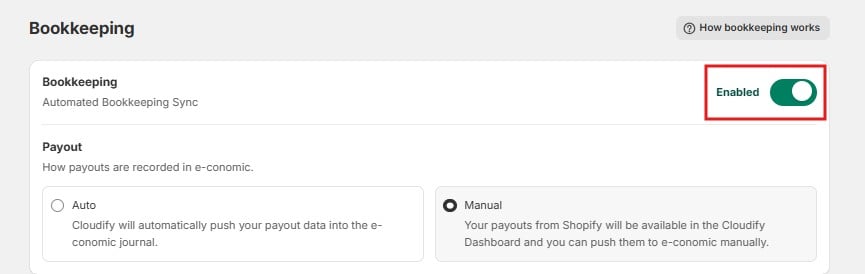
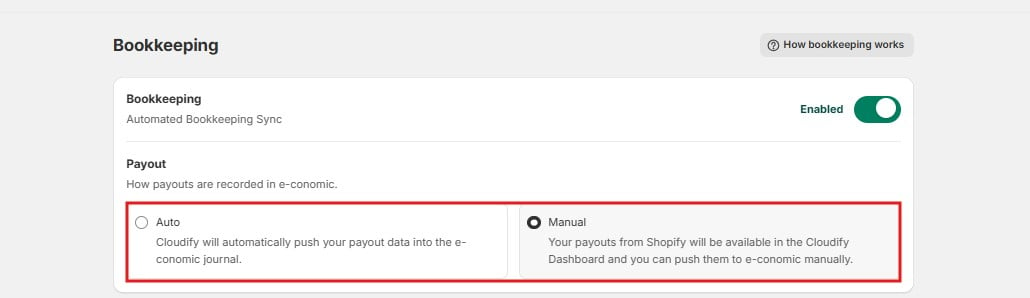
Payout
This setting controls how payouts are recorded in e-conomic:- Manual – your payouts from Shopify are made available in the Cloudify Dashboard, and you push them to e-conomic manually. This lets you review each payout before it is recorded.
- Auto – Cloudify automatically pushes your payout data into the e-conomic journal, with no manual step.
Journal entry preferences
This section sets up how journal entries are added to e-conomic. Journal entries are created for:- Shopify Payments – to record customer payments
- Shopify fees – the transaction fees Shopify charges you
- Payouts to your bank account – the money Shopify transfers to you
Each entry goes into the journal and account you specify here. If you’re unsure which accounts to pick, click Send to accountant and let your accountant choose.
Shopify processes merchant payouts cumulatively: multiple payouts are consolidated and disbursed as one scheduled transaction. The journal entries reflect this.
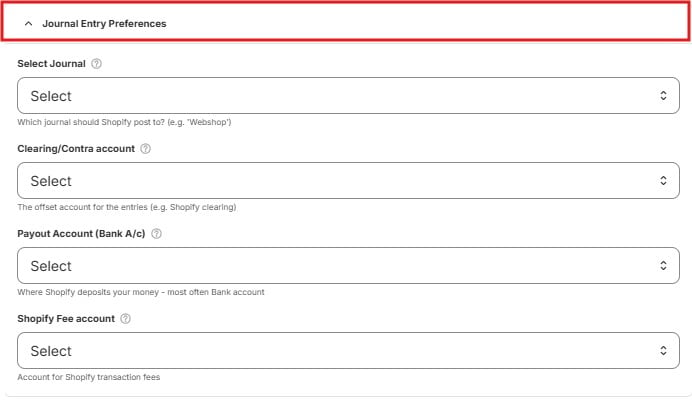
- Select Journal – the journal in e-conomic where Shopify entries are posted, for example a journal named “Webshop”.
- Clearing/Contra account – the offset account for the entries, for example a Shopify clearing account. This is a temporary “waiting” account that holds amounts until the money arrives in your bank.
- Payout Account (Bank A/c) – where Shopify deposits your money, most often your bank account.
- Shopify Fee account – the account where Shopify transaction fees are recorded as a cost.
Advanced Settings (optional)
Three additional accounts for less common amounts in your payouts: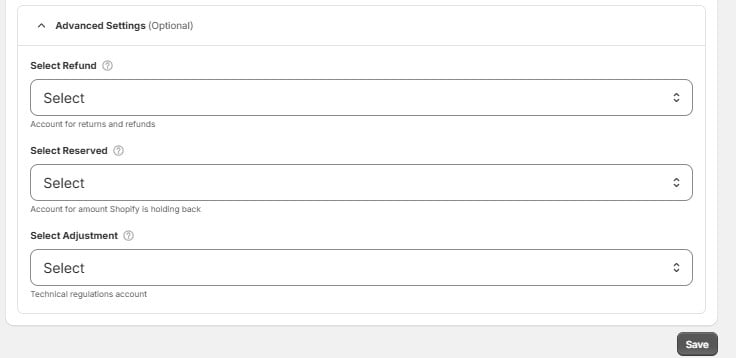
- Select Refund – the account for returns and refunds.
- Select Reserved – the account for amounts Shopify is holding back (reserves) before paying them out.
- Select Adjustment – a technical regulations account, used for small corrections and adjustments in payouts.